Converting UNECE eTir XML to SQL Server tables

In this guide we will show you how to process UNECE eTir XML files with the enterprise version of dockered Flexter and convert it to SQL Server.
eTir
The eTir international system ensure that national Customs systems are able to exchange data securely related to the international transit of goods, vehicles or containers according to the provisions of the TIR Convention.
SQL Server
Microsoft SQL Server is a relational database management system developed by Microsoft. As a database server, it is a software product with the primary function of storing and retrieving data as requested by other software applications—which may run either on the same computer or on another computer across a network (including the Internet).

Setting up SQL Server
- First we connect to the server through SQL Server Management Studio (SSMS)

- Then we create a new Database
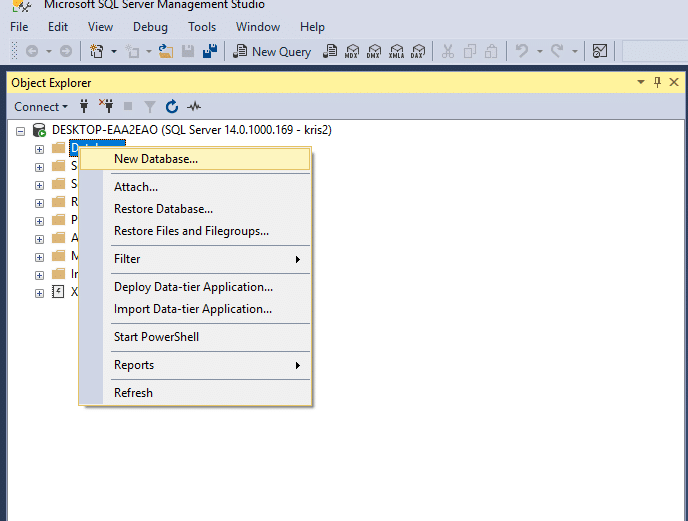
- We name our new DB ‘flexter’

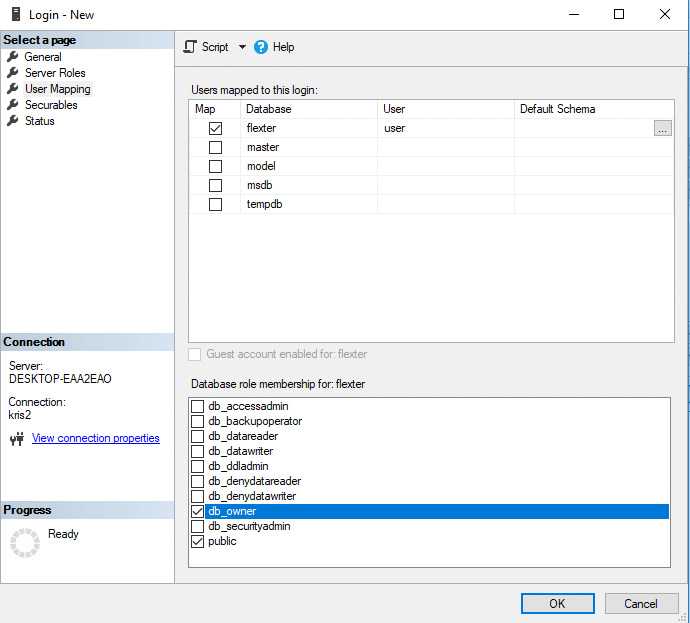
- Then we go to Security under Databases and create a New Login…
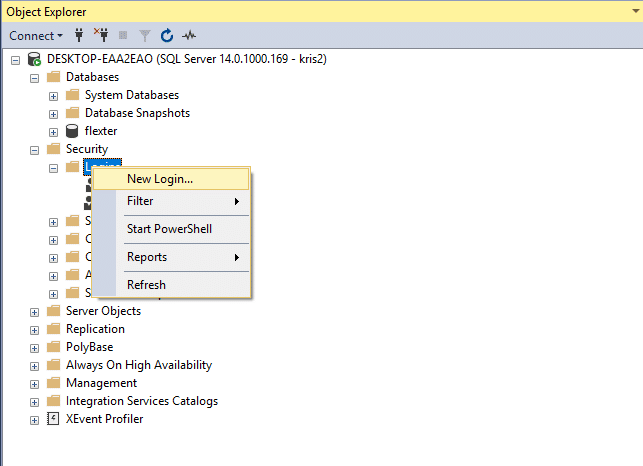
- We select SQL Server authentication and put our Login name and Password. Under ‘Default Database’ we select ‘flexter’

- Then under ‘User Mapping’ we mark ‘flexter’ and ‘db_owner’ and click OK
- And now we can start processing the file
Processing UNECE eTir XML file
We will use the Docker version of Enterprise Flexter on Localhost.
- We run docker with the below command and create a container that will be destroyed when we exit
docker run --rm -it -v %USERPROFILE%:/mnt/data/ d1.sonra.io:5000/flexter-local
- Next we generate the Logical Schema ID based on XML and XSD
xml2er -g1 /mnt/data/Desktop/etir.xml
We get a result similliar to this:
19:48:02.993 INFO Initialized in 5023 milliseconds
19:48:03.009 INFO Parsing data
19:48:03.860 INFO skipping data calculation
19:48:03.861 INFO calculating statistics
19:48:07.352 INFO Input split: Paths:/mnt/data/Desktop/etir.xml:0+1207
19:48:11.097 INFO writing statistics
19:48:11.171 INFO table du_stat: writing
19:48:11.672 INFO updating schema origin 1
19:48:11.676 INFO Generating the mapping: elevate
19:48:11.860 INFO updating schema origin 2
19:48:11.861 INFO updating logical schema 1
19:48:11.863 INFO Registering success of job 1
19:48:11.881 INFO Finished successfully in 13907 milliseconds
# schema
origin: 2
logical: 1
job: 1
# statistics
startup: 5023 ms
parse: 8035 ms
stats: 644 ms
map: 190 ms
xpaths: 28
- Now with the generated XML Schema ID (origin) the xsd2er can be run using the use-stats (-k, –use-stats <ID[, ID2…]>) parameter and also the mapping parameter to generate the new Logical Schema.
xsd2er -k1 -g1 /mnt/data/Desktop/etir.zip
We get a result similliar to this:
10:04:48.261 INFO Writing metadata
10:04:48.353 INFO updating schema origin 4
10:04:48.356 INFO Generating the mapping: elevate
10:04:48.516 INFO updating logical schema 2
10:04:48.517 INFO Registering success of job 2
10:04:48.532 INFO Finished successfully in 2159 milliseconds
# schema
origin: 4
logical: 2
job: 2
# statistics
startup: 264 ms
stats-load: 26 ms
parse: 1390 ms
build: 209 ms
write: 94 ms
map: 163 ms
xpaths: 116
- We now extract our data to SQL Server
xml2er -l2 -o jdbc:localhost://your_ip:1433; -u <user_name> -p <password> -S o /mnt/data/Desktop/etir.xml
We get a result similliar to this:
10:05:40.011 INFO Initialized in 4066 milliseconds
10:05:40.025 INFO Loading metadata
10:05:40.096 INFO Parsing data
10:05:40.948 INFO calculating data
10:05:41.819 INFO Input split: Paths:/mnt/data/Desktop/etir.xml:0+1027
10:05:42.122 WARN flx_event:scopeIn_missing /{eTIR:I1:1}ObligationGuarantee (etir.xml:7,33)
10:05:42.629 INFO writing tables
10:05:45.081 INFO table InterGov1: creating
10:05:45.105 INFO table InterGov1: writing
10:05:46.047 INFO calculating xpath statistics
10:05:48.111 INFO writing xpath statistics
10:05:48.145 INFO table du_stat: writing
10:05:48.407 INFO calculating document statistics
10:05:52.065 INFO writing document statistics
10:05:52.077 INFO table doc_stat: writing
10:05:52.203 INFO Registering success of job 3
10:05:52.227 INFO Finished successfully in 16279 milliseconds
# schema
origin: 4
logical: 2
job: 3
# statistics
startup: 4066 ms
load: 83 ms
parse: 2533 ms
write: 3408 ms
xpath stats: 2359 ms
doc stats: 3801 ms
- And now we can see our data

Conclusion
In this post, we have shown you how to convert complex XML and upload them to MS SQL Server.
You can also use the free version of Flexter to convert your XML files to text and load them to SQL Server.
If you are interested in a downloadable trial version of Flexter please reach out.