How to Cut Prompt Costs by 90% with Prompt Caching in Snowflake
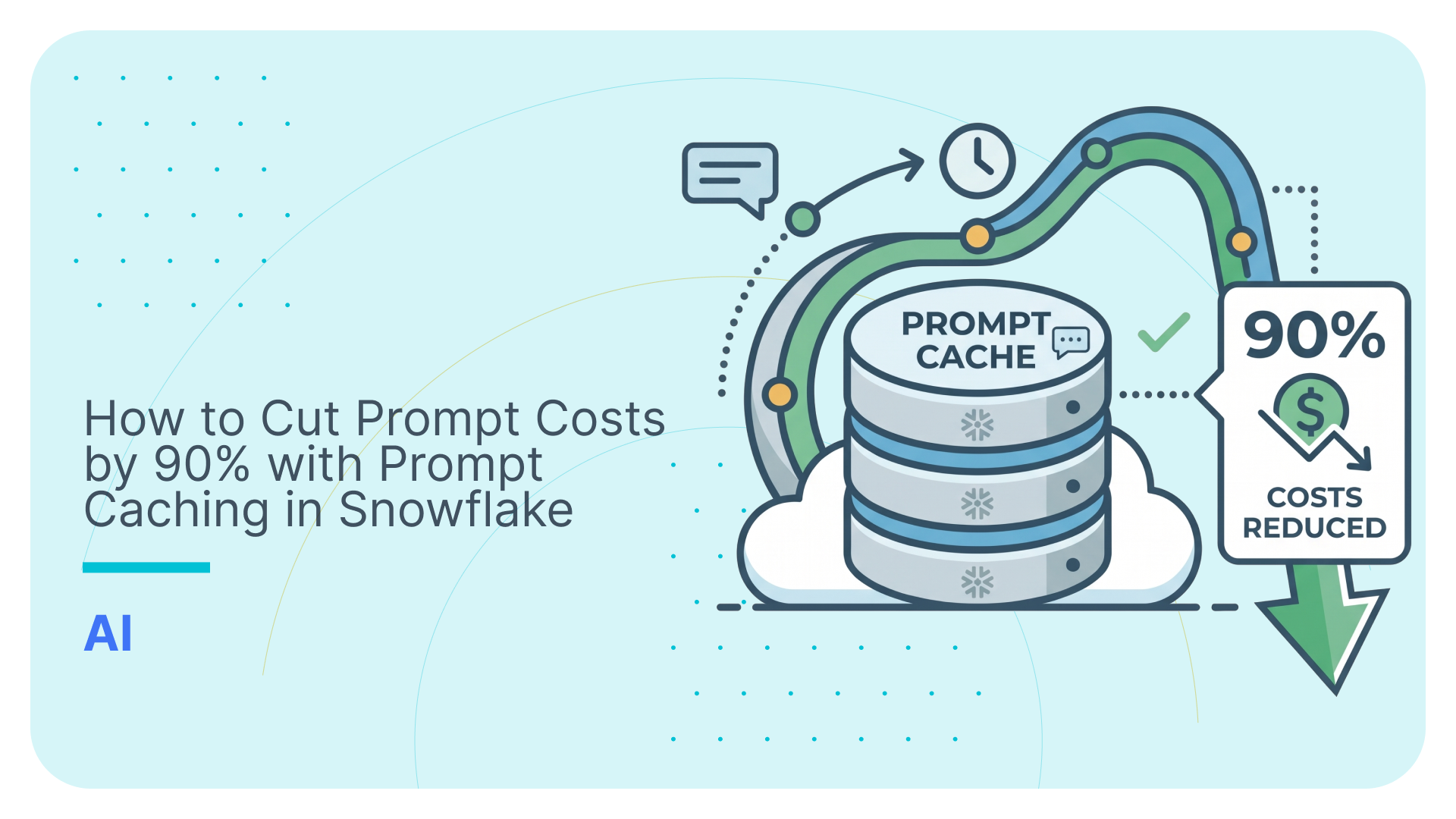

When building production LLM applications—whether question-answering systems over voluminous documentation, conversational agents with sprawling context windows, or batch processing pipelines—input token processing dominates both latency and compute costs.
To solve this, Snowflake supports Prompt Caching. On paper, it promises up to a 90% discount on cached input tokens. But where can you actually use it? How does it behave under the hood? How do you implement it across different model families, and how can you reliably monitor your cache hits when the API responses themselves can be deceiving?
In this post, we’ll explore how prompt caching works in Snowflake, unpack core concepts like ephemeral caching and cache breakpoints, clarify supported and unsupported Snowflake services, walk through a reproducible test using the claude-sonnet-4-5 model, and review the gotchas you must know before going to production.
TL;DR
- The Promise: Prompt caching in Snowflake Cortex reduces input token costs by 90% and significantly improves latency for repetitive prompts.
- Availability: Prompt caching is available in Cortex REST API, AI Gateway. It is not available in AI_COMPLETE and other AI functions
- The Rules: To qualify, the cached block must be at least 1,024 tokens. Caching requires an exact byte-for-byte prefix match from the very first token; any dynamic data placed at the top of the prompt will invalidate the cache.
- The Gotchas: The direct Cortex REST API response does not break out the cache reads and writes and does not include billing information. Built-in SQL functions (like AI_COMPLETE) do not support caching at all.
- The Solution: Route requests through the Cortex AI Gateway to gain full, per-request telemetry including cache reads / writes and per request billing info.
Use Flexter to turn XML and JSON into Valuable Insights
- 100% Automation
- 0% Coding
Overview: What is Prompt Caching and Why Care?
Every request sent to a large language model requires the transformer engine to ingest, tokenize, and compute attention keys and values (the KV cache) across all prompt tokens before emitting a single output token. In enterprise workflows, applications routinely resend identical blocks of text:
- Long system prompts and enterprise guardrails
- Extensive API tool descriptions
- Large enterprise reference manuals or policy documents
- Accumulated conversational turns
Without caching, you pay in both compute credits and latency to re-process that exact same prefix on every single call.
The Value Proposition
- Cost Reduction (90% Off): In Snowflake Cortex, cached input tokens that result in a cache hit (read) are billed at only 10% of the regular input rate (a 90% discount), provided the cached block is at least 1,024 tokens. Cache writes are billed at the standard input rate.
- Latency Improvements: Reusing pre-computed KV representations skips initial prompt computation. While latency savings for small prompts (~2,000 tokens) can be masked by normal network jitter, the throughput and time-to-first-token (TTFT) gains grow significantly on larger context blocks (10k+ to 100k+ tokens).
- Ideal Fits: RAG pipelines querying the same static source text, chatbots maintaining long message histories, and multi-tenant batch jobs sharing static enterprise context.
- Poor Fits: Single one-off queries, prompts smaller than 1,024 tokens, requests spaced farther than 5 minutes apart, or prompts where the beginning of the text changes dynamically on every call.
Support in Snowflake: Where Prompt Caching Works (and Where It Doesn’t)
A common point of confusion is assuming prompt caching applies globally across all Snowflake generative AI features. It does not.
Supported Surfaces
- Cortex REST API: Full support across both the /chat/completions and /messages endpoints.
- Cortex AI Gateway (Cortex Gateway AI): Supported when routing LLM requests through Snowflake’s centralized gateway infrastructure, enabling unified policy control and caching benefits for external clients.
Unsupported Surfaces
- SQL AI Functions (e.g., AI_COMPLETE, SNOWFLAKE.CORTEX.COMPLETE): Built-in SQL functions do not support prompt caching. When invoking AI_COMPLETE() in SQL queries or stored procedures, prompts are evaluated statelessly without prefix caching or cache breakpoint markers. If your architecture relies on caching large shared contexts, you must route those requests through the Cortex REST API or Cortex AI Gateway rather than invoking SQL functions.
Core Concepts: “Ephemeral” and “Cache Breakpoints”
To implement prompt caching effectively, two technical concepts must be understood: the ephemeral lifecycle and cache breakpoints.
What Does “Ephemeral” Mean?
In the context of LLM prompt caching (originating from Anthropic’s caching architecture and adopted by Cortex), ephemeral refers to the cache’s temporary, volatile lifecycle:
- Volatile In-Memory Storage: The cached KV states live in high-speed, volatile GPU/accelerator memory rather than persistent storage.
- 5-Minute Time-To-Live (TTL): A cache entry remains alive for exactly 5 minutes after creation.
- Sliding Window: Every subsequent request that successfully performs a cache read automatically resets the 5-minute countdown timer.
- Automatic Purging: If 5 minutes elapse without any requests referencing that exact prefix, the cache entry is purged automatically. Currently, “ephemeral” is the only cache type supported by Cortex.
What are Cache Breakpoints?
Large language models process text strictly sequentially from left to right. Therefore, prompt caching is prefix-based: any cache hit requires an exact, byte-for-byte match starting from token index zero up to a designated cut-off point.
A cache breakpoint is an explicit marker telling the caching engine: “Process everything up to this exact point, store the resulting state in the cache, and evaluate future requests against this prefix.”
|
1 2 3 4 5 6 7 |
[System Instructions + Standard Tool Definitions] <--- Breakpoint 1 (Static) │ [Loaded Document / Knowledge Base (~15k tokens)] <--- Breakpoint 2 (Semi-static) │ [User Conversation Turn 1 & Turn 2] <--- Breakpoint 3 (Dynamic) │ [Latest User Question (Uncached)] |
Key rules around breakpoints:
- Claude Models: Require explicit breakpoint definition via the cache_control: {“type”: “ephemeral”} parameter within the message content structure.
- OpenAI Models: Cache implicitly without explicit breakpoints on matching prefixes exceeding 1,024 tokens.
- Breakpoint Limits: You can define a maximum of 4 cache breakpoints per request. This allows multi-tiered caching hierarchies (e.g., common base prompt domain context user session).
Real-World Scenarios: Where Prompt Caching is Most Beneficial
Prompt caching is highly effective for workloads where a large, static block of text serves as the foundation for multiple subsequent queries. Common architectures that benefit include:
- Conversational Agents: Maintaining context windows with extensive system instructions, tools, and message history.
- Batch Processing: Multi-tenant jobs or data engineering pipelines sharing a static enterprise context.
A Practical Example: The 700-Column Data Mapping Pipeline
To illustrate the architectural impact, consider a recent data integration project. The objective was to map 150 standardized target columns to a legacy schema containing 700 source columns. To ensure accurate mapping and minimize hallucinations, the LLM required the full semantic context for all 700 source columns, which included business definitions, expected data types, and sample values.
Compiling this metadata resulted in a large token payload.
The Uncached Approach Processing this traditionally would require sending the full 700-column context repeatedly to evaluate the target columns. This approach incurs high input token costs and latency bottlenecks, as the transformer must re-evaluate the identical schema for every call.
The Caching Solution Using Cortex prompt caching, we set the schema text as our static prefix and applied a cache breakpoint (cache_control: {“type”: “ephemeral”}). We paid the standard input token rate once to load the schema into memory.
Rather than sending 150 individual requests, we batched the target columns into groups of five. For each request, we appended the small, variable batch to the end of the prompt:
“Based on the cached schema above, which source columns best map to the following 5 target columns: [customer_id, order_date, total_amount, status, lifetime_value]?”
The Result The initial call triggered the cache write, and all subsequent batched calls registered as cache reads. This provided a 90% discount on input token costs for the remainder of the process and significantly reduced the latency of each response.
How to Use Prompt Caching in Snowflake Cortex REST API
Rules of Engagement
- Minimum Block Size (1,024 Tokens): The cached prefix must be at least 1,024 tokens (~4,000 characters). Anything shorter bypasses the cache entirely with no warning.
- Exact Byte-for-Byte Prefix Matching: The cached block must be identical down to every whitespace, newline, and punctuation mark starting strictly from the first byte of the prompt.
- Model Selection: Ensure you are using modern models that support caching (e.g., claude-sonnet-4-5, claude-3-7-sonnet, gpt-4o). Deprecated versions like claude-3-5-sonnet will return HTTP 400 errors on Cortex REST.
Test Case Design & Reproducible Python Script
To verify caching behavior, billing accuracy, and expiration mechanics, we designed a reproducible test scenario:
- Call 1 (Cache Write / Miss): Send a large static block (~2,023 tokens, well above the 1,024-token floor) marked with cache_control: {“type”: “ephemeral”}, followed by Question A.
- Call 2 (Cache Read / Hit): Send the exact same static block followed by Question B.
- Call 3 (Cache Expiry Verification): Wait 5+ minutes, re-send the identical payload, and verify whether a fresh write occurs.
Below is the complete, production-grade test script using Snowflake Key-Pair authentication.
|
1 2 3 4 5 6 7 8 9 10 11 12 13 14 15 16 17 18 19 20 21 22 23 24 25 26 27 28 29 30 31 32 33 34 35 36 37 38 39 40 41 42 43 44 45 46 47 48 49 50 51 52 53 54 55 56 57 58 59 60 61 62 63 64 65 66 67 68 69 70 71 72 73 74 75 76 77 78 79 80 81 82 83 84 85 86 87 88 89 90 91 92 93 94 95 96 97 98 99 100 101 102 103 104 105 106 107 108 109 110 111 112 113 114 115 116 117 118 119 120 121 122 123 124 125 126 127 128 129 130 131 132 |
import base64 from datetime import datetime, timedelta, timezone import hashlib import os import time from cryptography.hazmat.primitives import serialization from cryptography.hazmat.primitives.serialization import Encoding, PublicFormat import jwt import requests # ---------------------------------------------------------------------- # Configuration & Environment Variables # ---------------------------------------------------------------------- ACCOUNT = os.environ["SNOWFLAKE_ACCOUNT_IDENTIFIER"].upper() USER = os.environ["SNOWFLAKE_USER"].upper() PRIVATE_KEY_PATH = os.environ["SNOWFLAKE_PRIVATE_KEY_PATH"] PRIVATE_KEY_PASSPHRASE = os.environ.get("SNOWFLAKE_PRIVATE_KEY_PASSPHRASE") MODEL = "claude-sonnet-4-5" URL = f"https://{ACCOUNT.lower()}.snowflakecomputing.com/api/v2/cortex/v1/chat/completions" # ---------------------------------------------------------------------- # Authentication & Helpers # ---------------------------------------------------------------------- def load_private_key(): password = PRIVATE_KEY_PASSPHRASE.encode() if PRIVATE_KEY_PASSPHRASE else None with open(PRIVATE_KEY_PATH, "rb") as key_file: return serialization.load_pem_private_key( key_file.read(), password=password, ) def calculate_public_key_fingerprint(private_key): public_key_der = private_key.public_key().public_bytes( Encoding.DER, PublicFormat.SubjectPublicKeyInfo, ) digest = hashlib.sha256(public_key_der).digest() fingerprint = base64.b64encode(digest).decode("utf-8") return f"SHA256:{fingerprint}" def generate_jwt(): private_key = load_private_key() fingerprint = calculate_public_key_fingerprint(private_key) account_formatted = ACCOUNT.replace(".", "-") qualified_username = f"{account_formatted}.{USER}" now = datetime.now(timezone.utc) payload = { "iss": f"{qualified_username}.{fingerprint}", "sub": qualified_username, "iat": now, "exp": now + timedelta(minutes=59), } return jwt.encode(payload, private_key, algorithm="RS256") # ---------------------------------------------------------------------- # API Invocation Function # ---------------------------------------------------------------------- def chat_completion(static_context: str, question: str): token = generate_jwt() headers = { "Authorization": f"Bearer {token}", "X-Snowflake-Authorization-Token-Type": "KEYPAIR_JWT", "Content-Type": "application/json", } body = { "model": MODEL, "messages": [ { "role": "user", "content": [ { "type": "text", "text": static_context, "cache_control": {"type": "ephemeral"}, # Breakpoint defined here }, { "type": "text", "text": question, }, ], } ], "max_completion_tokens": 50, } start_time = time.time() response = requests.post(URL, headers=headers, json=body, timeout=60) elapsed = time.time() - start_time if not response.ok: print(f"HTTP Error {response.status_code}: {response.text}") response.raise_for_status() # Capture Request ID from response header (Crucial step!) request_id = response.headers.get("x-snowflake-request-id") return response.json(), request_id, elapsed # ---------------------------------------------------------------------- # Execution # ---------------------------------------------------------------------- if __name__ == "__main__": # Create static context > 1,024 tokens (~15,000 characters / ~2,023 tokens) prefix_id = "RUN_V1_STABLE" # Change this value if you need to bust an existing cache static_context = ( f"Context ID: {prefix_id}. Snowflake Cortex REST API Documentation:\n" + ("Snowflake Cortex provides serverless access to foundation LLMs. " * 220) ) print("--- Call 1: Expecting Cache Write ---") resp1, req_id_1, lat1 = chat_completion(static_context, "Summarize key Cortex features.") print(f"Request ID: {req_id_1}") print(f"Latency: {lat1:.2f}s") print(f"Usage Body: {resp1.get('usage')}\n") print("--- Call 2: Expecting Cache Read (Immediate) ---") resp2, req_id_2, lat2 = chat_completion(static_context, "What are the primary use cases?") print(f"Request ID: {req_id_2}") print(f"Latency: {lat2:.2f}s") print(f"Usage Body: {resp2.get('usage')}\n") |
Test Outcomes & Monitoring Verification
Why You Can’t Trust the API Response Body
If you inspect the usage object returned by the Cortex API response, you will encounter confusing metrics:
|
1 2 3 4 5 6 7 8 9 10 11 12 |
{ "usage": { "prompt_tokens": 10, "prompt_tokens_details": { "cached_tokens": 2023, "cache_write_tokens": 0, "audio_tokens": 0 }, "completion_tokens": 20, "total_tokens": 2053 } } |
Notice that cache_write_tokens is 0, while cached_tokens reports 2023 on both Call 1 and Call 2. The API response does not split reads from writes—it combines both under cached_tokens.
The True Source of Truth: ACCOUNT_USAGE
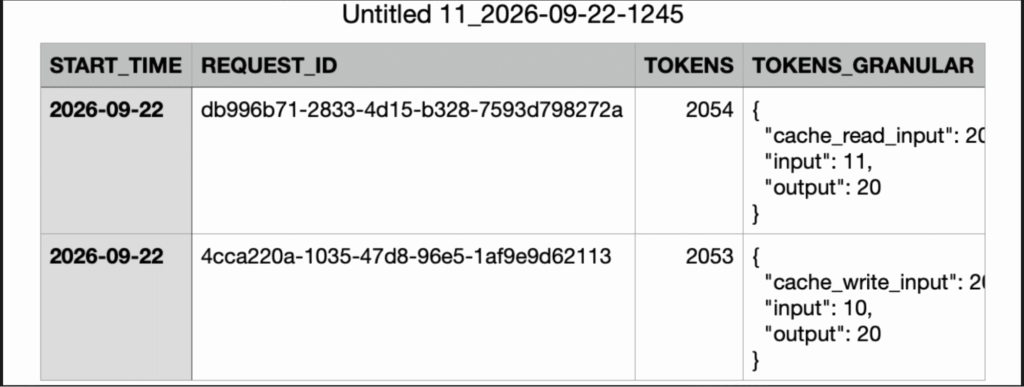
To verify what actually happened at the billing layer, query SNOWFLAKE.ACCOUNT_USAGE.CORTEX_REST_API_USAGE_HISTORY using the IDs captured from the x-snowflake-request-id response header:
|
1 2 3 4 5 6 7 8 9 10 11 |
SELECT start_time, request_id, model_name, tokens, tokens_granular:input::INT AS uncached_input_tokens, tokens_granular:cache_write_input::INT AS cache_write_tokens, tokens_granular:cache_read_input::INT AS cache_read_tokens, tokens_granular:output::INT AS output_tokens FROM SNOWFLAKE.ACCOUNT_USAGE.CORTEX_REST_API_USAGE_HISTORY WHERE request_id IN ('<call_1_request_id>', '<call_2_request_id>'); |
Verified Test Results
| Run Phase | Call | Request ID | Usage View Granular Metrics | API Response Claim | Reality |
|---|---|---|---|---|---|
| Initial Run | Call 1 | 8921aa64… | cache_write_input: 2023, input: 10 | cached: 2023, write: 0 | Cache Write (Full Price) |
| Initial Run | Call 2 | 44e3095a… | cache_read_input: 2023, input: 11 | cached: 2023, write: 0 | Cache Read (90% Discount) |
| After 5+ Min | Call 1 | 4cca220a… | cache_write_input: 2023, input: 10 | cached: 2023, write: 0 | Cache Write (Expired TTL) |
The account usage view confirms the mechanism:
- Call 1 created a 2,023-token cache entry (cache_write_input).
- Call 2 reused those tokens at the discounted tier (cache_read_input).
- After waiting 5 minutes without activity, the cache dropped, and the identical request triggered a fresh write.
Prompt Caching in Cortex AI Gateway
Relying on hidden headers and asynchronous billing views to track prompt caching efficiency is a cumbersome workaround for production monitoring. Fortunately, the recent release of the Cortex AI Gateway natively resolves the standalone REST API’s telemetry limitations. By acting as a central control plane for enterprise LLM requests, the Gateway inherently supports and tracks prompt caching workloads with full transparency.
- Centralized Proxy: It unifies authentication, rate limiting, guardrails, and observability across external tools, client applications, and internal Cortex models.
- End-to-End Telemetry: It captures full request lifecycle events and routes detailed metrics directly into account telemetry views.
- Seamless Prompt Caching Observability: Because all requests and telemetry now route through this single gateway, it supports and tracks the prompt caching workloads that the standalone REST API could not manage.
Enhanced Observability & Snowsight Integration
The Cortex AI Gateway records OpenTelemetry traces for every inference request. These traces provide full execution transparency: which models were invoked, token consumption and status.
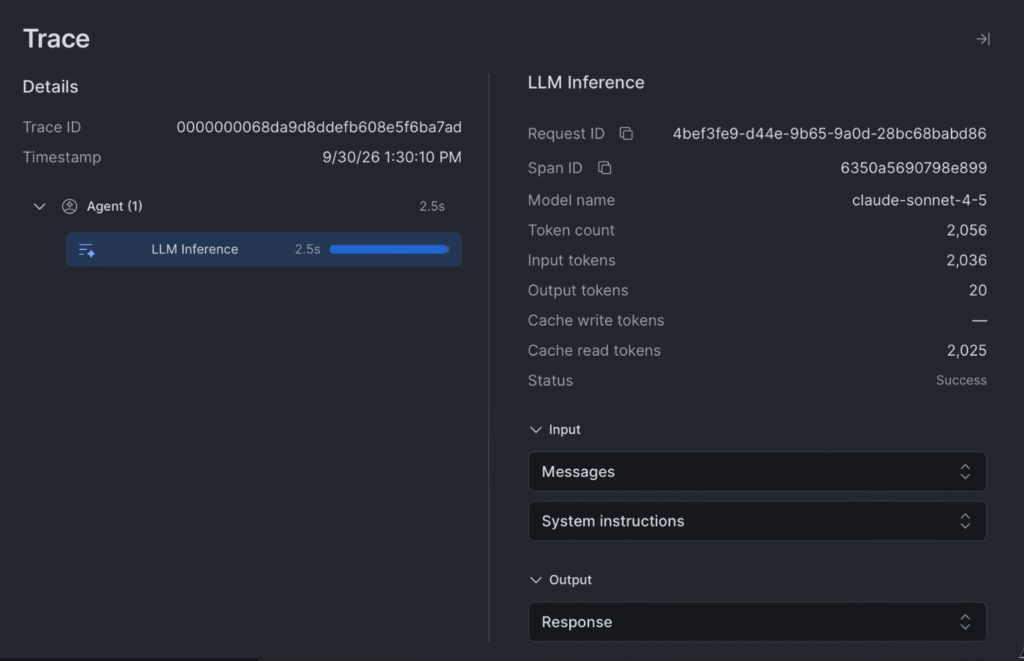
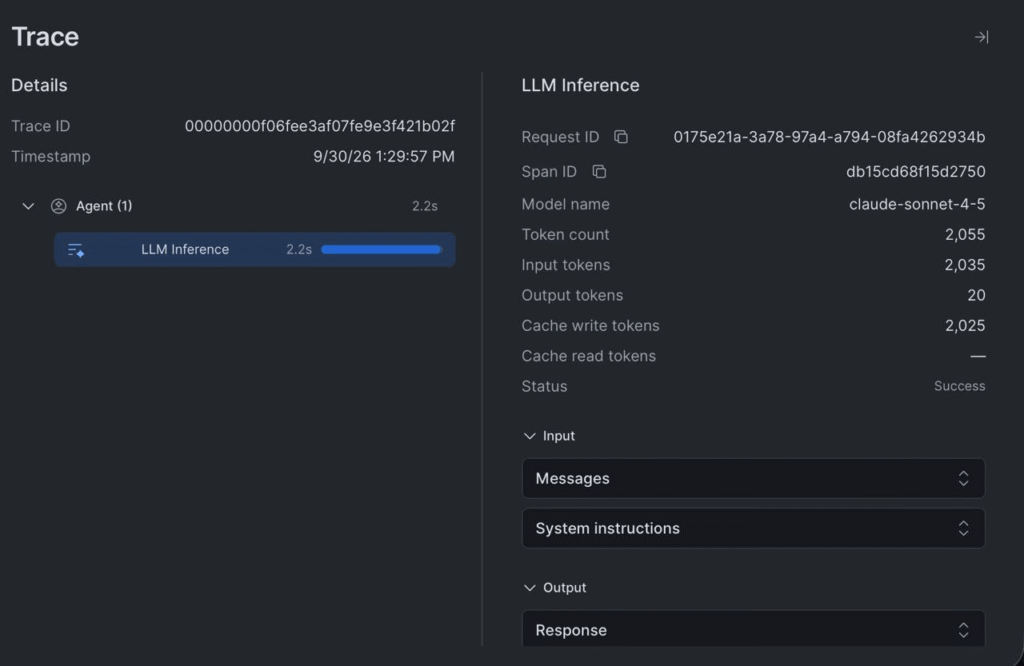
Each gateway request produces one span. The Observability UI (AI & ML >Cortex AI Gateway > Observability) shows a trace detail panel with the following fields:
Trace identity:
- Trace ID — unique identifier for the end-to-end execution. All spans in the same agent turn share this ID.
- Span ID — identifier for this specific inference call within the trace.
- Request ID — HTTP request identifier. This is the join key to AI_GATEWAY_USAGE_HISTORY for cross-referencing traces with credit consumption.
LLM Inference metrics:
- Model name — the model that served the request (e.g., claude-sonnet-4-5).
- Token count — total tokens processed (input + output).
- Input tokens — tokens sent to the model. Includes cached tokens —they count as input but are read from cache rather than reprocessed.
- Output tokens — tokens generated by the model.
- Cache write tokens — tokens written to the prompt cache on this call.Present on the first call that includes a cache_control block.
- Cache read tokens — tokens served from an existing cache. Present on subsequent calls with the same cached prefix.
- Status — Success or Error.
Step by Step process of testing AI Gateway Cache Behaviour
Run the following steps directly in the terminal
Step 1: Set your variables
|
1 2 |
export GATEWAY_URL="<your base URL, no /v1>" export SNOWFLAKE_PAT="<your PAT token>" |
Step 2: Build the cached context
This generates the large text block and writes both request bodies to files:
|
1 2 3 4 5 6 7 8 9 10 11 12 13 14 15 16 17 18 19 20 21 22 23 24 25 26 27 28 29 30 31 32 33 34 35 36 37 38 39 40 41 42 43 44 45 46 47 48 49 50 51 52 53 54 55 56 57 58 59 60 |
python3 - <<'EOF' import json cached_context = ( "Cortex AI Gateway prompt caching test number 1.\n" "System context and knowledge base...\n" + ("Important documentation text. " * 500) ) call1 = { "model": "claude-sonnet-4-5", "max_tokens": 20, "messages": [ { "role": "user", "content": [ { "type": "text", "text": cached_context, "cache_control": {"type": "ephemeral"}, }, { "type": "text", "text": "Summarize the key points.", }, ], } ], } call2 = { "model": "claude-sonnet-4-5", "max_tokens": 20, "messages": [ { "role": "user", "content": [ { "type": "text", "text": cached_context, "cache_control": {"type": "ephemeral"}, }, { "type": "text", "text": "What are the main takeaways?", }, ], } ], } with open("/tmp/gw_call1.json", "w") as f: json.dump(call1, f) with open("/tmp/gw_call2.json", "w") as f: json.dump(call2, f) print(f"Context length: {len(cached_context)} characters") print("Files written: /tmp/gw_call1.json and /tmp/gw_call2.json") EOF |
Step 3: Send call 1 (expect cache write)
|
1 2 3 4 5 |
curl -i "$GATEWAY_URL/v1/messages" \ -H "Authorization: Bearer $SNOWFLAKE_PAT" \ -H "Content-Type: application/json" \ -H "anthropic-version: 2023-06-01" \ -d @/tmp/gw_call1.json |
Step 4: Send call 2 immediately (expect cache read)
|
1 2 3 4 5 |
curl -i "$GATEWAY_URL/v1/messages" \ -H "Authorization: Bearer $SNOWFLAKE_PAT" \ -H "Content-Type: application/json" \ -H "anthropic-version: 2023-06-01" \ -d @/tmp/gw_call2.json |
Step 5: Query the usage view
|
1 2 3 4 5 6 7 8 9 10 11 12 13 14 15 16 17 18 |
WITH parsed AS ( SELECT SERVICE_TYPE, f.key AS MODEL, f.value:input_tokens::INT AS INPUT_TOKENS, f.value:output_tokens::INT AS OUTPUT_TOKENS, f.value:cache_write_input_tokens::INT AS CACHE_WRITE_TOKENS, f.value:cache_read_input_tokens::INT AS CACHE_READ_TOKENS, CREDITS FROM SNOWFLAKE.ACCOUNT_USAGE.AI_GATEWAY_USAGE_HISTORY, LATERAL FLATTEN(input => OPERATION_DETAILS) f, LATERAL FLATTEN(input => CREDITS_GRANULAR) g WHERE f.key = g.key ) SELECT * FROM parsed WHERE CACHE_WRITE_TOKENS IS NOT NULL OR CACHE_READ_TOKENS IS NOT NULL; |

Example output of AI Gateway Prompt Caching Test
|
1 2 3 4 5 6 7 8 9 10 11 12 13 14 15 16 17 18 19 20 21 22 23 24 25 26 27 28 29 30 31 32 33 34 35 36 37 38 39 40 41 42 43 44 45 46 47 48 49 50 51 52 |
[ { "model": "claude-sonnet-4-5", "id": "msg_011CfUp2yBNCnDcncrcgFvjF", "type": "message", "role": "assistant", "content": [ { "type": "text", "text": "# Summary of Key Points\n\nThis appears to be a **prompt caching test** for the" } ], "stop_reason": "max_tokens", "stop_sequence": null, "stop_details": null, "usage": { "input_tokens": 10, "cache_creation_input_tokens": 2025, "cache_read_input_tokens": 0, "cache_creation": { "ephemeral_5m_input_tokens": 2025, "ephemeral_1h_input_tokens": 0 }, "output_tokens": 20 } }, { "model": "claude-sonnet-4-5", "id": "msg_011CfUp61c3gK5m7iqGTTk5e", "type": "message", "role": "assistant", "content": [ { "type": "text", "text": "# Summary of Key Points\n\nThis appears to be a **prompt caching test** for the" } ], "stop_reason": "max_tokens", "stop_sequence": null, "stop_details": null, "usage": { "input_tokens": 10, "cache_creation_input_tokens": 0, "cache_read_input_tokens": 2025, "cache_creation": { "ephemeral_5m_input_tokens": 0, "ephemeral_1h_input_tokens": 0 }, "output_tokens": 20 } } ] |
Unlike the direct REST API endpoint—which folds write tokens into cached counts and always returns 0 for cache_write_tokens—the AI Gateway returns fully transparent token usage objects in its HTTP response body:.
Empirical Test Results & Telemetry Breakdown
Executing the same reproducible test scenario using claude-sonnet-4-5 with a 2,025-token cached block through the Cortex AI Gateway gave the following telemetry in SNOWFLAKE.ACCOUNT_USAGE.AI_GATEWAY_USAGE_HISTORY:
- Call 1 (Cache Write): Recorded cache_write_input_tokens: 2025 with a total credit cost of 0.003962 credits.
- Call 2 (Cache Read): Recorded cache_read_input_tokens: 2025 with a total credit cost of 0.000469 credits, an 88% reduction in credit costs compared to the initial write call.
- Cost Savings: The combined cost for this request pair was 0.004431 credits, compared to ~0.008 credits for two uncached executions. That is an immediate 44% cost reduction on just a two-prompt sequence. At scale, these savings approach 90% for large batch workloads.
Key Observability Improvements vs. Cortex REST API
- Explicit Token Categorization: Telemetry views provide distinct, dedicated fields for cache_write_input_tokens and cache_read_input_tokens, eliminating the confusion of combined metrics.
- Direct Per-Request Credit Costing: Exact credit burn is directly attributed to each individual request ID in the credits_consumed column of AI_GATEWAY_USAGE_HISTORY. In contrast, the direct Cortex REST API does not expose per-request credits in CORTEX_REST_API_USAGE_HISTORY.
Critical Prompt Caching Gotchas to Keep in Mind
Byte-for-Byte Prefix Rule: Dynamic Data at the Top Destroys the Cache
LLM prompt caching operates strictly from token 0 sequentially forward. Any alteration in the prefix—a dynamic timestamp, a session UUID, user metadata, or even minor whitespace changes at the top of the prompt—invalidates all cached blocks downstream.
Anti-pattern (Cache Bust Every Time):
|
1 2 3 |
[Current Timestamp: 2026-09-23 14:05:00] <-- Dynamic prefix breaks token 0! [Knowledge Base Doc (~15k tokens)] <-- Breakpoint NEVER hit [User Question] |
Best Practice:
|
1 2 3 |
[Knowledge Base Doc (~15k tokens)] <-- Breakpoint 1 (Static prefix matches byte-for-byte) [Current Timestamp: 2026-09-23 14:05:00] <-- Dynamic metadata placed AFTER static block [User Question] |
Always structure your prompts with invariant, reusable content first, and append variable data (timestamps, queries, user context) after the cache breakpoint.
No Prompt Caching in SQL Functions (AI_COMPLETE)
Prompt caching is not supported in built-in SQL functions like AI_COMPLETE or SNOWFLAKE.CORTEX.COMPLETE. If you execute SQL queries containing large static contexts, every query is treated as an uncached, full-price execution. You must use the Cortex REST API or Cortex AI Gateway to get caching.
No Per-Call Credit Visibility in Cortex REST API
While CORTEX_REST_API_USAGE_HISTORY gives granular token counts (cache_write_input, cache_read_input), Snowflake does not expose per-request credit consumption for the direct REST API. Account-level credits aggregate in general billing views, so you must manually multiply granular token counts by Snowflake model credit rates. However, routing requests through the Cortex AI Gateway resolves this limitation by populating the credits_consumed column directly in AI_GATEWAY_USAGE_HISTORY.
Request IDs Are in the Headers, Not the Body
The JSON response body returned on successful 200 OK calls leaves the id field empty. The actual identifier needed to join against ACCOUNT_USAGE is returned exclusively in the x-snowflake-request-id HTTP header. If your client does not record response headers, you will have no reliable way to trace individual calls back to Snowflake billing records.
API Response Mislabels Writes as Reads
As shown above, cache_write_tokens is unsupported in the REST response and consistently outputs 0. The API folds writes into cached_tokens. Do not build internal metering or telemetry solely on the HTTP response payload; rely on the Account Usage views.
Silent Failures Below Threshold
If you submit a prompt that is 1,023 tokens long with cache_control: {“type”: “ephemeral”}, Cortex does not raise an exception, nor does it return a warning. It silently executes the model call, bills you the full standard input token rate, and ignores the cache directive.
No Manual Cache Invalidation Endpoint
Snowflake provides no API command or SQL function to purge or invalidate a prompt cache on demand. To force a cache miss during testing or document updates, you must either wait out the 5-minute TTL or prepend/modify a dynamic token (such as a UUID or version tag) at the start of your prompt.
Latency Variance on Small Payloads
Do not rely on wall-clock latency to confirm whether caching is functioning. At ~2,000 tokens, prompt evaluation savings (~50–100ms) are easily obscured by network latency and model generation variance. Rely strictly on token breakdown metrics.
Uli Bethke
Uli has been rocking the data world since 2001. As the Co-founder of Sonra, the data liberation company, he’s on a mission to set data free. Uli doesn’t just talk the talk—he writes the books, leads the communities, and takes the stage as a conference speaker.
Any questions or comments for Uli? Connect with him on LinkedIn.
Follow Uli Bethke: