Maciek is the Co-founder of Sonra. He has a knack for turning messy semi-structured formats like XML, JSON, and XSD into readable data. With a brain wired for product and data architecture, Maciek is the magic ingredient to making sure your systems don’t just work—they shine.
Published on July 23, 2020 Updated on February 23, 2026
Sonra has recently certified Flexter against Yellowbrick. In this blog post we show you how Flexter and Yellowbrick work together to easily convert and query data that is locked away in XML or JSON documents. Using Flexter we convert XML and JSON documents to tables in Yellowbrick without writing a single line of code. We then run SQL queries on Yellowbrick to analyse the data and easily generate insights. Yellowbrick Data Warehouse is the first analytic database built and optimized for flash memory from the bottom up. Yellowbrick made a key architectural shift called NFQ (Native Flash Query). It allows them to run analytic queries against flash just as fast as an in-memory database. Flexter is a data warehouse automation solution for semi-structured data. It automates the conversion of XML or JSON documents to a database, text or big data formats such as Parquet, ORC, or Avro. 0% coding. 100% automation. Flexter is available in three editions. An enterprise edition, which can be installed on-premise or in your cloud. A managed SaaS edition Flexter as a Service. You can also use Flexter for free.
✕
Use Flexter to turn XML and JSON into Valuable Insights
We will use an XML data set and a JSON data set. The XML data set is a collection of Covid related news articles from around the world. The Covid XML data set is compiled and kept up to date by Medisys. The JSON data set is a collection of JSON documents related to the sport of Rugby.
Converting Covid XML to Yellowbrick Data Warehouse
Converting our XML data set to Yellowbrick Data Warehouse can be performed in a few simple steps.
Step 1 – Create a data flow
Flexter can use a sample of XML documents, an XSD (if available), or a combination of the two to create a data flow, which is a relational target model and its mappings to the XML / JSON documents. Flexter collects information such as the data types, the structure of the XML, the XPaths, the names of XML elements etc. from the XSD or sample of XMLs. Using this information, Flexter generates a relational data model and the mappings between source XML and destination tables. This mapping is called a data flow. The information is stored in Flexter’s metadata database.
Step 2 – Convert the XML data
We use the data flow we created in step 1 to convert the XML documents to Yellowbrick. Each time we want to convert new XML data we use the data flow we generated in Step 1.
Step 3 – Querying the data with SQL on Yellowbrick
We query the data that we converted to Yellowbrick with SQL. Let’s look at the steps in detail.
Step 1 – Create a data flow
For the Covid XML data set no XSD has been made available. We use a sample of XML documents to create the data flow. We analyse the sample and collect metadata such as the data types or relationships inside the sample. We run the xml2er command
xml2er -g1 <FILE PATH>
Example of output
18:21:13.316 INFO Registering success of job 62
18:21:13.331 INFO Finished successfully in 3392260 milliseconds
# schema
origin: 29
logical: 7
job: 62
# statistics
startup: 2326 ms
load: 154 ms
xpath stats: 137590 ms
doc stats: 285597 ms
parse: 141479 ms
write: 2825066 ms
xpaths: 52 | map:100%/52 new:0%/0
documents: 1233 | suc:92.4%/1140 part:7.5%/93 fail:0%/0 size:1.2GB
overall status: 99.9% | map:100% conv:99.9% fks:100% occur:100% warn:0%
Step 2 – Convert the data
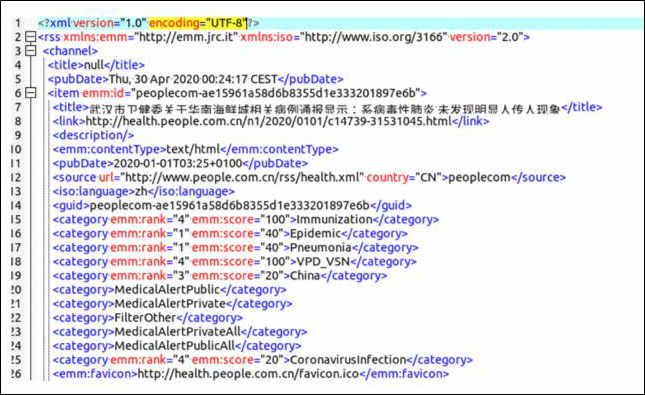
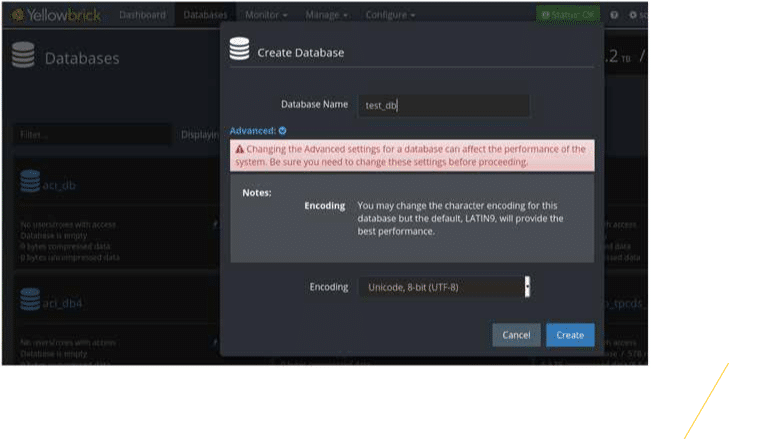
The Medisys XML documents are encoded in UTF-8 . Here is a screenshot of an example document. We need to set up a Yellowbrick database with UTF-8 encoding to load Unicode character sets correctly. We can then convert the XML to Yellowbrick tables using Flexter’s xml2er command line tool.
In the output we get some key information on the status of the conversion, e.g. how long each phase took, how many different XPaths were processed, how many documents were converted successfully etc.
20:28:15.900 INFO Registering success of job 64
20:28:15.912 INFO Finished successfully in 22516 milliseconds
# schema
origin: 13
logical: 6
job: 64
# statistics
startup: 1895 ms
load: 160 ms
xpath stats: 9474 ms
doc stats: 1609 ms
parse: 123 ms
write: 9232 ms
xpaths: 441| map:100%/441 new:0%/0
documents: 1 | suc:100%/1 part:0%/0 fail:0%/0 size:655.2KB
overall status:100%| map:100% conv:100% fks:100% occur:100%
warn:0%
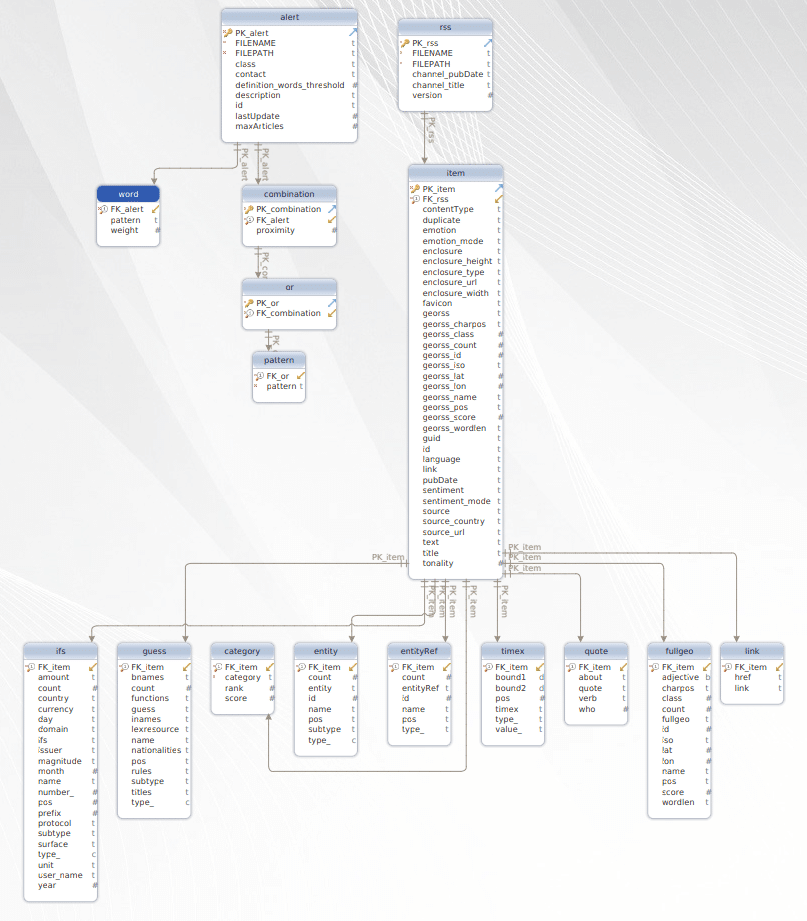
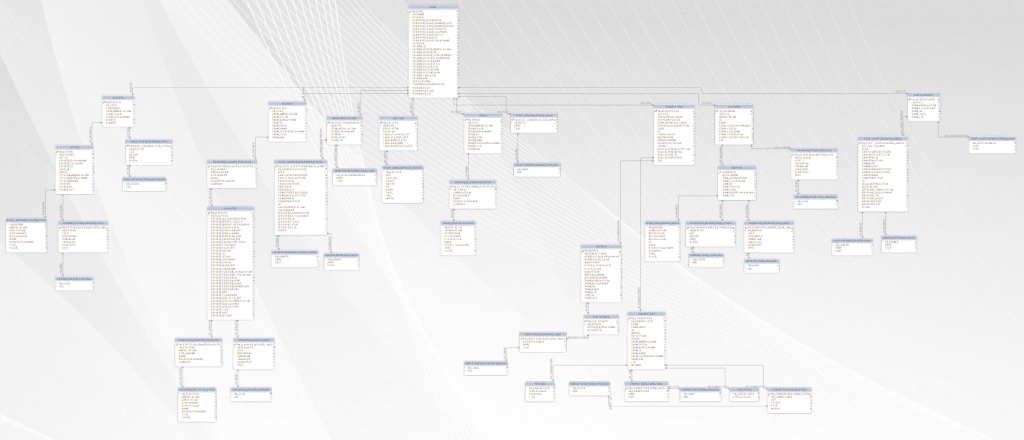
Flexter generated the following data model
Step 3 – Querying Covid data
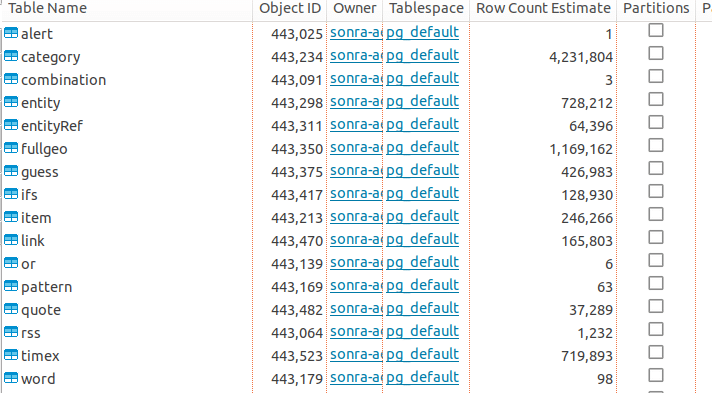
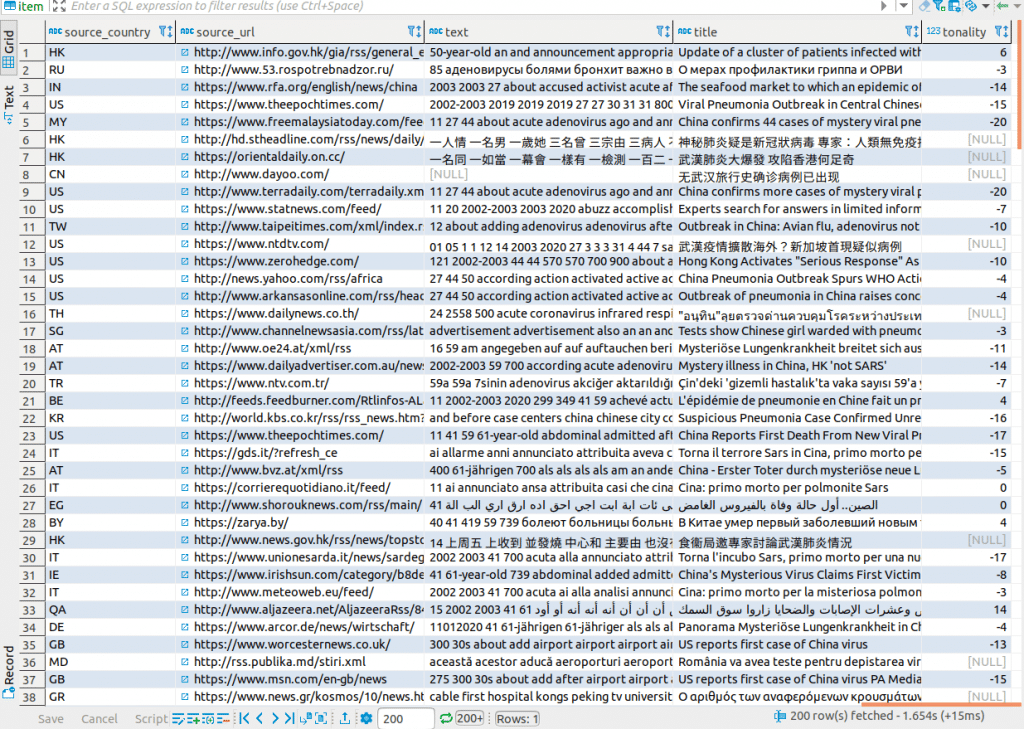
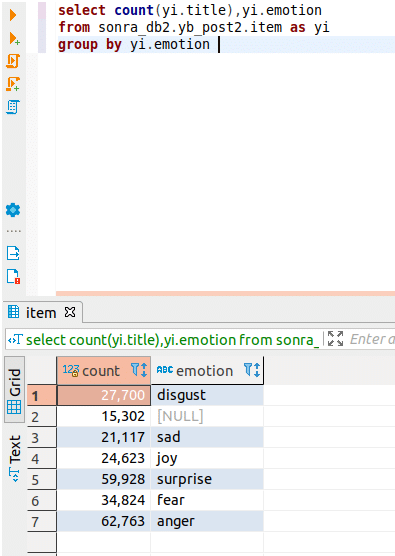
Now that we have converted the Covid XML documents to Yellowbrick, we can take a closer look at a couple of tables. In table “item” we find information on the journal articles such as the title of the article, an abstract, and the sentiment of the article. All articles have a sentiment attribute, which represents the sentiment the readers feel after reading them. In the next step we will run a simple SQL query which will show us a summary of the sentiment across all articles in the dataset. Negative sentiment prevails…
Reading XML from Yellowbrick Data Warehouse
Flexter is also able to use Yellowbrick as a source of XML data and read XML documents stored inside a table column. This is a very handy feature. We can store the output of Flexter directly in Yellowbrick or one of the other supported formats. In this example we convert the XML from Yellowbrick to text files. Let’s first load some XML documents to Yellowbrick. We first create the table in Yellowbrick
Next step is to load our XML documents to the table. We can do that by using some simple SQL queries. XML CONTENT represents the content of the XML document in the query below.
insert into xml_table (pk_col, xml_col) values (1, ‘XML CONTENT1’);
insert into xml_table (pk_col, xml_col) values (2, ‘XML CONTENT2’);
We are now ready to kick off the conversion
Step 1 – Create the data flow
In this step we will read XML data, collect metadata and create a data flow. The -T switch tells Flexter which table to read from. The -C switch provides the column name containing the XML documents.
xml2er -g1 “jdbc:postgresql://<DATABASE URL>” -U <USER> -P <PASSWORD> -T xml_table -C xml_col
13:26:10.489 INFO Registering success of job 61
13:26:10.502 INFO Finished successfully in 3954923 milliseconds
# schema
origin: 22
logical: 16
job: 61
# statistics
startup: 1870 ms
load: 108 ms
xpath stats: 172898 ms
doc stats: 362092 ms
parse: 177586 ms
write: 3240341 ms
xpaths: 52 | map:100%/52 new:0%/0
documents: 1233 | suc:92.4%/1140 part:7.5%/93 fail:0%/0 size:1.2GB
overall status: 99.9% | map:100% conv:99.9% fks:100% occur:100% warn:0%
Step 2 – Convert the data
We also could have converted from Yellowbrick XML to Yellowbrick relational format.
We have specified a folder for -o as the folder path.
13:26:10.489 INFO Registering success of job 61
13:26:10.502 INFO Finished successfully in 3954923 milliseconds
# schema
origin: 29
logical: 15
job: 61
# statistics
startup: 1870 ms
load: 108 ms
xpath stats: 172898 ms
doc stats: 362092 ms
parse: 177586 ms
write: 3240341 ms
xpaths: 52 | map:100%/52 new:0%/0
documents: 1233 | suc:92.4%/1140 part:7.5%/93 fail:0%/0 size:1.2GB
overall status: 99.9% | map:100% conv:99.9% fks:100% occur:100% warn:0%
Once the conversion has completed successfully we will get the output as files in the specified folder.
Converting JSON data to Yellowbrick
For the last part of this post, we will use the json2er command line tool, which allows you to convert JSON files to the Yellowbrick Data Warehouse in a couple of simple steps. The process is the same as for XML.
We first create the data flow from a sample of representative JSON documents and then re-use the data flow to convert the data.
Step 1 – Create the data flow
In this step we will collect JSON data statistics and create a data flow. We derive the data types, relationships, create the target data model, and the mappings. This metadata is stored in the Flexter metadata catalog.
json2er -g1 <FILE PATH>
Output
# schema
origin: 70
logical: 17
job: 65
# statistics
startup: 1870 ms
load: 108 ms
xpath stats: 172898 ms
doc stats: 362092 ms
parse: 177586 ms
write: 3240341 ms
xpaths: 52 | map:100%/52 new:0%/0
documents: 1233 | suc:92.4%/1140 part:7.5%/93 fail:0%/0 size:1.2GB
overall status: 99.9% | map:100% conv:99.9% fks:100% occur:100% warn:0%
Step 2 – Convert the data
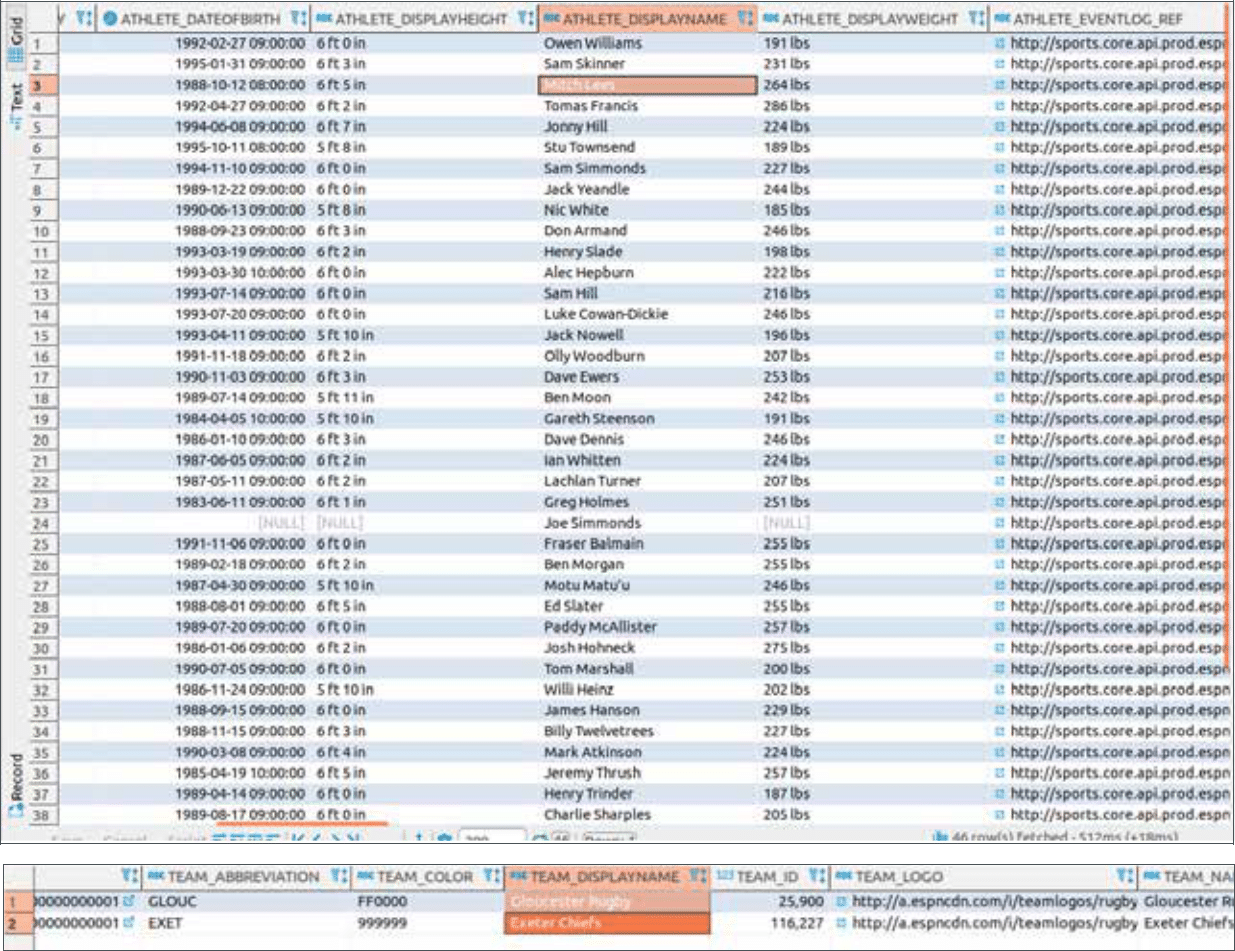
In this step we convert our JSON documents to the Yellowbrick Data Warehouse.
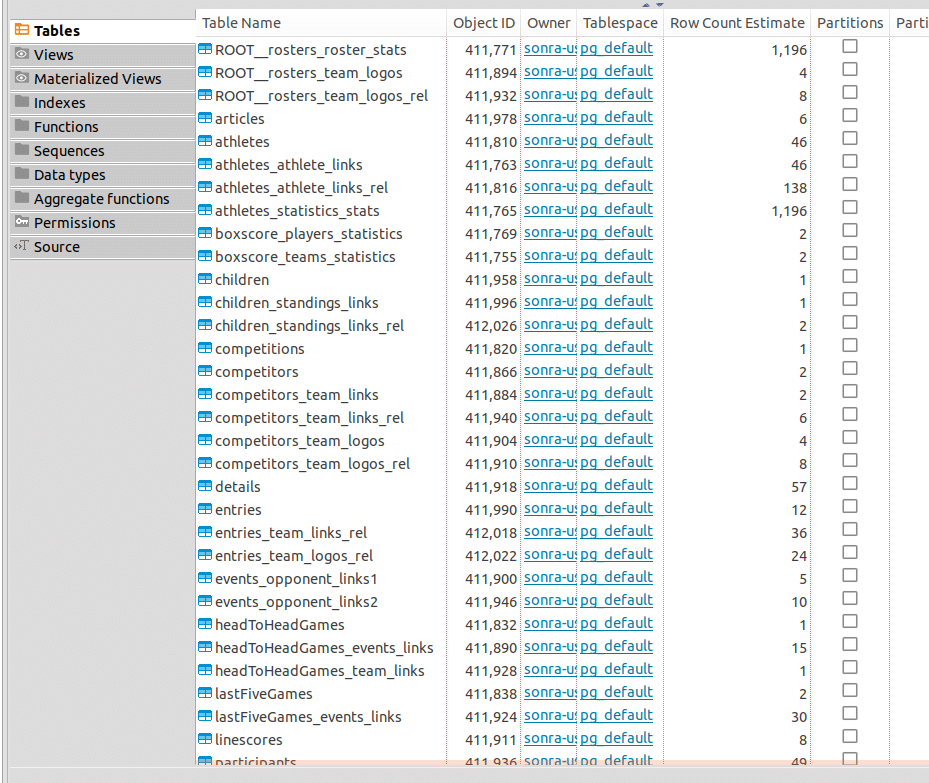
As you can see, the generated schema is relatively complex.
Step 3 – Querying Rugby data
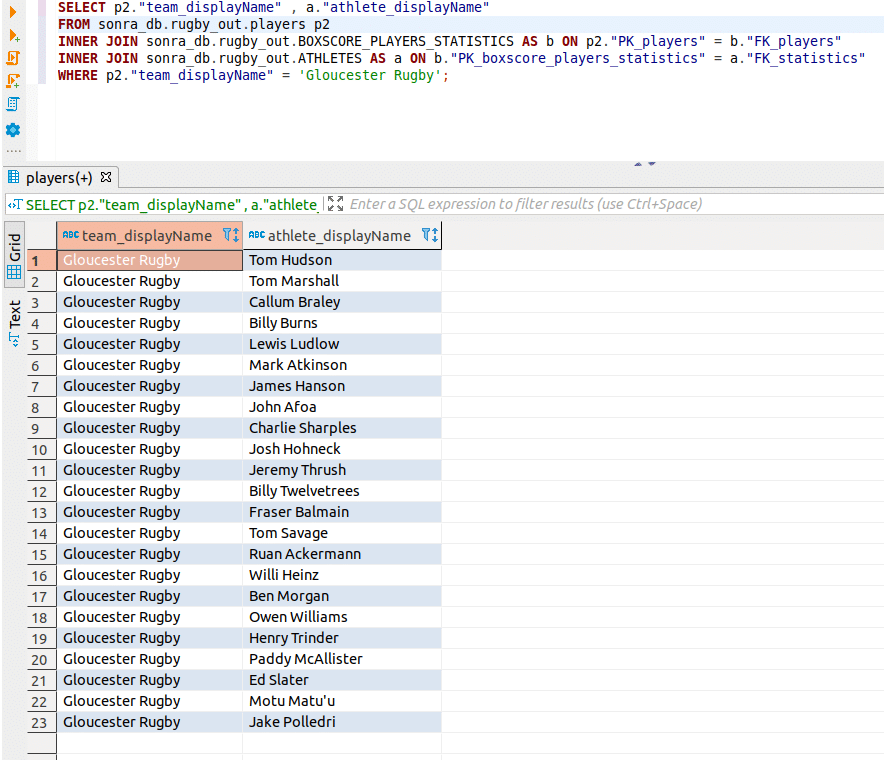
We can now run an SQL query where we will retrieve the players from the Gloucester Rugby team. We will use next SQL Query
SELECT p2.”team_displayName” , a.”athlete_displayName” FROM sonra_db.rugby_out.players p2
INNER JOIN sonra_db.rugby_out.BOXSCORE_PLAYERS_STATISTICS AS b ON p2.”PK_players” = b.”FK_players”
INNER JOIN sonra_db.rugby_out.ATHLETES AS a ON b.”PK_boxscore_players_statistics” = a.”FK_statistics”
WHERE p2.”team_displayName” = ‘Gloucester Rugby’;
Conclusion
We have shown you how you can easily convert and query XML and JSON documents in a few minutes. We didn’t have to write a single line of code. The data is available in an instant in the Yellowbrick data warehouse. On Yellowbrick data analysts can use familiar tools such as SQL, the lingua franca of data to answer complex questions and generate meaningful insights for decision makers.
Maciek is the Co-founder of Sonra. He has a knack for turning messy semi-structured formats like XML, JSON, and XSD into readable data. With a brain wired for product and data architecture, Maciek is the magic ingredient to making sure your systems don’t just work—they shine.
We use cookies on our website to give you the most relevant experience by remembering your preferences and repeat visits. By clicking “Accept All”, you consent to the use of ALL the cookies. However, you may visit "Cookie Settings" to provide a controlled consent.
This website uses cookies to improve your experience while you navigate through the website. Out of these, the cookies that are categorized as necessary are stored on your browser as they are essential for the working of basic functionalities of the website. We also use third-party cookies that help us analyze and understand how you use this website. These cookies will be stored in your browser only with your consent. You also have the option to opt-out of these cookies. But opting out of some of these cookies may affect your browsing experience.
Necessary cookies help make a website usable by enabling basic functions like page navigation and access to secure areas of the website. The website cannot function properly without these cookies.
Cookie
Duration
Description
__cfruid
session
Cloudflare sets this cookie to identify trusted web traffic.
cookielawinfo-checkbox-marketing
1 month
This cookie is set by the GDPR Cookie Consent plugin to store the user consent for the cookies in the category "Marketing".
cookielawinfo-checkbox-necessary
1 month
This cookie is set by GDPR Cookie Consent plugin. The cookies is used to store the user consent for the cookies in the category "Necessary".
cookielawinfo-checkbox-preferences
1 month
This cookie is set by the GDPR Cookie Consent plugin to check if the user has given consent to use cookies under the "Preferences" category.
cookielawinfo-checkbox-statistics
1 month
This cookie is set by the GDPR Cookie Consent plugin to store the user consent for the cookies in the category "Statistics".
cookielawinfo-checkbox-unclassified
1 month
This cookie is set by GDPR Cookie Consent plugin. The cookie is used to store the user consent for the cookies in the category "Unclassified".
CookieLawInfoConsent
1 month
Records the default button state of the corresponding category & the status of CCPA. It works only in coordination with the primary cookie.
csrftoken
1 year
This cookie is associated with Django web development platform for python. Used to help protect the website against Cross-Site Request Forgery attacks
Statistic cookies help website owners to understand how visitors interact with websites by collecting and reporting information anonymously.
Cookie
Duration
Description
AnalyticsSyncHistory
1 month
Linkedin set this cookie to store information about the time a sync took place with the lms_analytics cookie.
bcookie
2 years
LinkedIn sets this cookie from LinkedIn share buttons and ad tags to recognize browser ID.
bscookie
2 years
LinkedIn sets this cookie to store performed actions on the website.
lang
session
LinkedIn sets this cookie to remember a user's language setting.
li_gc
2 years
Linkedin set this cookie for storing visitor's consent regarding using cookies for non-essential purposes.
lidc
1 day
LinkedIn sets the lidc cookie to facilitate data center selection.
mgref
1 year
This cookie is set by Eventbrite to deliver content tailored to the end user's interests and improve content creation. It is also used for event-booking purposes.
mgrefby
1 year
This cookie is set by Eventbrite to deliver content tailored to the end user's interests and improve content creation. It is also used for event-booking purposes.
UserMatchHistory
1 month
LinkedIn sets this cookie for LinkedIn Ads ID syncing.
Preference cookies enable a website to remember information that changes the way the website behaves or looks, like your preferred language or the region that you are in.
Cookie
Duration
Description
G
1 year
Cookie used to facilitate the translation into the preferred language of the visitor.
SERVERID
session
This cookie is set by Slideshare's HAProxy load balancer to assign the visitor to a specific server.
Marketing cookies are used to track visitors across websites. The intention is to display ads that are relevant and engaging for the individual user and thereby more valuable for publishers and third party advertisers..
Cookie
Duration
Description
_ga
2 years
The _ga cookie, installed by Google Analytics, calculates visitor, session and campaign data and also keeps track of site usage for the site's analytics report. The cookie stores information anonymously and assigns a randomly generated number to recognize unique visitors.
_ga_7H38LVR4Z5
2 years
This cookie is installed by Google Analytics.
_gat_gtag_UA_44804396_1
1 minute
Set by Google to distinguish users.
_gat_UA-44804396-1
1 minute
A variation of the _gat cookie set by Google Analytics and Google Tag Manager to allow website owners to track visitor behaviour and measure site performance. The pattern element in the name contains the unique identity number of the account or website it relates to.
_gcl_au
3 months
Provided by Google Tag Manager to experiment advertisement efficiency of websites using their services.
_gid
1 day
Installed by Google Analytics, _gid cookie stores information on how visitors use a website, while also creating an analytics report of the website's performance. Some of the data that are collected include the number of visitors, their source, and the pages they visit anonymously.
CONSENT
2 years
YouTube sets this cookie via embedded youtube-videos and registers anonymous statistical data.
SIDCC
6 Months
The "SIDCC" cookie is used as security measure to protect users data from unauthorised access
test_cookie
15 minutes
The test_cookie is set by doubleclick.net and is used to determine if the user's browser supports cookies.
VISITOR_INFO1_LIVE
5 months 27 days
A cookie set by YouTube to measure bandwidth that determines whether the user gets the new or old player interface.
YSC
session
YSC cookie is set by Youtube and is used to track the views of embedded videos on Youtube pages.
yt-remote-connected-devices
never
YouTube sets this cookie to store the video preferences of the user using embedded YouTube video.
yt-remote-device-id
never
YouTube sets this cookie to store the video preferences of the user using embedded YouTube video.
yt.innertube::nextId
never
This cookie, set by YouTube, registers a unique ID to store data on what videos from YouTube the user has seen.
yt.innertube::requests
never
This cookie, set by YouTube, registers a unique ID to store data on what videos from YouTube the user has seen.