XML to XSD – Generate XSD from XML Files (2026 Guide)
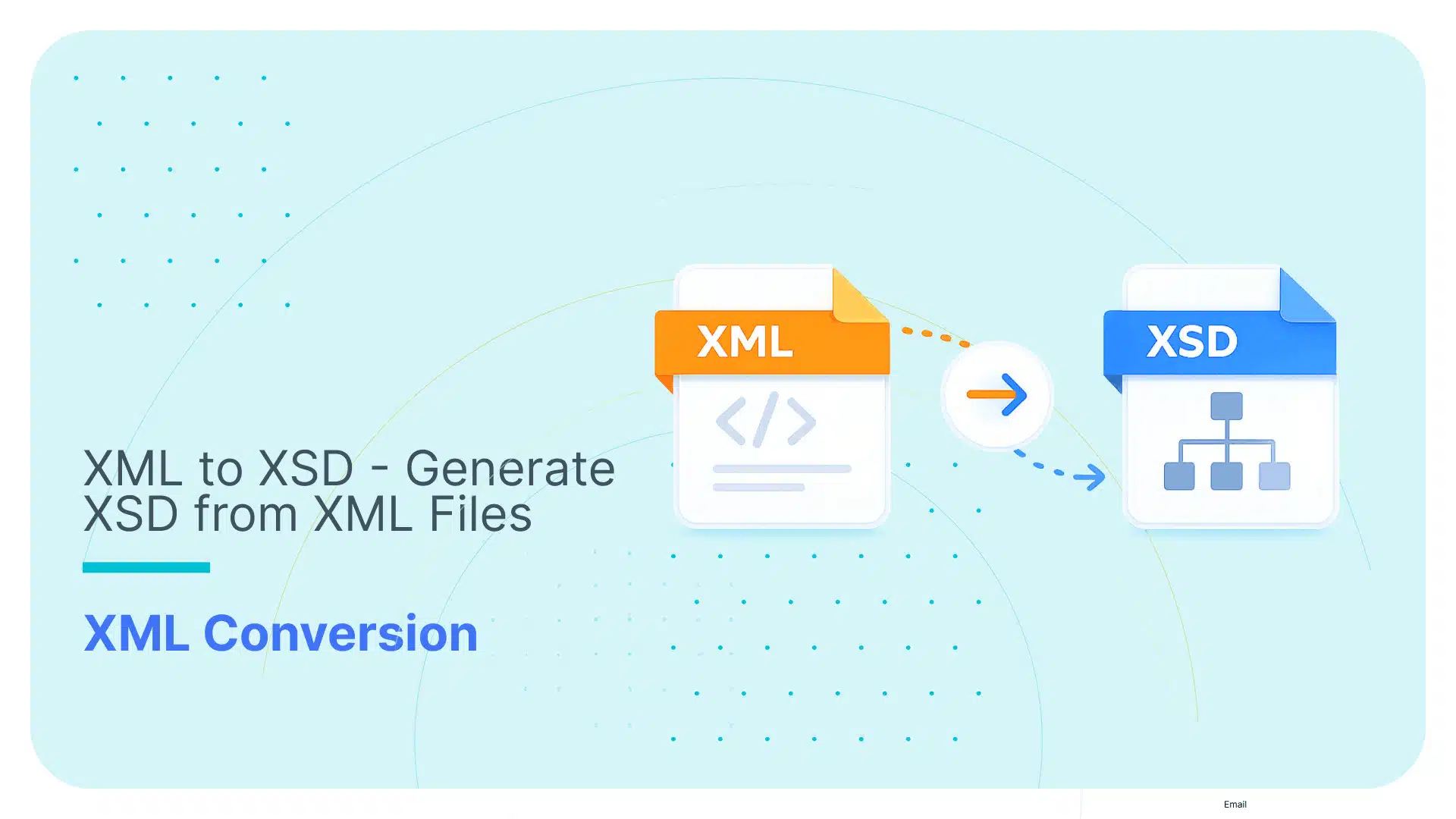

Converting XML to XSD sounds like one of those “five minutes, tops” tasks.
You have the XML. You generate the schema. You move on with your life.
In practice, it’s only that simple when your XML is clean, consistent, and actually representative of what you’ll get in production. Cute.
This guide is built for the real version of the problem: you want a usable XSD fast, but you also don’t want to accidentally create a brittle “point-in-time” schema that becomes the reason your downstream parsing or ingestion breaks later.
We’ll start with the best open-source way to generate readable XSDs from XML instances (using Trang), then we’ll zoom out to the bigger question most teams hit next:
“What happens when this stops being ‘one file on a laptop’ and turns into an XML to database project?”
What you can achieve with Trang (open source):
- Generate an XSD quickly from XML so you can validate data and stop guessing the structure.
- Infer schema from multiple XML files so the resulting XSD covers more of the dataset than a single “lucky” sample.
What Trang won’t help you with:
- Treating an inferred XSD as a permanent “contract” when your XML varies across files or evolves over time.
- Solving the hard part of XML to database work: target table design, mappings, and ongoing schema drift.
If you’re new to the XML ecosystem, our overview of XML tools for developers covers validators, editors, converters, and parsers in one place.
That’s the framing for this guide. Next comes the fun part: using Trang to generate clean XSDs, starting from a single-file workflow and scaling up to multi-file and batching examples.
Oh, but first we’ll make a quick stop on the “Mystery XML” problem to make sure you’re well acquainted with the fundamentals.
Use Flexter to turn XML and JSON into Valuable Insights
- 100% Automation
- 0% Coding
The “Mystery XML” Problem
You get a dump of XML files.
No documentation. No upstream engineer to ask. No .xsd sitting next to the feed like it’s supposed to. Just a folder of nested tags and a vague promise that “it’s standard”.
This is the most common starting point for an XML-to-anything project:
“I have XML but no XSD. Help.”
And the moment you don’t have an XSD, you’re basically flying blind.
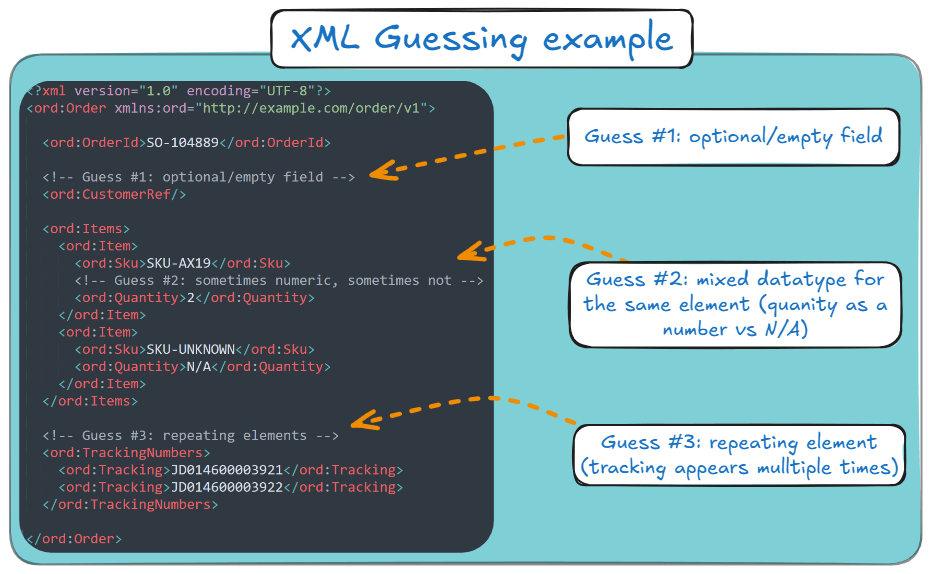
Because now you’re stuck guessing your XML’s fields:
- Optional vs. Required: Which fields are missing, or just empty, in the XML file that reached you?
- Cardinality: does an element appear once or many times (one item vs a list of items)?
- Data types: is it an integer, decimal, date, boolean, or “sometimes N/A because humans”?
- Valid values/enums: is status free text, or one of {NEW, PAID, SHIPPED}?
- Field meaning: Is id a stable identifier, a per-file sequence, or just decorative?
- Structure variations: do different files use different branches (sometimes Address, sometimes Addresses)?
- Namespaces: which elements belong to which schema, and whether the same tag name means different things under different namespaces.
Here’s a very simple XML where guesswork is involved:
Why this is painful (and why you care)
Without a schema:
- You can’t reliably validate the XML data. You don’t know what “valid” even means yet.
- Parsing becomes guesswork. You’re reverse-engineering a hierarchy by reading example files and hoping they’re representative.
- Loading it into a database is where things go to die. Snowflake and BigQuery (or any relational target) want something predictable. XML without a schema is the opposite of predictable.
So even though the task sounds like “convert XML to XSD”, what you’re really trying to do is derive structure from chaos.
What you need to keep in mind before diving into the next section
Before we touch tools, here’s the point:
- We need an XSD so we can stop guessing and start validating.
- We need a schema that’s useful, not just technically “generated.” (A schema that only matches one sample file is how pipelines become fragile.)
- And if this is heading toward XML to database tables, the XSD is a necessary first step, but not the finish line.
That’s why we start with schema generation.
Next, we’ll use Trang as the open-source “hero” to infer a clean XSD from XML instances, and we’ll do it in a way that feels like real work, not a toy demo.
XML vs XSD in 60 seconds
Before moving on, this section serves as a quick primer on XML and XSD.
If XML is your data, XSD is your rulebook.
- XML (eXtensible Markup Language) is the actual document you have in front of you, meaning the content and structure you receive, export, or generate.
- XSD (XML Schema Definition) describes what XML is allowed to look like: which elements you can have, which attributes are valid, what order things appear in, and what datatypes the values should follow.
In practical terms:
- XML = “here’s your message”,
- XSD = “here’s the contract your message is supposed to follow”.
Why this matters in my guide: if you already have XML files but no schema documentation, I can use a tool like Trang to infer an XSD from your example files, giving you a solid starting point.
I treat that first XSD as a working draft, not the final truth, because your next batch of files usually reveals edge cases the first sample didn’t include.
In short: your XML carries the data, and your XSD defines the rules.
The Open Source Hero (Trang)
So you’ve got XML, you need to convert XML to XSD, and you’d prefer not to spend your afternoon reverse-engineering tag hierarchies like it’s a Victorian mystery novel.
Trang (by James Clark) is one of those “quietly legendary” open-source tools.
In essence, it is an XML to XSD converter. It generates readable XSDs from XML instances.
And most importantly: Trang often produces cleaner, more readable output than many generic schema inference tools.
If your goal is simple, like:
- “I need an XSD so I can validate this XML”,
- “I need a schema so parsing doesn’t feel like guesswork”,
- “I need a schema as a starting point, before I load my XML into a pipeline”.
…then Trang is the fastest path from chaos to structure.
Quick decision: Infer an XSD vs. Define the schema/model manually.
If your goal is to get a usable XSD quickly so you can validate XML, document a feed, or stop guessing the structure, infer it.
If your goal is a long-lived integration contract or a production-grade database ingestion design, manual schema/model design (or a system that derives the target model for you) is usually the safer choice.
Infer with Trang when…
- You need to quickly understand an unfamiliar XML feed.
- You need an XSD for validation, documentation, or parser prototyping.
- You’re working with a single XML file or a small representative sample.
- You want a fast starting point, not a permanent contract.
Define the schema/target model manually when…
- The XML feed is a long-term integration contract, and correctness matters more than speed.
- The producer changes the XML over time (new fields, optional branches, datatype drift, structural variations).
- Your real goal is XML to database, where you need more than validation:
- target tables,
- keys/relationships,
- mappings,
- and a plan for schema drift.
- You need to enforce rules that won’t reliably show up in sample XML alone.
The practical middle ground (what most teams should do)
Start with Trang to infer an XSD from a representative sample set, so you get structure fast.
Then treat that XSD as a draft artefact:
- validate more files against it,
- fix what inference missed,
- and decide whether it stays a validation schema or becomes input to a larger ingestion design.
That gives you speed without pretending inference is magic.
Before you start: a quick note on your options
If you need a quick one-off result and your XML is small and non-sensitive, an online tool like FreeFormatter or Liquid Technologies XML Editor gets the job done in about 30 seconds with no setup required.
For anything involving multiple or large files, sensitive data, or a pipeline you will run more than once, Trang is the more reliable starting point, and that is what the rest of this section covers.
If you’re still here, then let me walk you through some examples of how you can use Trang.
Example 1: The simple “single XML to single XSD” workflow
This is the smallest useful workflow: one XML in, one XSD out.
It’s also the one you’ll repeat constantly when you’re exploring unknown feeds.
Step 1: Prerequisites checklist
If you’re on Windows, you’ll want:
- Git,
- Java (JRE/JDK),
- A properly set JAVA_HOME + updated PATH (so your shell stops pretending it can’t find Java).
If you’re a non-technical or less-technical person, you don’t need to worry.
All of these setup steps on Windows can be done through a UI.
And instead of using Git, you can use GitHub Desktop, which makes Git much easier and fun.
On Ubuntu/Debian-like Linux, the setup looks like this:
- Install Git,
- Install Java,
- Find Java path (readlink -f $(which java)),
- Export JAVA_HOME and update PATH in ~/.bashrc, then source ~/.bashrc.
Step 2: Get Trang the “official” way (build it from jing-trang)
Trang is distributed via the jing-trang project. Clone it and run the included Ant script.
When it finishes, you’ll get the key artefacts in the build/ directory, including:
- build/jing.jar,
- build/trang.jar
The flow is:
- Clone the repo,
- cd jing-trang,
- Run the repo’s included Ant wrapper (./ant on Linux, .\ant on Windows),
- Confirm build/trang.jar exists.
Step 3: Quick start (copy/paste)
If you just want the fastest path from an XML file to an XSD, use this Trang command:
|
1 |
java -jar build/trang.jar sample.xml output.xsd |
And please keep in mind that:
- sample.xml = your input XML,
- output.xsd = your inferred XSD schema.
And that’s it. Trang should produce an XSD for your XML.
Pro tip
Trang auto-detects the output type from the file extension. If you end in .xsd, it knows what you want. No extra ceremony required.
Example 2: Improve schema coverage with multiple XML files
Here’s the catch with any inference tool: it can only infer what it sees.
So if you generate an XSD from a single XML instance, Trang will happily “lock in” assumptions based on that file’s values and optionality.
If file #2 disagrees, your “schema” becomes an optimistic suggestion.
The fix is simple: feed Trang multiple XML files so it learns a broader range of XML shapes.
To achieve that, you’d need to explicitly set input/output formats through arguments (-I / -O) when triggering Trang from CLI.
Trang supports explicit format control through two arguments:
- -I for input format,
- -O for output format.
A practical multi-file schema inference command looks like:
|
1 |
java -jar trang.jar -I xml -O xsd file1.xml file2.xml schema.xsd |
What is this command trying to say:
- java -jar trang.jar runs Trang (a Java program packaged as a .jar).
- -I xml tells Trang the input format is XML (instance documents).
- -O xsd tells Trang the output format should be XSD (W3C XML Schema).
- file1.xml file2.xml schema.xsd attempts to provide two input XML files (file1.xml, file2.xml) and one output schema (schema.xsd).
When this command executes from your CLI, and given that all filepaths are correct, then, Voila!
A single combined XSD will be inferred from both of your inputs.
Next, I’ll show you my third and most complicated example, which is closer to what happens in the real world.
Example 3: Batch conversion for “real work” XML dumps
At some point, you stop working with “an XML file” and start working with “a folder full of XML that someone dumped on you.”
That is where Trang stops being convenient and starts being absurd.
Yes, Trang can infer one schema from multiple XML examples. No, it will not accept a .zip or a directory by itself.
As I showed earlier, you still have to pass the XML files on the command line, one-by-one, so Trang can infer a single schema from the combined set.
So, what happens when you’ve got 10,000 XML files? Exactly, what you think.
You have to pass 10,000 files to Trang. One by one.
Don’t write Trang off yet. It is still useful here, if you’re willing to put in the effort to write and put around it a repeatable batch wrapper, so that:
- You point the wrapper towards a directory of XML files,
- Have Trang generate a single consolidated XSD,
- Have the wrapper to protect you by failing if filepaths are wrong or the folder is empty.
I’ll give you this batch wrapper, and in the next few lines, I’ll explain how to use it to infer schema from multiple XML files with Trang.
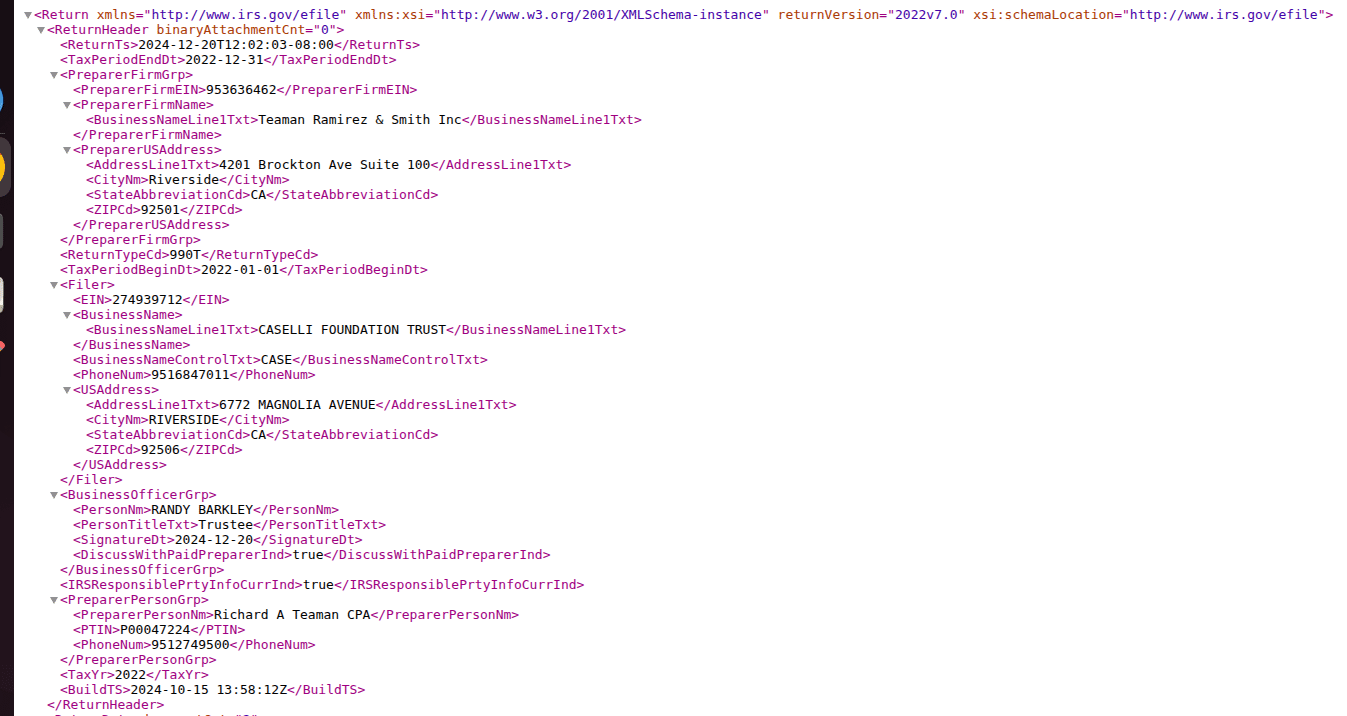
Here’s a realistic dataset example: IRS bulk XML
The IRS Form 990 bulk data is a good example of the “XML dump” scenario: many files, similar shape, plenty of variation, and a strong incentive not to do anything manually.
This is what it looks like:
A practical batching script (what it does)
Here’s how the batching approach works:
- Validate arguments (jar path, XML folder, output path),
- Collect all *.xml files in the folder,
- Run Trang once with all XML files as input, producing a single XSD.
I’ll show you how to do that on Linux:
Step A: Create the script file
|
1 |
nano xml_to_xsd.sh |
Step B: Copy and paste the script below into the nano editor
|
1 2 3 4 5 6 7 8 9 10 11 12 13 14 15 16 17 18 19 20 21 22 23 24 25 26 27 28 29 30 31 32 33 34 35 36 37 38 39 40 41 42 43 44 45 46 47 48 49 50 51 52 53 54 55 56 |
#!/bin/bash # ------------------------- # Argument validation # ------------------------- if [ "$#" -ne 3 ]; then echo "Usage: $0 <trang-jar-path> <xml-folder-path> <output-xsd-file>" exit 1 fi TRANG_PATH="$1" XML_DIR="${2%/}" OUT_XSD="$3" # ------------------------- # Validate inputs # ------------------------- if [ ! -f "$TRANG_PATH" ]; then echo "Error: Trang JAR not found at $TRANG_PATH" exit 1 fi if [ ! -d "$XML_DIR" ]; then echo "Error: XML directory not found at $XML_DIR" exit 1 fi mkdir -p "$(dirname "$OUT_XSD")" # ------------------------- # Collect XML files # ------------------------- shopt -s nullglob XML_FILES=("$XML_DIR"/*.xml) if [ "${#XML_FILES[@]}" -eq 0 ]; then echo "Error: No XML files found in $XML_DIR" exit 1 fi echo "Starting schema generation..." echo "Trang JAR : $TRANG_PATH" echo "XML files : ${#XML_FILES[@]}" echo "Output XSD: $OUT_XSD" echo # ------------------------- # Run Trang ONCE with all XMLs # ------------------------- java -jar "$TRANG_PATH" -I xml -O xsd \ "${XML_FILES[@]}" \ "$OUT_XSD" echo echo "Conversion complete." echo "Single XSD generated at: $OUT_XSD" |
Step C: Save and Exit
- Press Ctrl + O → press Enter (save)
- Press Ctrl + X (exit)
Step D: Make the script executable
|
1 |
chmod +x xml_to_xsd.sh |
Step E: Then you need this core execution line (for your terminal):
|
1 |
./xml_to_xsd.sh /path/to/build/trang.jar /path/to/xml_files/ /path/to/output/combined_schema.xsd |
Yes, it expects three arguments. Humans love consistency until they have to type it.
Here’s what these arguments are:
- Trang JAR File Path
- Full absolute path to the trang.jar file.
- Used by the script to convert XML files into XSD schemas.
- Example: /home/rohan/jing-trang/build/trang.jar
- XML Input Directory Path
- Directory containing the XML files to be converted.
- All files with .xml extension in this folder will be processed.
- Example: /home/rohan/Downloads/xml_files
- XSD Output File Path
- A single XSD file that contains the inferred schema derived from all input XML files.
- Example: /home/rohan/Downloads/xsd_files/combined_schema.xsd
And what you see as output in your terminal is:
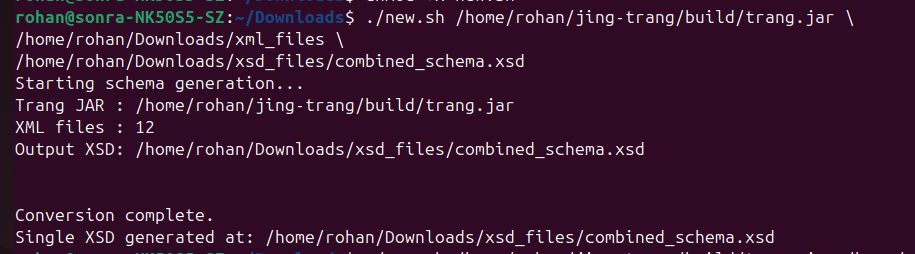
So you’re not generating 500 tiny XSDs. You’re generating one schema inferred from the batch.
And you should get this single XSD file along with a file with an .xsi extension.
Verdict: Trang is excellent… within its lane
Trang is one of the best open-source options to generate an XSD from XML instances when you’re doing:
- Schema discovery,
- Validation,
- One-off parsing work,
- Quick documentation.
But it has a hard limit; you can’t “power user” your way around.
Inferred schemas are only as good as the XML samples you provide.
If your sample set misses edge cases (it will), the schema will miss them too.
If later files contain wider types, optional branches, or inconsistent structures, your shiny inferred XSD can break your pipeline.
Which tees up my main section nicely:
What happens when you’re not trying to generate an XSD… but trying to load 10,000 XML files into a database without babysitting the whole thing?
Next steps with Trang (so you don’t have to bounce back to Google)
If you came here just to generate an XSD with Trang, you’re probably at the exact point where the next questions start:
- How do I validate XML against the generated XSD?
- What do I do when validation fails but the XML “looks fine”?
- How do I improve the inferred schema when file #2 disagrees with file #1?
- Where are the actual Trang docs and examples?
Here’s the practical next-step stack.
Validate the XML against your generated XSD
Once Trang gives you an XSD, the next step is validation.
Use any XML validator you trust (IDE, CI pipeline, or CLI tool) and run your XML files against the generated schema.
This is where the usual real-world issues show up: namespace mismatches, optional branches missing from your sample set, datatype drift, and element-order/cardinality issues.
Re-run inference on a better sample set (this fixes more than people expect)
If validation fails on later files, don’t immediately assume Trang is broken.
More often, the first XSD was inferred from a sample that was too narrow.
Re-run inference using a broader set of XML files across different dates, versions, and edge cases.
Treat that as the normal workflow, not a failure.
Use the actual Trang docs and examples when you need more control
Trang is simple for the common case, but it also supports explicit input/output format options and additional parameters.
You can check the official Trang manual or the Trang repo for more information on those options.
That matters when:
- file extensions are ambiguous,
- you’re batching examples,
- Or you want tighter control over how input and output formats are interpreted.
If you want a more visual walkthrough in addition to the docs, here’s a useful Trang YouTube playlist (including a Trang XML GUI walkthrough).
Keep a short troubleshooting checklist next to your XSD
When the inferred schema “looks right” but validation still fails, the recurring causes are usually the same:
- namespace mismatch,
- datatype too narrow (int vs decimal vs string),
- optional/repeating elements not represented in your sample set,
- element order/occurrence constraints that don’t match messy input.
In other words, the XSD is often doing exactly what you asked. The sample set was the problem.
And if you’ve reached the “I’m desperate” or “I can’t do this anymore” stages, you can post an issue on Trang’s GitHub page.
If your end goal is XML to database, treat the XSD as a checkpoint, not the destination
Trang gives you a schema artefact. That is genuinely useful.
But if your real goal is database ingestion, the hard part starts after XSD generation:
- target model design,
- mappings,
- schema drift handling,
- and operationalising the pipeline.
That’s where “generate XSD” stops being the finish line, and where the next page picks up if your goal is to move from schema generation to production-ready XML to database ingestion.
The “Hidden” Data Engineering Gap
So far, Trang solved the immediate simple problem:
- You had XML.
- You had no schema.
- Now you have an inferred XSD you can validate against.
Nice.
But now comes the part where projects leave the “developer laptop” stage and enter the “why is the pipeline on fire at 3 am” stage.
What if you need to load 10,000 of these XML files into a database?
This is the gap people don’t notice at first, because generating an XSD feels like progress. And it is, for validation and documentation.
But if your real goal is to convert XML to database tables (Snowflake, BigQuery, Postgres, whatever), the XSD is just the beginning.
The hard part is everything that comes after. Here’s how it looks:
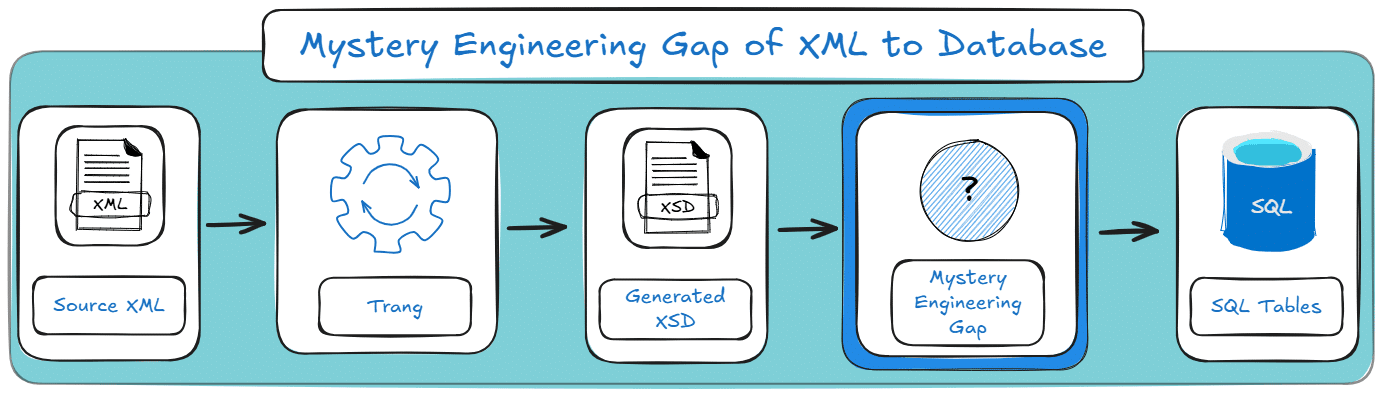
Below are the three reasons the “manual XML to XSD approach with Trang” fails to scale.
TL;DR for this section: Trang can infer an XSD fast, but “fast” isn’t “production-ready”, especially when thinking in XML to database projects.
Incomplete samples, manual table design, and schema drift make this approach brittle at scale.
For the automated route, skip ahead to Flexter.
Problem #1: The Sample Size Trap (aka “your schema is only as smart as your samples”)
Trang infers types and structure based on the XML files you feed it.
That sounds fine until you remember one annoying detail:
The first few files are never representative.
Here’s what usually happens in real pipelines:
- File #1 has <amount>12</amount>: Your inferred schema decides: integer.
- File #237 has <amount>12.75</amount>: Now it’s decimal (and your “integer” schema is wrong).
- File #913 has <amount>UNKNOWN</amount>: Now it’s actually a string (and your “decimal” schema is wrong too).
And yes, XML producers do this. No, they don’t warn you. They simply ship chaos and call it “data”.
This is the core issue with inference-based schemas:
Inferred XSDs are snapshots of observed reality, not contracts.
What breaks in practice:
- Type mismatches: int vs. decimal vs string,
- Optional branches that show up later,
- Repeating elements that your samples didn’t include,
- Elements that appear under different parents depending on the source system/version.
What does it mean for XML to database?
If your DDL and parsing logic are built from a fragile inferred schema, you don’t have a pipeline.
You have a time bomb with a scheduler.
Pro tip
If you’re building anything that resembles an ingestion pipeline, do not infer from “one example file someone emailed you.”
Feed inference tools as many distinct files as possible, across dates and edge cases. And even then, assume you missed something
Problem #2: No Target Schema (aka “cool XSD, now write the database”)
Let’s say you generated a beautiful XSD.
Now answer this:
How does that XSD become database tables?
Because databases don’t store trees. They store rows and columns.
So you still have to do the unglamorous work:
- Decide the target shape:
- One wide table?
- many normalised tables?
- semi-structured storage (VARIANT/JSON columns)?
- Write the DDL:
- CREATE TABLE …
- primary keys (if you can even define them)
- relationships between nested collections
- Map the XML tree to the tables:
- flatten arrays/repeating elements into child tables,
- decide how to join them back (synthetic keys? path-based keys?),
- handle optional subtrees without generating junk rows.
- Implement the extraction/parsing logic:
- shredding XML into relational form,
- handling namespaces,
- dealing with mixed content/attributes vs. elements,
- deciding what to do with unknown fields.
In other words:
An XSD helps you validate XML. It doesn’t design your database.
And in most teams, these “manual mapping” steps are where timelines go to die.
Pro tip
If your plan is “generate an XSD and then handwrite the DDL”, you’ve basically signed up for a second project called “schema translation,” and it tends to be more work than the original conversion.
If you’re interested in how XSD can be converted to a database, read our complete guide to converting XSD to a database schema.
Problem #3: Static vs. Dynamic (aka “schema drift is inevitable, sorry”)
Even if you do everything “right”:
- You generate an XSD from lots of samples,
- You design a solid target data model,
- You write the DDL,
- You build a parser that loads cleanly into your database system..
…your victory lasts exactly until the producer changes the XML.
And they will.
Sometimes it’s legitimate (new field, new optional block)..
Sometimes it’s accidental (a type change because someone exported from Excel differently)..
Sometimes it’s just because they felt like it..
This creates the long-term problem:
- Your generated XSD is a point-in-time artefact.
- Your database schema is also a point-in-time artefact.
- Your ingestion pipeline becomes a maintenance treadmill.
What schema drift looks like:
- new elements appear,
- An element changes type,
- a repeating element becomes “sometimes single”,
- optional blocks become mandatory (or vice versa),
- nested structures get rearranged.
And then you fall into a schema drift maintenance loop:
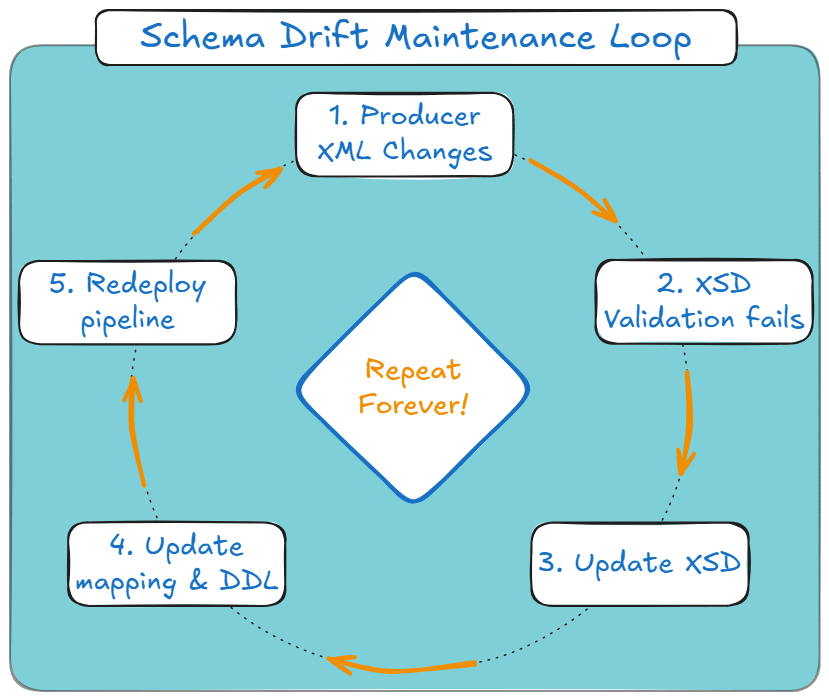
If you’re handling large batches weekly or daily, you don’t just need a schema generator (like Trang).
- detect drift,
- adjust the model,
- regenerate outputs (DDL, mappings),
- and do it without you diffing XSD files manually like a detective who made bad life choices.
So what’s the takeaway?
Trang is excellent at what it’s meant for: deriving an XSD from XML instances so you can validate, document, and understand the structure.
But if your end goal is XML to database, the “manual XSD approach” runs into three scaling walls:
- The sample size trap: inference breaks when new files disagree.
- No target schema: an XSD doesn’t create tables or mappings for you.
- Static vs dynamic: drift turns schemas into ongoing maintenance.
This means that there is considerably sized gap between what Trang can give you and what you want in an XML to SQL project.
To address this scaling, you and your team will need to do a lot of manual work. Here’s how your project stages will look on a high level:
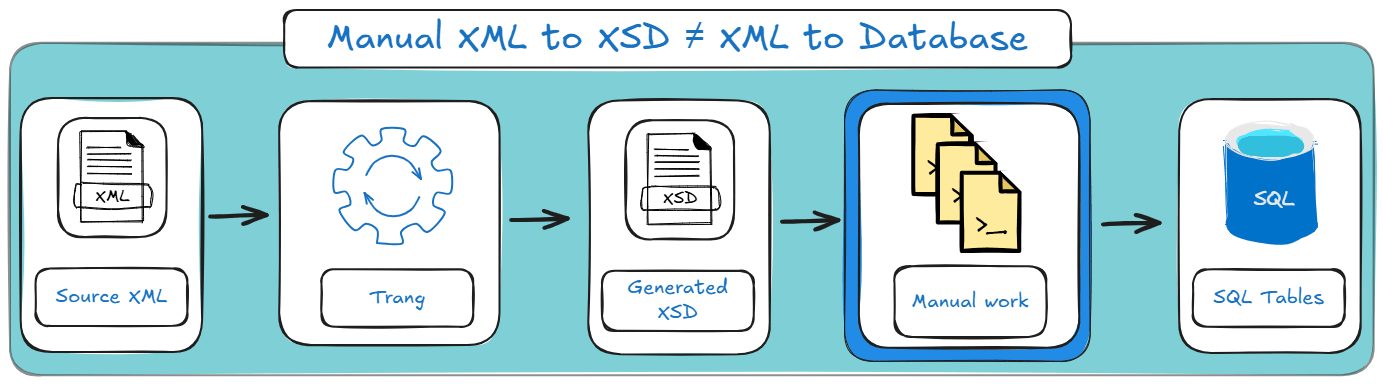
Which leads directly to the obvious next question:
What if you skip the “XSD as the final destination” idea and generate the actual target data model instead?
That’s what we’ll cover next in the Flexter section.
Want to see your XML or XSD converted to a Snowflake instance in the next 2 minutes?
Don’t overthink it. Run one of your XML files (or all of them) through the Flexter XML to Snowflake online converter and see the generated tables and mappings in seconds.
It’s the fastest way to feel what “XML to database” actually looks like, before you commit to building anything by hand.
The Enterprise Solution (Flexter)
Trang is great when the goal is “give me an XSD file.”
But once the goal becomes “load a lot of XML into a database reliably”, the XSD stops being the destination and starts being a speed bump.
Flexter’s pitch is basically: skip the middleman.
Instead of generating only an XSD, Flexter derives the target data model (the thing you actually need to build pipelines): tables, keys, relationships, and documentation.
The key idea: derive the target model, not just a schema file.
If you’re heading toward Snowflake, BigQuery, or Databricks, you don’t just need validation rules. You need:
- a relational design that won’t collapse under nesting,
- DDL, you don’t have to hand-write,
- a way to deal with “same feed, different shape next week”.
What Flexter does differently
1) Deep scanning (type detection that isn’t based on vibes)
Trang infers types from the files you feed it. If your sample set is unrepresentative, your schema is too.
What Flexter does differently: It tackles this by scanning large repositories (GBs/TBs) and determining types statistically, rather than guessing from one or two files.
2) Automation: generates the target DDL and loads data
Instead of stopping at “here’s an XSD,” Flexter can generate the target DDL and produce a working database-oriented output (or load into a target system), so you don’t have to manually design tables and mappings.
What Flexter does differently: It is also built to run like a real tool (not a one-off laptop ritual): CLI + API, local install, scalable throughput, and integration into normal infra.
3) Visual documentation: ER diagrams that humans can read
XSD is… technically documentation. But it’s still code.
What Flexter does differently: It produces documentation artefacts like ER diagrams, plus metadata and lineage-style outputs, so both engineers and non-engineers can understand the resulting model without parsing angle brackets for sport.
What you get out of the box (practical benefits)
- Zero-code automation: configure the target and point Flexter at files.
- Scalability: handles large volumes and adapts to your infrastructure.
- Normalised schemas (not one big table): avoids the “flatten everything and regret it later” design by producing multiple connected tables.
- Schema optimisation algorithms: reduce unnecessary hierarchy where possible to improve query performance.
- Metadata management: ER diagrams, source-to-target mappings, schema diffs, and a metadata catalogue.
- Schema evolution support: track diffs and handle change over time (instead of “regen XSD and hope”).
- Deployment flexibility: run it in the environments teams actually use (cloud/on-prem) and integrate with common platforms.
Interested in the full list of differentiators?
Flexter isn’t just “another XML tool”; it’s built specifically for XML to database projects where scale, schema drift, and target modelling actually matter.
When Flexter is the right move
If your job is ad-hoc validation, or “I need an XSD so I can understand this one file,” Trang is a perfectly sane choice.
If your job is production ingestion (many files, evolving structure, database targets, repeatable runs), Flexter is designed for that reality: it doesn’t just give you a schema artefact, it gives you a target model + automation + documentation.
Side-by-Side Comparison: Flexter vs. Trang
If you haven’t made up your mind yet, here’s a tightened-up comparison table which compares your two options across common dimensions:
|
Feature |
Trang (open-source) |
Flexter (Enterprise) |
|---|---|---|
|
Primary goal |
Generate a schema file (.xsd) for validation/documentation. |
Convert XML data into a database-ready target model. |
|
Input scope |
Single file or small batch. |
Massive repositories (GBs to TBs). |
|
Type detection |
Heuristic (infers from the sample XML you feed it). |
Statistical (scans broadly to determine types). |
|
Output |
XSD code. |
Target DDL, ER diagrams, mappings, and loaded/structured outputs. |
|
Schema evolution |
Manual (re-run tool + manually handle differences). |
Automated (detects drift + supports evolution workflows). |
|
Best for |
Developers, one-off tasks, and quick schema discovery. |
Data engineers, repeatable pipelines, production ingestion. |
|
Documentation & metadata |
XSD is the documentation. |
ER diagram + lineage-style documentation and metadata outputs. |
|
Support & ops |
Community + your own troubleshooting. |
Enterprise support options, plus it runs as a system (CLI/API). |
Scaling beyond “one-off XSD generation”
Generating an XSD from XML is a useful step, and Trang is genuinely good at it.
If you’re dealing with fast schema discovery, validation, and documentation or just with one XML file (or a small set) and you just need structure, then Trang has got you covered.
The catch is the one you’ve probably felt already: inferred schemas are only as good as the samples you feed them, and real-world XML rarely stays still.
If your XSD becomes a point-in-time artefact, then your database schema becomes a point-in-time artefact, and your ingestion pipeline turns into a maintenance treadmill.
The practical takeaway is simple:
- Pick Trang when you need a schema artefact quickly: validation, documentation, or understanding a feed.
- Pick Flexter when you need a complete XSD to database schema workflow: target schema + automation + handling drift without turning your life into an XSD diff hobby.
Pro tip: If you’re beyond a one-off conversion, it may be worth talking with our team about your XML setup.
If you’re handling XML conversions at scale or working with feeds that change over time, the project usually involves more than a simple one-time workflow.
A short conversation about your XML, target database, and what “done” looks like can help clarify the right approach and reduce rework later.
If helpful, you can schedule a call to discuss your project and possible next steps.
FAQ: XML to XSD (and the stuff people actually trip over)
An XML to XSD converter takes one or more XML instance documents and infers an XML Schema (XSD) that describes the structure it sees (elements, attributes, nesting, basic datatypes). It’s schema discovery, not mind-reading.
Yes. You can convert XML to XSD from a single file and get something usable quickly. Just don’t pretend it’s “the schema” for the whole dataset. It’s the schema for that file (and whatever patterns it happened to contain).
Use multiple representative XML files when you generate XSD from XML so the inferred schema covers optional branches, repeated sections, and real-world variation. If you only feed the “happy path” file, the XSD will only validate the “happy path”.
Not really in practice. People use “create XSD from XML” and “generate XSD from XML” interchangeably. Both mean “infer an XSD from XML instances”.
Yes, there are tools that claim to convert XML to XSD online. It may be convenient for quick checks or small files.
For sensitive data, large files, or repeatable pipelines, you’ll usually want a local/enterprise workflow instead of pasting production data into a browser and hoping for the best.
As I discussed earlier in the blog post, your best option for small, one-off jobs is Trang.
You use an XML validator (many IDEs and CLI tools support this) to validate XML against XSD.
Common reasons:
. namespaces don’t match what the XSD expects,
. The schema inferred from one file is missing branches used in other files,
. datatypes were inferred too strictly (a field looks numeric in sample files but later contains “N/A”),
. Element order/occurrence constraints don’t match messy reality.
In one of my earlier sections in this blog post, I discuss this in a bit more detail.
XML is the data. XSD is the formal contract that defines what “valid XML” means for a particular structure.
If you’re dealing with XML and XSD together, the XSD is what makes validation, parsing rules, and downstream processing predictable.
Pretty much. When people say XML XSD, they usually mean “how XML and XSD schema work together”. Formally, XSD is the XML Schema language used to define XML schemas.
An XSD for XML is also useful for:
. documenting a feed (especially when humans keep inheriting it),
. generating code/classes (some ecosystems do this well),
. driving parsing rules and mapping logic,
. making integration testing less of a guessing game.
Generating an XSD is a good start, but databases need more than validation rules:
. table design (normalisation vs flattening),
. keys/relationships,
. mappings from hierarchical XML into relational structures,
. handling schema drift over time.
If you’re doing this once, you can brute-force it.
If you’re doing it repeatedly at scale, that’s where enterprise tooling (like Flexter) exists, because humans are not built for maintaining fragile schema inference pipelines indefinitely.
Pro tip: If your end goal is XML to SQL, don’t stop at “I have an XSD”
Generating an XSD is useful for validation and schema discovery.
But if you’re ultimately trying to load XML into SQL tables (and keep it working when the XML evolves), you’ll want an XML to database approach that covers things like normalisation, mixed content/type handling, schema optimisation, automation, and documentation.
If you’re planning that next step, skim this guide on must-have features for XML to SQL converters before you commit to a brittle build.