Avoid SQL Anti-Patterns – OUTER Joins & Anti Joins Explained

You often need to find both matched and unmatched rows between two or more tables. As we all know we use OUTER joins in SQL to achieve this.
However, there are many traps that inexperienced SQL developers fall into when working with OUTER joins. Some of these traps can be quite tricky and will lead to unintended, unexpected, or plain wrong results.
This blog post will show you how to bypass these dangerous mines and guide you safely through the SQL OUTER JOINs minefield.
Use Flexter to turn XML and JSON into Valuable Insights
- 100% Automation
- 0% Coding
Bad SQL! Don’t use INNER JOIN after OUTER JOIN.
The following query gets a list of unique customer names and unique stock items they have ordered.
SELECT DISTINCT C.CUSTOMERNAME AS Customer, SP.STOCKITEMID
FROM
    SALES_CUSTOMERS c
INNER JOIN
    SALES_ORDERS o ON c.CUSTOMERID = o.CUSTOMERID
INNER JOIN
    SALES_ORDERLINES ol ON o.ORDERID = ol.ORDERID
INNER JOIN
    STOCKITEM_PRICE sp ON ol.STOCKITEMID = sp.STOCKITEMID;
Result
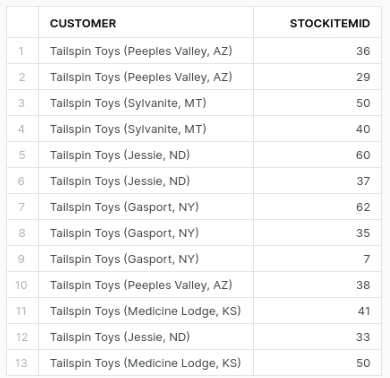
This gives us 13 rows.
In the query, all joins are INNER JOINs, which means only customers with orders and corresponding order details and stock items are listed. If you’ve noticed a couple of customers missing from the result, it’s likely because they haven’t placed any orders.
So how do we identify customers who did not place orders? Exactly! We use an OUTER join.
Some developers might try the following query and are surprised that they get the same result as for the previous query with INNER joins.
SELECT DISTINCT C.CUSTOMERNAME AS Customer, SP.STOCKITEMID
FROM
	SALES_CUSTOMERS c
LEFT OUTER JOIN
	SALES_ORDERS o ON c.CUSTOMERID = o.CUSTOMERID
INNER JOIN
	SALES_ORDERLINES ol ON o.ORDERID = ol.ORDERID
INNER JOIN
	STOCKITEM_PRICE sp ON ol.STOCKITEMID = sp.STOCKITEMID;
Result:
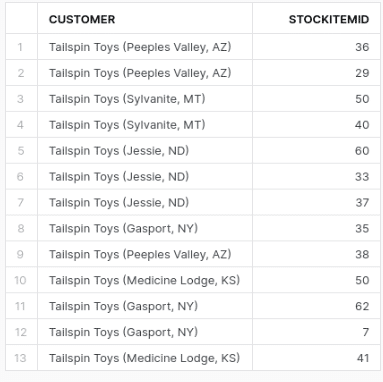
This is super bad SQL. Why? It returns results that are unintended. The intention was to return all customers including those without orders. However, we only got customers with orders. Our query returned the wrong results or at least not the result we expected.
The LEFT OUTER JOIN between Customers and Orders does initially preserve any customers without any orders. But, as we then inner join ORDERS with ORDERLINES the rows with NULL values are removed. The INNER JOIN between ORDERS and ORDERLINES overrides the OUTER JOIN and implicitly converts it to an INNER JOIN.
Let’s see what happens when we convert all of our joins to LEFT OUTER joins
SELECT DISTINCT C.CUSTOMERNAME AS Customer, SP.STOCKITEMID
FROM
	SALES_CUSTOMERS c
LEFT OUTER JOIN
	SALES_ORDERS o ON c.CUSTOMERID = o.CUSTOMERID
LEFT OUTER JOIN
	SALES_ORDERLINES ol ON o.ORDERID = ol.ORDERID
LEFT OUTER JOIN
	STOCKITEM_PRICE sp ON ol.STOCKITEMID = sp.STOCKITEMID;
Result:
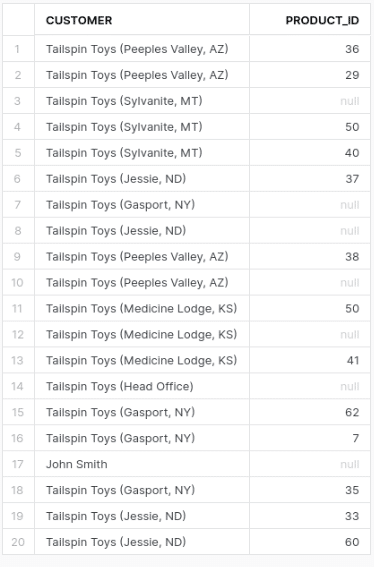
This gives us 20 rows.
While we now get all of the customers without orders we also get all of the orders without order lines and stock items. In other words we also preserved orders with no order lines and stock items. This may also be unintended.
What if we only want customers without orders but don’t want to show orders without orderlines at the same time?
The following query will work for this scenario.
SELECT DISTINCT c.CUSTOMERNAME AS Customer
     ,SP.STOCKITEMID
 FROM SALES_ORDERS o
 JOIN SALES_ORDERLINES ol
   ON o.ORDERID=ol.ORDERID
 JOIN STOCKITEM_PRICE sp
   ON ol.STOCKITEMID=sp.STOCKITEMID
RIGHT
 JOIN SALES_CUSTOMERS c
   ON c.CUSTOMERID=o.CUSTOMERID;
Result:
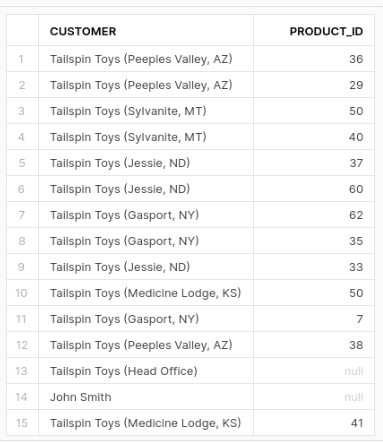
We now get 15 rows. All of the customers without orders but ignoring orders without orderlines.
Some people prefer LEFT JOINs over RIGHT JOINs. We can rewrite the query as a LEFT JOIN with a subquery.
SELECT DISTINCT C.CUSTOMERNAME AS Customer, SQ.STOCKITEMID
FROM SALES_CUSTOMERS AS C
LEFT OUTER JOIN
(
	SELECT O.CUSTOMERID, SI.STOCKITEMID
	FROM SALES_ORDERS O
	INNER JOIN SALES_ORDERLINES OL ON O.ORDERID = OL.ORDERID
	INNER JOIN STOCKITEM_PRICE SI ON SI.STOCKITEMID = OL.STOCKITEMID
) AS SQ
ON C.CUSTOMERID = SQ.CUSTOMERID;
Result:
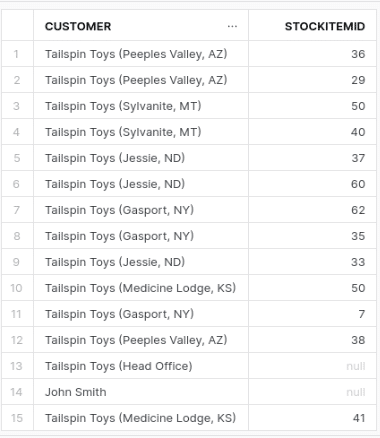
We get 15 rows. The same result as the query with the RIGHT OUTER JOIN.
LEFT ANTI JOIN in SQL – Syntax and Examples
The RIGHT JOIN and subquery examples above work.
But for this problem, there is a more direct pattern: the anti join.
A left anti join returns rows from the left table where no matching row exists in the right table.
In this case, the question is:
“Which customers have no orders?”
Most SQL databases do not use explicit LEFT ANTI JOIN syntax. Instead, you usually write the same logic with NOT EXISTS, NOT IN, or LEFT JOIN … IS NULL.
Method 1 – NOT EXISTS (recommended)
This is usually the safest way to write an anti join.
|
1 2 3 4 5 6 |
SELECT CUSTOMERNAME FROM SALES_CUSTOMERS c WHERE NOT EXISTS ( SELECT 1 FROM SALES_ORDERS o WHERE o.CUSTOMERID = c.CUSTOMERID ); |
This query returns every customer for whom no matching order exists.
Read it almost as plain English:
“Give me each customer for whom there does not exist an order for that customer.”
That is the anti-join pattern.
The database does not need order details. It does not need order dates, amounts, or anything else from the right table. It only needs to know whether a matching row exists.
That is why NOT EXISTS is normally the best default for this kind of query.
Method 2 – NOT IN (use with caution)
You can also write the same query with NOT IN.
|
1 2 3 4 5 6 |
SELECT c.CUSTOMERNAME FROM SALES_CUSTOMERS c WHERE CUSTOMERID NOT IN ( SELECT CUSTOMERID FROM SALES_ORDERS WHERE CUSTOMERID IS NOT NULL ); |
This works only because the subquery removes NULL values.
If you leave out WHERE CUSTOMERID IS NOT NULL, and the subquery returns even one NULL, NOT IN can return no rows.
No error. No warning. Just a result set quietly pretending to be correct.
Use NOT IN only when the subquery column is guaranteed to be non-null.
Method 3 – LEFT JOIN + WHERE IS NULL
The classic join-based version looks like this:
|
1 2 3 4 5 |
SELECT c.CUSTOMERNAME FROM SALES_CUSTOMERS c LEFT JOIN SALES_ORDERS o ON c.CUSTOMERID = o.CUSTOMERID WHERE o.CUSTOMERID IS NULL; |
The LEFT JOIN keeps all customers. The WHERE clause then keeps only the rows where no matching order was found.
Pro Tip
Use NOT EXISTS as your default.
It is clear, NULL-safe, and expresses the real question directly: Does a matching row exist or not?
Use LEFT JOIN … IS NULL when your query already uses joins, and your team finds that style easier to read.
Use NOT IN only when the subquery column cannot contain NULL.
When Should You Avoid a Full Join?
Avoid a full join when you only need to check whether a match exists.
If the question is:
“Which rows do not have a match?”
then you do not need columns from the right table. You need an anti join.
This matters on large tables. Pulling matched rows just to throw them away later is extra work wearing a SQL costume.
For missing reference data, orphan checks, reconciliation queries, and “customers without orders” logic, start with NOT EXISTS.
FlowHigh can detect join anti-patterns like this automatically, as shown in the next section.
Using FlowHigh UI to detect the anti pattern
As a DBA it is important that you detect anti patterns in SQL that lead to incorrect results.. We have created a module in FlowHigh to detect these and dozens of other anti patterns.
In this section, we’ll guide you through the process of using the FlowHigh UI to detect the anti pattern we covered earlier on.
Gain access to FlowHigh today.
Follow these steps:
- Access FlowHigh: Log in to FlowHigh’s web interface and select the “optimise sql” option from the left panel.
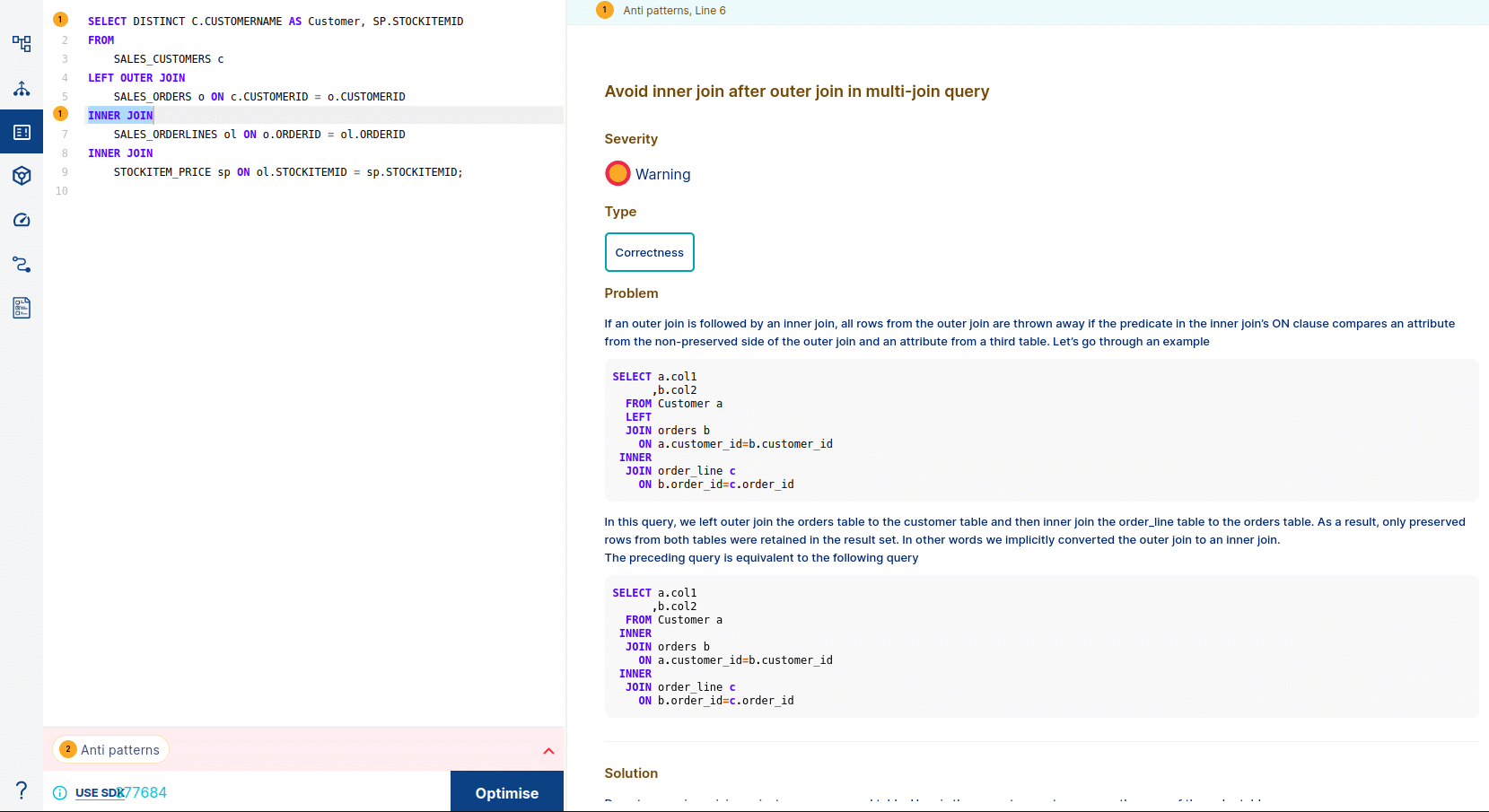
- Submit the Query: Paste the SQL query into the editor and click “Optimise”.
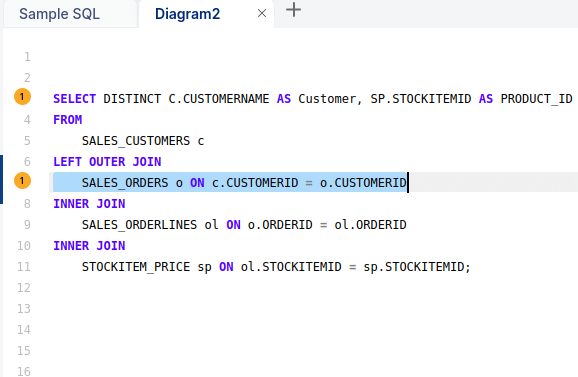
FlowHigh’s analysis will identify instances of the anti pattern. If multiple anti patterns are detected in the same query, FlowHigh will highlight them individually.
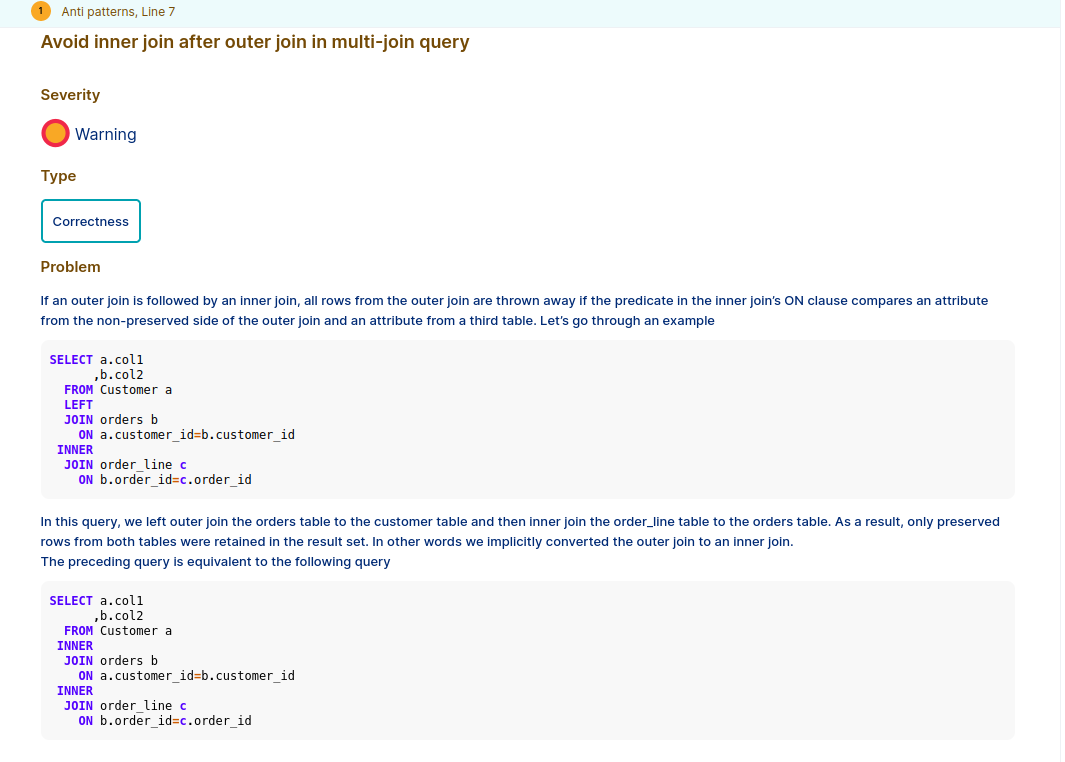
We can get the details of each antipattern by clicking the highlighted number as shown in the figure above. Flowhigh will show the details of the anti pattern
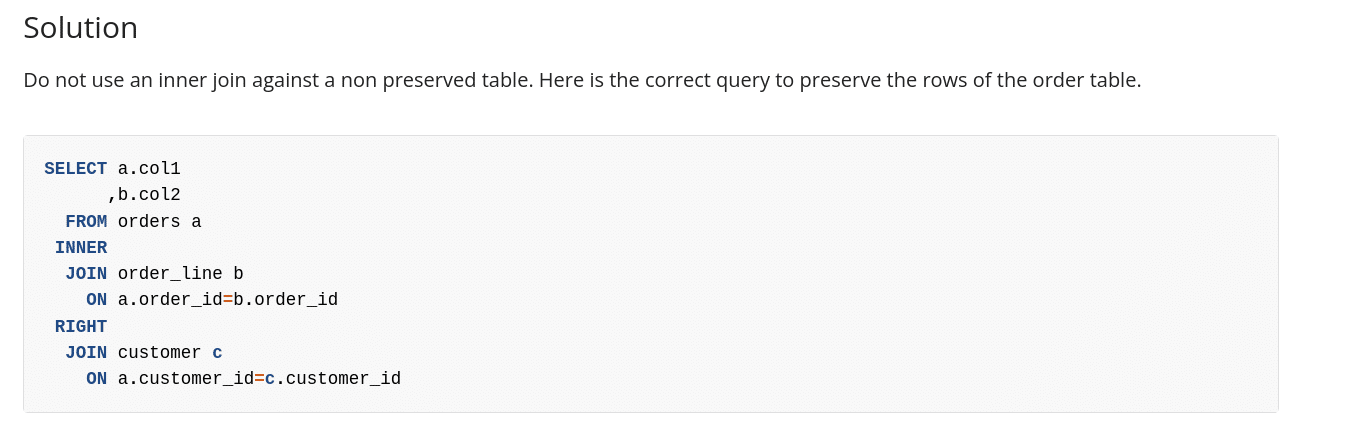
Flowhigh will also offer a solution to this discovered antipattern.
Using FlowHigh SDK to detect the anti pattern
The SQL that inner joins a table after an OUTER join affects the correctness of the result set. Hence you want to closely monitor distinct in SQL query history of your database for this particular anti pattern.
The FlowHigh SDK is very useful to programmatically detect anti patterns in your SQL code for automation purposes. As an example we can provide the sql discussed in this post as an input to FH and detect the bad SQL. We will use the below query:
SELECT DISTINCT C.CUSTOMERNAME AS Customer, SP.STOCKITEMID
FROM
	SALES_CUSTOMERS c
LEFT OUTER JOIN
	SALES_ORDERS o ON c.CUSTOMERID = o.CUSTOMERID
INNER JOIN
	SALES_ORDERLINES ol ON o.ORDERID = ol.ORDERID
INNER JOIN
	STOCKITEM_PRICE sp ON ol.STOCKITEMID = sp.STOCKITEMID;
Follow these steps to use the FlowHigh SDK:
- Import the SDK: Begin by importing the required modules from the FlowHigh SDK in your Python script.
- Instantiate FlowHighSubmissionClass: Create an instance of the FlowHighSubmissionClass by passing your SQL query to the constructor:
fh = FlowHighSubmissionClass.from_sql(query_txt)
- Retrieve Anti Patterns: Utilize the instantiated object to extract all anti pattern details present in your SQL code. By using the get_all_antipatterns() method, you’ll obtain a list of anti pattern instances detected within the query.
antipatterns = fh.get_all_antipatterns()
Output:
| AP_ID | AP_NAME | SEVERITY | PERFORMANCE_FLAG | READABILITY_FLAG | CORRECTNESS_FLAG |
|---|---|---|---|---|---|
| AP_13 | Avoid inner join after outer join in multi-join query | Warning | N | N | Y |
| AP_06 | Beware of SELECT DISTINCT | Warning | Y | N | Y |
To fully automate the detection of SQL anti patterns you can use the FlowHigh SDK to scan the query history of your database.
Register to gain access to the FlowHigh
Uli Bethke
Uli has been rocking the data world since 2001. As the Co-founder of Sonra, the data liberation company, he’s on a mission to set data free. Uli doesn’t just talk the talk—he writes the books, leads the communities, and takes the stage as a conference speaker.
Any questions or comments for Uli? Connect with him on LinkedIn.
Follow Uli Bethke: