Snowflake XML Parsing – Parse, Flatten & Query XML (2026)

In this post we cover every detail of parsing XML in Snowflake including storing, loading, querying, and parsing XML.
Very few cloud data platforms have native support for parsing XML. Unlike Redshift or BigQuery, Snowflake stands out and provides the user with various options around working with XML.
We will look at these options but also at the limitations of working with XML on Snowflake.
These limitations also need to be looked at in the light of the general limitations and downsides of manually converting XML.
Instead of writing code using the Snowflake XML functions to parse complex and deeply nested XML, you can fully automate XML parsing with an XML conversion tool.
Pro tip: If your goal is not just to inspect XML in Snowflake but to convert it into relational tables quickly, you can try the Free XML to Snowflake Online Converter. It gives you a practical feel for automated XML conversion without needing to write parsing or mapping logic first.
What can you expect from this blog post?
As a very first step we go through a quick XML tutorial and clarify some of the core concepts you need to be aware of when working with XML and converting it to tables in a relational format.
We then outline the native options of working with XML on Snowflake:
- Options for storing XML in Snowflake,
- Options for loading XML into Snowflake,
- Options for querying XML via SQL (aka Schema on Read),
- Options for parsing XML to a relational format (aka Schema on Write),
- Options for flattening XML to a denormalised table.
We then look at the various limitations of working with XML on Snowflake.
We will go through the downsides and give clear guidance under what circumstances it makes sense to use an automated approach using an XML conversion tool and when the manual coding approach is a better fit.
Can Snowflake read XML?
Yes. Snowflake natively supports XML via the VARIANT data type.
You can load XML files using COPY INTO and query them using PARSE_XML, XMLGET, and FLATTEN; without any external ETL transformation required.
Let’s dive in but before we start …
Here are the KEY TAKEAWAYS for those in a hurry:
- Snowflake supports XML natively, unlike Redshift, Azure Synapse, or BigQuery.
- Traditional databases such as Oracle or SQL Server have much wider support for working with XML, e.g. features to work with XML schemas (XSDs) and support for standard XML tools such as XQuery.
- In comparison to other semi-structured data types such as JSON, XML support in Snowflake still lags behind in terms of feature depth and maturity, even though it reached General Availability in July 2025.
- Parsing and writing XML to Snowflake tables in a relational format is generally preferred over directly querying the XML as schema on read.
- When working with XML on Snowflake you will inevitably run into various limitations, in particular if you are working with complex and nested XML.
- When working with complex XML or many different types of XML the benefits of an automated XML conversion approach often outweigh the costs and risks associated with a manual conversion approach.
- The manual approach using code is fine for simple XML conversion projects but runs into limitations for complex and deeply nested XML based on industry data standards. Having many different types of XML in an organisation also makes the manual approach costly.
- Flexter is an enterprise XML converter that automatically converts XML to a Snowflake relational model. It addresses all of the Snowflake limitations and the wider limitations of manually converting XML by writing code.
Who this guide is for?
This guide is written for two different audiences, and you do not need to read it in exactly the same way.
If you are new to XML or new to hierarchical data, start with the XML primer.
It gives you the minimum background needed to understand how XML elements, attributes, nested structures, and repeating branches affect querying and conversion in Snowflake.
If you already work with Snowflake or semi-structured data, you can skip the primer and jump straight to the Snowflake-specific sections:
Use Flexter to turn XML and JSON into Valuable Insights
- 100% Automation
- 0% Coding
Snowflake XML Data Type: Storing XML in VARIANT
Snowflake stores XML in the VARIANT data type, the same column type used for JSON, Avro, and Parquet. There is no separate XML-specific data type in Snowflake.
This makes XML storage in Snowflake relatively straightforward. Unlike Oracle and SQL Server, which offer multiple XML-specific storage and query options, Snowflake takes a simpler approach by storing XML in the same semi-structured type used for other hierarchical formats.
That simplicity has a practical advantage. In platforms with many XML-specific features, choosing the right storage and query path can take time, especially when some older options have been deprecated.
Snowflake avoids much of that complexity by standardising on VARIANT.
Internally, Snowflake stores VARIANT data in an efficient compressed representation, which helps optimise both storage and query performance.
It also uses its internal optimisation mechanisms to improve how semi-structured data is accessed and processed.
Important Tip
When working with XML and the VARIANT data type you will need to be knowledgeable around OBJECTs and ARRAYs.
Before you start your XML journey on Snowflake make sure to read up on how OBJECTs and ARRAYs work and the various ways of working with these on Snowflake.
Quick XML primer
Before we dive into Snowflake, here is a short XML primer focused only on the concepts that matter later in the examples.
The goal is not to cover XML exhaustively. It is simply to explain the parts of XML structure that affect how XML is stored, queried, flattened, and converted in Snowflake.
If you already know XML basics, you can skip ahead to the Snowflake-specific sections.
XML Elements and Attributes
XML elements
An XML element is the primary building block of an XML document. It is used to structure the data into a hierarchy and can contain other elements, text, and attributes. An element consists of:
- A start tag, which opens the element, such as <name>.
- An end tag, which closes the element, such as </name>.
- The content between the start and end tags, which can be text, other elements, or both. The content is often referred to as the value.
- Optionally, attributes that provide additional information about the element.
- An empty element tag is used for elements that do not need to enclose any content. This type of tag combines the opening and closing into a single self-closing tag. The syntax for an empty element tag ends with a slash / just before the closing angle bracket >, e.g. </name>

XML attribute
An XML attribute provides additional information about an element, usually in the form of a name-value pair, and is always included within the start tag of an element. Attributes are used to store data that is not specifically part of the data content, such as identifiers, properties, or values that affect the behaviour of the element.
Example
|
1 |
<author id=”12345”> |
Difference between XML attribute and element
What are the differences between XML attribute and element? There is no fast and hard rule, just some rough guidelines.
- Function: Elements structure the main data of the document and can contain other elements or text. Attributes provide additional, ancillary information about an element.
- Multiplicity: An element can contain multiple other elements and text, whereas attributes are generally simple name-value pairs attached to elements.
- Nesting: Elements can be nested within other elements to create a document structure. Attributes cannot contain other attributes or elements; they only exist within the start tag of an element.
- Usage: Elements are used to represent the main components and complex data structures of the document. Attributes are best used for metadata or information that specifies properties of elements, such as identifiers, styles, or specific characteristics that do not constitute the primary data content.
XML Fragment and Entities
XML Fragments
An XML fragment is a portion of an XML document that may consist of multiple elements and other content. Unlike a complete XML document, an XML fragment does not need to include the XML declaration (<?xml version=”1.0″?>) or a single root element. It can be a piece of the XML that is well-formed but not necessarily a complete document on its own.
Example of an XML Fragment:
|
1 2 3 4 5 6 7 8 9 |
<Department id="ComputerScience"> <Course>Introduction to Programming</Course> <Course>Algorithms and Data Structures</Course> </Department> <Department id="ElectricalEngineering"> <Course>Circuit Analysis</Course> <Course>Electromagnetics</Course> <Course>Control Systems</Course> </Department> |
XML entities
XML has a small set of predefined entities, which are necessary for escaping special characters that have specific meanings in XML syntax. These include:
- & for the ampersand (&),
- < for the less-than sign (<),
- > for the greater-than sign (>),
- ' for the apostrophe (‘),
- " for the quotation mark (“).
XML CDATA & Namespaces
XML CDATA
As an alternative to XML entity you can use a CDATA section.
CDATA sections in XML are particularly useful in scenarios where you need to embed content that includes characters that would normally be interpreted as XML markup and would need to be escaped via predefined XML entities. You can use CDATA instead of XML entities.
A CDATA section is enclosed within <![CDATA[ and ]]> markers. Anything placed between these markers is ignored by the XML parser, which means it does not process any markup inside the CDATA section.
Here is an example. As you can see you don’t need to escape any elements via XML entities.
|
1 2 3 4 5 6 7 8 9 10 11 |
<content> <![CDATA[ Welcome to our detailed blog post on XML! Here we discuss various aspects of XML, including: <ul> <li>Elements</li> <li>Attributes</li> <li>CDATA sections</li> </ul> Check out our <a href="https://example.com/more_xml">additional resources</a>. ]]> </content> |
XML Namespace
Namespaces in XML are primarily used to avoid naming conflicts by distinguishing elements and attributes that may have the same name but different meanings, based on their context or domain.
This is particularly useful when combining XML documents from different sources or when extending existing XML formats.
|
1 2 3 4 5 6 7 8 9 10 11 12 13 |
<?xml version="1.0" encoding="UTF-8"?> <lib:Library xmlns:lib="https://www.example.com/library"> <lib:Book> <lib:Title>Great Expectations</lib:Title> <lib:Author>Charles Dickens</lib:Author> <lib:ISBN>978-0141439563</lib:ISBN> </lib:Book> <lib:Book> <lib:Title>To Kill a Mockingbird</lib:Title> <lib:Author>Harper Lee</lib:Author> <lib:ISBN>978-0446310789</lib:ISBN> </lib:Book> </lib:Library> |
- Namespace Declaration: xmlns:lib=”https://www.example.com/library” declares a namespace identified by the URI https://www.example.com/library. This URI is a unique identifier and does not need to point to an actual web resource.
- Elements with Namespace Prefix: Each element within the library (like lib:Book, lib:Title, lib:Author, lib:ISBN) is prefixed with lib, associating it with the declared namespace.
XML Conversions to Relational Format
When converting XML to a relational format you need to be aware of the following concepts and their pitfalls.
Denormalisation / Flattening
A common approach when converting XML to a relational format is to denormalise the data. Flattening is another word for denormalisation and refers to the same thing.
For each branch in the XML (more on branches in a minute), we create one fully flattened table.
Let’s go through an example.
We have the following XML document:
|
1 2 3 4 5 6 7 8 9 10 11 12 13 14 15 16 17 18 19 20 21 22 23 24 25 |
<Company> <CompanyName>Tech Solutions</CompanyName> <Department> <DepartmentName>Engineering</DepartmentName> <Employee> <Name>John Doe</Name> <Position>Software Engineer</Position> </Employee> <Employee> <Name>Jane Smith</Name> <Position>DevOps Engineer</Position> </Employee> </Department> <Department> <DepartmentName>Marketing</DepartmentName> <Employee> <Name>Emily Johnson</Name> <Position>Marketing Manager</Position> </Employee> <Employee> <Name>Michael Brown</Name> <Position>Content Strategist</Position> </Employee> </Department> </Company> |
The denormalised version looks as follows. It’s fully flattened into a single table.
|
CompanyName |
DepartmentName |
Name |
Position |
|---|---|---|---|
|
Tech Solutions |
Engineering |
John Doe |
Software Engineer |
|
Tech Solutions |
Engineering |
Jane Smith |
DevOps Engineer |
|
Tech Solutions |
Marketing |
Emily Johnson |
Marketing Manager |
|
Tech Solutions |
Marketing |
Michael Brown |
Content Strategist |
Normalisation
Having a normalised relational structure is typically preferred over a denormalised structure for the following reasons.
- Data Integrity and Consistency:
- Smaller Data Sets: By eliminating redundant data, normalised databases typically require less storage space.
- Faster Updates: Updates are faster because only one copy of the data needs to be modified.
- Scalability: Scalability: Normalised databases can be more easily scaled. Because data is stored in a structured way, adding new types of data or relationships typically involves adding new tables rather than modifying existing ones.
Multiple branches
Apart from simple scenarios, XML documents typically contain multiple branches. When denormalising XML documents you need to be aware that denormalising multiple branches may lead to cartesian products if not done properly. Later on we will look at an example on how to handle multiple branches in XML documents in Snowflake.
Have a look at the following XML document with two branches
|
1 2 3 4 5 6 7 8 9 10 11 |
<root> <BranchA> <ItemA>A1</ItemA> <ItemA>A2</ItemA> </BranchA> <BranchB> <ItemB>B1</ItemB> <ItemB>B2</ItemB> <ItemB>B3</ItemB> </BranchB> </root> |
If not done carefully the conversion to a denormalised tabular format may lead to a cartesian product as shown in the following example.
It results in a multiplication of the resultset. It is definitely something you want to avoid as it will have a significant impact on performance and might even bring down your Snowflake Virtual Warehouse. More importantly it will give you the wrong results and bad data.
Cartesian table
|
ItemA |
ItemB |
|---|---|
|
A1 |
B1 |
|
A1 |
B2 |
|
A1 |
B3 |
|
A2 |
B1 |
|
A2 |
B2 |
|
A2 |
B3 |
You will need to create separate tables when you convert branches in an XML doc. One denormalised table for each branch.
The correct conversion of the previous examples has the following tables.
Table 1: BranchA
|
ItemA |
|---|
|
A1 |
|
A2 |
Table 2: BranchB
|
ItemB |
|---|
|
B1 |
|
B2 |
|
B3 |
|
Quick Decision Box Did you just read my XML Primer, but don’t have a lot of time in your hands? Here’s a Quick Decision Box for you. The right approach depends less on whether Snowflake can read XML, and more on how complex, large, and operationally important the XML is. | |
|---|---|
|
If your situation looks like this… |
Best fit |
|
A few simple XML files, mostly for inspection or ad hoc queries. |
Native Snowflake XML functions |
|
Small XML documents with stable structure and limited nesting. |
Native Snowflake XML functions |
|
Deeply nested XML with repeating groups and many parent-child relationships. |
Automated XML conversion |
|
XML is based on XSDs or industry standards such as HL7, FpML, ACORD, or ISO 20022. |
Automated XML conversion |
|
XML files are very large or arrive in very high volumes. |
Automated XML conversion |
|
You need analytics-ready relational tables, not just XML exploration. |
Automated XML conversion |
|
Your team has strong XML/Snowflake skills and plenty of time. You can also outsource or hire expert consultants. |
Manual approach may be acceptable |
|
Your team has tight deadlines or limited XML expertise. |
Automated XML conversion |
How to Load XML Files in Snowflake
Before you can work with XML on Snowflake you first have to load and store the XML documents in the Snowflake database.
Loading XML
There are multiple options around loading XML into Snowflake.
IIS (INSERT INTO … SELECT)
IIS can be used for ad-hoc loading of individual XML documents to a Snowflake table with a VARIANT column. It is great for quickly loading XMLs and running some test queries. For bulk loading in a production environment we recommend to use COPY INTO.
Here’s how you would structure this operation:
Create the table: First, create a table that includes a VARIANT column capable of storing semi-structured XML data.
|
1 2 3 4 |
CREATE OR REPLACE TABLE xml_data_table ( xml_content VARIANT ); |
Insert XML data: Use the INSERT INTO … SELECT method to load an XML document.
|
1 2 |
INSERT INTO xml_data_table (xml_content) SELECT PARSE_XML('<root><item id="1">Item 1</item><item id="2">Item 2</item></root>') AS xml_content; |
The PARSE_XML function is used to convert a string that contains XML into a VARIANT format that Snowflake can store in the xml_content column.
External Table
While it is possible to create an external table over JSON documents this is not possible for XML. As XML is not a widely used format, support for external tables was not added by Snowflake.
Copy INTO
Copy INTO is a command that is used to load files. Both tabular (e.g. CSV) and hierarchical data (JSON, XML, Parquet etc.) can be loaded into Snowflake with Copy INTO.
The command comes with a ton of options. For XML you have the following options
- COMPRESSION = AUTO | GZIP | BZ2 | BROTLI | ZSTD | DEFLATE | RAW_DEFLATE | NONE
- IGNORE_UTF8_ERRORS = TRUE | FALSE
- PRESERVE_SPACE = TRUE | FALSE
- STRIP_OUTER_ELEMENT = TRUE | FALSE
- DISABLE_SNOWFLAKE_DATA = TRUE | FALSE
- DISABLE_AUTO_CONVERT = TRUE | FALSE
- REPLACE_INVALID_CHARACTERS = TRUE | FALSE
- SKIP_BYTE_ORDER_MARK = TRUE | FALSE
We will look at COMPRESSION, CopyOptions, and STRIP_OUTER_ELEMENT as the more commonly used options.
COMPRESSION
If your XML comes compressed you can specify the type of compression.
From the options around COMPRESSION you can see that various algorithms are supported. We gzipped XML documents and successfully loaded our XML data into Snowflake.
As you can see, ZIP is not included in the list. ZIP is better described as an archive or file format that supports the compression and archiving of multiple files and directories. It uses various compression algorithms, e.g. DEFLATE.
When we tried to load XML in a ZIP we got an error.
|
1 2 3 |
COPY INTO employee_data FROM @my_internal_xml_stage/employees.zip FILE_FORMAT = (TYPE = 'XML'); |
Error Message:
|
1 |
100100 (22P02): Error parsing XML: not an XML element |
This is unfortunate as XML documents are often shipped as ZIP files and first need to unzipped and then compressed using one of the support compression algorithms before they can be loaded.
Copy options
You can specify one of the following copy options:
ON_ERROR = CONTINUE | SKIP_FILE | SKIP_FILE_num | ‘SKIP_FILE_num%’ | ABORT_STATEMENT
You might be wondering about the difference between CONTINUE and SKIP_FILE.
Let’s go through some test cases to show the difference in detail.
Test Case: CONTINUE versus SKIP_FILE in COPY INTO Command
Objective
To evaluate the behaviour of the COPY INTO command in Snowflake when processing XML files with errors, using ON_ERROR options CONTINUE and SKIP_FILE.
This test focuses on observing how Snowflake handles a file containing a malformed XML tag during data load operations.
Files Used
- customer.xml: Contains three customer records; the third record has a malformed XML tag (</email1> instead of </email>).
|
1 2 3 4 5 6 7 8 9 10 11 12 13 14 15 16 17 18 19 20 21 |
<customer> <id>001</id> <name>John Doe</name> <email>john.doe@example.com</email> <age>30</age> <city>New York</city> </customer> <customer> <id>002</id> <name>Jane Smith</name> <email>jane.smith@example.com</email> <age>25</age> <city>Los Angeles</city> </customer> <customer> <id>003</id> <name>Bob Johnson</name> <email>bob.johnson@example.com</email1>//wrong tag <age>40</age> <city>Chicago</city> </customer> |
- employee.xml: Contains two well-formed employee records.
|
1 2 3 4 5 6 7 8 9 10 11 12 13 14 15 |
<?xml version="1.0" encoding="UTF-8"?> <employees> <employee> <id>1</id> <name>John Doe</name> <department>Finance</department> <position>Manager</position> </employee> <employee> <id>2</id> <name>Jane Smith</name> <department>IT</department> <position>Developer</position> </employee> </employees> |
Test Execution
Loading with ON_ERROR = CONTINUE
|
1 2 3 4 |
COPY INTO customer_data FROM @my_internal_xml_stage FILE_FORMAT = (TYPE = 'XML') ON_ERROR = CONTINUE; |
Expected behaviour: Snowflake should load all valid XML entries and ignore the entry with the malformed XML tag. Specifically, it should load two valid customer records from customer.xml and two employee records as a single row from employee.xml.
Loading with ON_ERROR = SKIP_FILE
|
1 2 3 4 |
COPY INTO customer_data FROM @my_internal_xml_stage FILE_FORMAT = (TYPE = 'XML') ON_ERROR = SKIP_FILE; |
Expected Behaviour: Snowflake should skip the entire customer.xml file due to the malformed tag in the third record, resulting in no records from this file being loaded. It should successfully load the two employee records from employee.xml.
Observations
- With CONTINUE:

- With SKIP_FILE:

When you have an error in your XML file and you use CONTINUE, Snowflake will still process the file but just ignore the erroneous element / record. When using SKIP_FILE the whole document will be ignored.
STRIP_OUTER_ELEMENT
STRIP_OUTER_ELEMENT is used to strip away the outermost element in the document, which can simplify the data structure and make it easier to work with XML inside Snowflake.
- If your data has an unnecessary outer wrapper, you can strip it to work directly with the contained data.
- By removing the outer element, you can avoid additional querying steps or path navigation to access the core data elements.
In this simple example the outer wrapper of <customers> does not have much of a purpose and we can use STRIP_OUTER_ELEMENT to remove this element as part of the load to Snowflake.
|
1 2 3 4 5 6 7 8 9 10 11 12 13 14 15 16 17 18 19 20 21 22 23 |
<customers> <customer> <id>001</id> <name>John Doe</name> <email>john.doe@example.com</email> <age>30</age> <city>New York</city> </customer> <customer> <id>002</id> <name>Jane Smith</name> <email>jane.smith@example.com</email> <age>25</age> <city>Los Angeles</city> </customer> <customer> <id>003</id> <name>Bob Johnson</name> <email>bob.johnson@example.com</email> <age>40</age> <city>Chicago</city> </customer> </customers> |
We use COPY INTO to load the XML file into a Snowflake table.
|
1 2 3 4 |
COPY INTO customer_data FROM @my_internal_xml_stage/customers.xml FILE_FORMAT = (TYPE = 'XML' STRIP_OUTER_ELEMENT = TRUE)); |
Next we query the table to ensure that data has been loaded.
|
1 |
SELECT * FROM customer_data; |
Snowflake processed the XML fragment successfully, despite the absence of a root element.
This indicates that Snowflake can parse and load XML data structures that are non-standard yet well formed.

While your XML needs to be well formed to be loaded into Snowflake it does not necessarily have to be valid, e.g. loading an XML fragment without a root element works.
Loading Metadata
When using COPY INTO you can also load metadata such as the filename into the target table. This is useful to trace back the XML data to the file it originated from.
Load the XML data from the staging area, capturing both the file name and the content.
|
1 2 3 4 5 6 |
COPY INTO customer_data FROM ( SELECT METADATA$FILENAME, t.$1 FROM @my_internal_xml_stage/customers.xml (file_format => my_xml_file_format) t ); |

The feature INCLUDE_METADATA is now supported in COPY INTO <table> and is used together with MATCH_BY_COLUMN_NAME to map file metadata into target columns.
Performance considerations for loading XML
The general recommendations for loading files into Snowflake also apply to XML. Here is a quick summary of the most important points.
- File Size: Aim for file sizes between 100 MB and 1 GB (compressed) for optimal performance. Smaller files can increase overhead, while larger files may lead to timeouts and increased load times.
- Splitting Large Files: If you have very large files, consider splitting them into smaller chunks within the optimal size range.
- Compress Files: Use compression formats like gzip to reduce file size. Compressed files consume less storage and can be loaded faster.
- Multiple Files: Load data from multiple files concurrently to leverage Snowflake’s automatic parallelism. Snowflake can parallelize the loading process to improve performance.
Querying & Parsing XML in Snowflake
In this section we cover the options around querying XML on Snowflake in depth. We start by introducing some useful Snowflake XML functions and then show you how to traverse and flatten the XML hierarchy. We provide tips and tricks as we go.
Snowflake XML functions
Snowflake offers various XML functions to check and cast XML.
PARSE_XML
The PARSE_XML function in Snowflake interprets an input string as an XML document, producing an OBJECT value. This allows you to work with XML data within Snowflake by converting it into a format that Snowflake can manipulate and query.
Inserting XML without the PARSE_XML function would just store the XML as VARCHAR and you would not be able to use the Snowflake SQL features to query and read XML.
Syntax
|
1 2 3 |
PARSE_XML( <string_containing_xml> [ , <disable_auto_convert> ] ) PARSE_XML( STR => <string_containing_xml> [ , DISABLE_AUTO_CONVERT => <disable_auto_convert> ] ) |
- string_containing_xml: The XML string to be parsed.
- disable_auto_convert: (Optional) With this parameter you can decide whether or not to convert string values that appear to be numbers into a numerical format.
Example
You can use PARSE_XML to store XML data in a Snowflake table as follows:
|
1 2 3 4 5 6 7 8 9 10 11 12 13 14 15 16 17 18 19 20 21 22 23 24 25 |
CREATE TABLE xml_data_table (xml_content OBJECT); INSERT INTO xml_data_table SELECT PARSE_XML('<org> <company id="1"> <employee id="1"> <name>John Doe</name> <position>Manager</position> </employee> <employee id="2"> <name>Jane Smith</name> <position>Developer</position> </employee> </company> <company id="2"> <employee id="1"> <name>Hans Wurscht</name> <position>Hansel</position> </employee> <employee id="2"> <name>Leo A</name> <position>Support</position> </employee> </company> </org>') AS xml_content; |
Now you can run SQL queries against the table to work on the XML data.
|
1 |
Select * from xml_data_table; |

CHECK_XML
The CHECK_XML function in Snowflake checks the validity of an XML document. If the input string is NULL or a valid XML document, the function returns NULL. If there is an XML parsing error, the function returns an error message describing the issue.
Use Cases:
- Validating XML Data: To ensure that XML data is correctly formatted before processing or storing it in the database.
- Error Diagnostics: To diagnose and locate specific issues in XML documents that fail to parse correctly.
Syntax:
|
1 2 3 |
CHECK_XML( <string_containing_xml> [ , <disable_auto_convert> ] ) CHECK_XML( STR => <string_containing_xml> [ , DISABLE_AUTO_CONVERT => <disable_auto_convert> ] ) |
- string_containing_xml: The XML string to be checked for validity.
- disable_auto_convert: (Optional) Boolean value to disable automatic conversion of numeric and boolean values, similar to the parameter in the PARSE_XML function.
Examples
Example 1: Checking Valid XML
|
1 |
SELECT CHECK_XML('<name> Valid </name>'); |

Example 2: Checking Invalid XML
|
1 |
SELECT CHECK_XML('<name> Invalid </WRONG_CLOSING_TAG>'); |

TO_XML
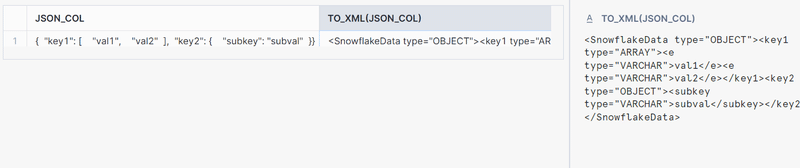
The TO_XML function in Snowflake converts a VARIANT to a VARCHAR containing an XML representation of the value. If the input is NULL, the result is also NULL. This function is useful for converting semi-structured data into an XML-formatted string.
Use Cases:
Generating XML Strings: To generate XML-formatted strings from VARIANT data, including JSON or other semi-structured formats.
Preserving Data Format: Ensuring that data originally formatted as XML can be converted back to its XML representation after manipulation.
Syntax:
|
1 |
TO_XML( <expression> ) |
Example: Converting JSON Data to XML
|
1 2 3 4 5 6 7 |
CREATE TABLE json_to_xml_table (json_col VARIANT); INSERT INTO json_to_xml_table SELECT PARSE_JSON('{"key1": ["val1", "val2"], "key2": {"subkey": "subval"}}') AS json_col; SELECT json_col, TO_XML(json_col) FROM json_to_xml_table; |
TRY_PARSE_XML
TRY_PARSE_XML is the fault-tolerant version of PARSE_XML. Instead of raising an error when the XML is malformed, it returns NULL.
This is useful in production pipelines where input quality cannot be guaranteed.
|
1 2 |
SELECT TRY_PARSE_XML('<valid>data</valid>'); -- returns OBJECT SELECT TRY_PARSE_XML('<broken>'); -- returns NULL |
Walking the XML hierarchy with XMLGET
You can use XMLGET to traverse the hierarchy of the elements in your XML document.
The documentation states the purpose of XMLGET clearly
XMLGET extracts an XML element object (often referred to as simply a tag) from the content of the outer XML element based on the name and instance number of the specified tag.
XMLGET returns an OBJECT. It does not return tag values or attribute values but the whole element or fragment.
Tip
If you need to read up on XML elements (or other XML fundamentals), check the XML primer in this blog post.
Let’s go through some examples.
First we load some nested XML into a table:
|
1 2 3 4 5 6 7 8 9 10 11 12 13 14 15 16 17 18 19 20 21 22 |
CREATE TABLE xml_demo (ID INTEGER, object_col OBJECT); INSERT INTO xml_demo (id, object_col) SELECT 1, PARSE_XML(' <?xml version="1.0" encoding="UTF-8"?> <level1 level1attr="this is level 1"> #1 <level2 level2attr="this is level 2"> #2 <level3 level3attr="this is level 3" level3attr2="this is level 3. another one"> #3.1 <level4>#4.1<level5>5</level5></level4> <level4>#4.2</level4> </level3> <level3 level3attr="this is also level 3"> #3.2 </level3> </level2> </level1> '); |
Let’s run XMLGET to retrieve the level2 element:
|
1 2 3 |
SELECT XMLGET(object_col, 'level2') FROM xml_demo; |
The result is the element level2 and its child elements.
|
1 2 3 4 5 6 7 8 9 10 11 12 |
<level2 level2attr="this is level 2"> #2 <level3 level3attr="this is level 3" level3attr2="this is level 3. another one"> #3.1 <level4> #4.1 <level5>5</level5> </level4> <level4>#4.2</level4> </level3> <level3 level3attr="this is also level 3">#3.2</level3> </level2> |
Important note!
You can not use XMLGET to extract the outermost element, which is level1 in our XML doc.
|
1 2 3 |
SELECT XMLGET(object_col, 'level1') FROM xml_demo; |
Running this query for the level1 element will result in NULL being returned.
Using GET or a shorthand of XMLGET you can extract names of attributes and elements and their values. More on this topic in the next section.
We can walk the hierarchy of XML elements by using nested XMLGET calls.
Let’s move down one level in the hierarchy to element level3.
|
1 2 3 |
SELECT XMLGET(XMLGET(object_col, 'level2'), 'level3',1) FROM xml_demo; |
There are multiple level3 elements and the positions of these elements will be represented as an array.
If we don’t specify a position, XMLGET will default to position 0. In our example we specify position 1 in XMLGET and get the second child element inside the element level3.
|
1 |
<level3 level1attr="this is also level 3">3.2</level3> |
Extracting attributes, tags and values with GET
This is all great, but how do we actually get to the data itself?
You can use Operators of the GET function to extract the following information
- @attrname: To extract attribute values, use GET(tag/element, ‘@attrname’)
- $: To extract the content, use GET(tag/element, ‘$’)
- @: To extract the tag name, use GET(tag/element, ‘@’)
Using our XML document from the previous section, let’s go through some examples.
Let’s first extract the values (content) of an element. In this case element level2.
|
1 2 3 |
SELECT GET(XMLGET(object_col, 'level2'),'$') FROM xml_demo; |
GET returns an ARRAY if the XML element does have children.
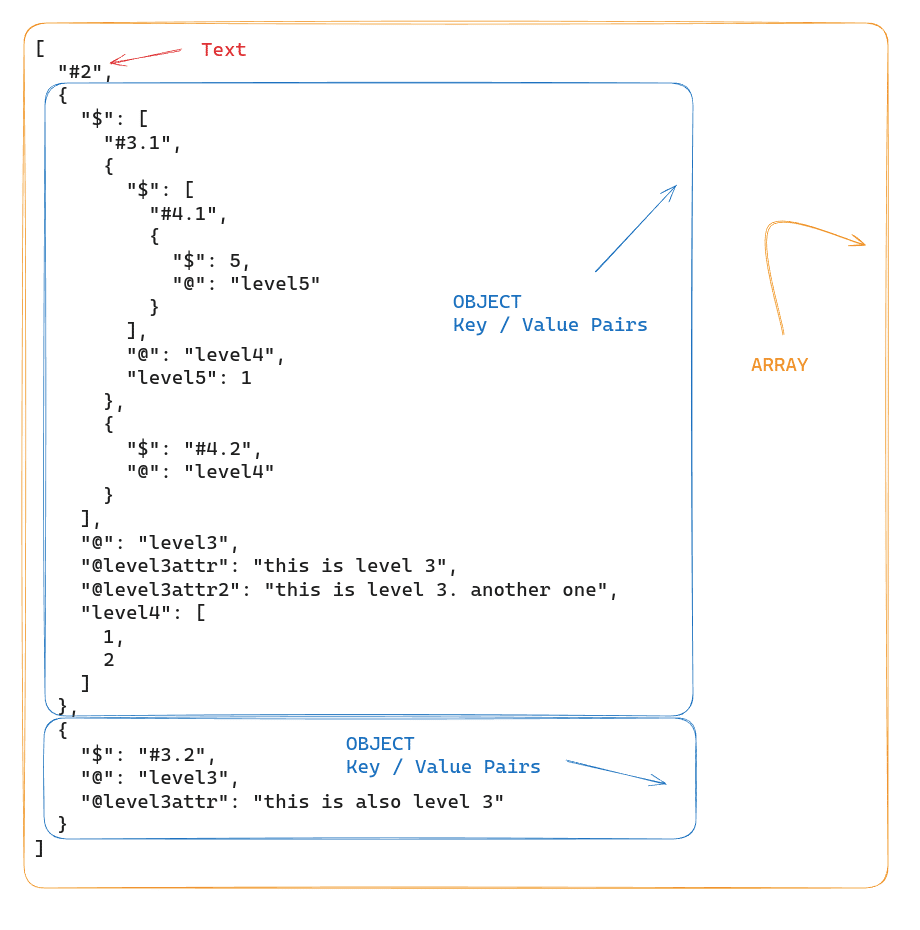
In this example, the level2 element contains multiple items (text and multiple nested elements). The nested tags are represented by OBJECTs (key-value pairs). The @ property contains the nested tag name and the $ property contains the nested tag contents.
Example with $
$ returns the value of the element if the element does not have any children of its own.
The second child of level 3, which is element <level3 level3attr=”this is also level 3″>#3.2</level3> does not have any children.
Let’s run GET with $ operator against this element.
|
1 2 3 4 |
SELECT XMLGET(XMLGET(object_col, 'level2'), 'level3',1), GET(XMLGET(XMLGET(object_col, 'level2'), 'level3',1),'$') FROM xml_demo; |
This returns text “#3.2”
Example with @
|
1 2 3 4 |
SELECT XMLGET(XMLGET(object_col, 'level2'), 'level3',1), GET(XMLGET(XMLGET(object_col, 'level2'), 'level3',1),'@') FROM xml_demo; |
This will return the tag name “level3”
Example with @attr
|
1 2 3 4 |
SELECT XMLGET(XMLGET(object_col, 'level2'), 'level3',1), GET(XMLGET(XMLGET(object_col, 'level2'), 'level3',1),'@level3attr') FROM xml_demo; |
With @level3attr you can get the value of the attribute level3attr. The query will return “this is also level 3”.
Instead of GET you can use the following shorthand notation.
|
1 2 3 4 |
SELECT XMLGET(XMLGET(object_col, 'level2'), 'level3',1), XMLGET(XMLGET(object_col, 'level2'), 'level3',1):"$" FROM xml_demo; |
The same XMLGET() function is used but is followed by a single colon character, then followed by the argument.
It is the equivalent of:
|
1 2 3 4 |
SELECT XMLGET(XMLGET(object_col, 'level2'), 'level3',1), GET(XMLGET(XMLGET(object_col, 'level2'), 'level3',1),'$’) FROM xml_demo; |
Both the queries will return “#3.2”.
Filtering XML with Higher Order Functions
Using higher-order functions in Snowflake, such as FILTER and TRANSFORM, you can apply Lambda expressions to arrays for filtering and transforming data. With these functions you can manipulate both structured and semi-structured data without the need for complex SQL operations or user-defined functions (UDFs).
Key Components of Higher-Order Functions:
- Lambda Expression: A block of code that takes an argument and returns a value. In the context of Snowflake higher-order functions, Lambda expressions are anonymous functions specified directly within the higher-order function call.
- Array: The data structure that contains the elements to be filtered or transformed. Arrays can be either structured or semi-structured.
Syntax of Higher-Order Functions:
The general syntax for higher-order functions like FILTER in Snowflake is as follows:
|
1 |
FILTER(<array>, <lambda_expression>) |
Higher Order Functions in action
The following example focuses on filtering products from a parsed XML content stored in a temporary SQL table based on their price attributes.
Data Preparation
First, we create a temporary table named xml_data. It contains XML content representing a list of products.
Each product has an id and a price. We parse the XML into a structured format suitable for querying.
|
1 2 3 4 5 6 7 8 9 10 11 |
CREATE TEMP TABLE xml_data AS SELECT PARSE_XML('<products> <product> <id>1</id> <price>100</price> </product> <product> <id>2</id> <price>200</price> </product> </products>') AS xml_content; |
XML Structure and Conversion to Array
We access the XML data stored in xml_data using the xml_content:”$” expression. This notation converts the XML structure into an array format.
This conversion is necessary because the FILTER function requires an array as input to apply the provided lambda function across each element of the array.
Output of xml_content:”$”
The xml_content:”$” notation translates the XML structure into a JSON-like array where each product in the XML becomes an object in this array. The structure of this array looks like this:
|
1 2 3 4 5 6 7 8 9 10 11 12 13 14 15 16 17 18 19 20 |
[ { "$": [ {"$": 1, "@": "id"}, {"$": 100, "@": "price"} ], "@": "product", "id": 0, "price": 1 }, { "$": [ {"$": 2, "@": "id"}, {"$": 200, "@": "price"} ], "@": "product", "id": 0, "price": 1 } ] |
In this structure, each product is an object with a $ array holding its attributes. The attributes are also objects, where the $ denotes the value and @ the name of the attribute.
Filtering Query
The main query uses the FILTER function to select only those products whose price is greater than 100.
|
1 2 3 4 5 6 |
SELECT to_xml(FILTER( a.xml_content:"$", p -> p:"$"[1]."$" >100 )) AS updated_products FROM xml_data a; |
Understanding the Lambda Function
The Lambda expression in Snowflake follows this structure:
|
1 |
<arg> [<datatype>] -> <expr> |
- <arg>: The argument representing each element in the array.
- <datatype>: Optional. Specifies the data type of the argument.
- <expr>: The expression that defines the operation to be performed on each element.
In the FILTER function, the lambda expression p -> p:”$”[1].”$” > 100 operates as follows:
- p:”$”: This accesses the array of attributes and values within the product object. It effectively retrieves the array stored under the $ key of each product.
- [1]: This is an array index that selects the second element of the attributes array (“$”). Given the consistent structure of each product, the second element in this array is always the price attribute.
- “$”: This further drills down to extract the value of the price attribute. It selects the value of the price from the object, which looks like {“$”: 100, “@”: “price”}.
- > 100: This part of the lambda function checks if the extracted price value is greater than 100.
Result
We can now convert the filtered XML back to XML to_xml(). This final XML output consists only of products that meet the filtering criteria.

Denormalising with Flatten and Lateral Flatten
We can use denormalisation and flattening techniques to transform complex, hierarchical data into simpler tabular forms. Hierarchical data, such as XML or JSON, often contains nested structures. Flattening involves combining and merging data related by parent – child relationships into a single table with rows and columns. This breaks down nested structures into flattened tables.
FLATTEN
The FLATTEN function in Snowflake converts hierarchical, semi-structured data into a tabular format by breaking down data types such as VARIANT, OBJECT, or ARRAY into multiple rows.
Input and Output:
- Input: The function takes an expression of data type VARIANT, OBJECT, or ARRAY as input. Optional parameters can specify the path within the data structure, whether to include empty expansions, recursive expansion, and the mode (OBJECT, ARRAY, or BOTH).
- Output: The output consists of a fixed set of columns (SEQ, KEY, PATH, INDEX, VALUE, THIS) that detail the flattened data elements.
Example of using FLATTEN for XML
|
1 2 3 4 5 6 7 8 9 10 11 12 13 14 15 16 17 18 19 20 21 22 23 24 25 |
SELECT GET(company.value, '@id') company_id, company.value FROM TABLE( FLATTEN( input => PARSE_XML('<org> <company id="1"> <employee id="1"> <name>John Doe</name> <position>Manager</position> </employee> <employee id="2"> <name>Jane Smith</name> <position>Developer</position> </employee> </company> <company id="2"> <employee id="1"> <name>Hans Wurscht</name> <position>Hansel</position> </employee> </company> </org>'):"$" ) ) company; |
Output
The output will look like this, with each of the two <company> elements being exploded into its own row:

Flattening XML with LATERAL FLATTEN in Snowflake
LATERAL FLATTEN is a combination of the FLATTEN function with the LATERAL keyword. The LATERAL keyword allows the FLATTEN function to access columns from preceding tables in the FROM clause.
This means that LATERAL FLATTEN can reference and operate on the data produced by the preceding FROM clause elements, making it more flexible and powerful for dealing with complex data transformations and correlations.
Example of using LATERAL FLATTEN
Step 1: Create a Table and Insert XML Data
|
1 2 3 4 5 6 7 8 9 10 11 12 13 14 15 16 17 18 19 20 21 22 23 24 25 26 27 28 29 |
CREATE OR REPLACE TABLE xml_data_table ( id INTEGER AUTOINCREMENT, xml_content XML ); INSERT INTO xml_data_table (xml_content) SELECT PARSE_XML('<org> <company id="1"> <employee id="1"> <name>John Doe</name> <position>Manager</position> </employee> <employee id="2"> <name>Jane Smith</name> <position>Developer</position> </employee> </company> <company id="2"> <employee id="1"> <name>Hans Wurscht</name> <position>Hansel</position> </employee> <employee id="2"> <name>Leo A</name> <position>Support</position> </employee> </company> </org>'); |
Step 2: Use LATERAL FLATTEN to Extract Employee Data Along with Company ID
|
1 2 3 4 5 6 7 8 |
select GET(Company.value, '@id')::integer as Company_id, GET(employee.value, '@id')::integer as employee_id, XMLGET( employee.value, 'name' ):"$"::string as emp_id from XML_DATA_TABLE , lateral FLATTEN(XML_CONTENT:"$") Company, LATERAL FLATTEN(Company.value:"$") employee |
- LATERAL FLATTEN on xml_content: The first LATERAL FLATTEN function processes the company elements within the xml_content.
- LATERAL FLATTEN on Company.value: The second LATERAL FLATTEN function processes the employee elements nested within each company.
Output
The output will look like this, with each row representing an employee and their associated company ID and name:

For each level of nesting you will need to add a separate LATERAL FLATTEN function. If you have branches you will need to do this for each branch in your XML. This brings us to our next topic..
Issue flattering XML with single element arrays
When we used LATERAL FLATTEN with an XML structure where a company has only one employee we ran into an issue. You will come across the problem because Snowflake’s LATERAL FLATTEN treats single element arrays differently than multi element arrays, leading to improper flattening. So for an XML like the following example:
|
1 2 3 4 5 6 7 8 9 10 11 12 13 14 15 16 17 18 19 20 21 22 23 24 25 26 27 28 29 30 31 32 33 34 35 36 37 38 39 40 41 42 43 44 45 46 47 48 49 50 51 52 53 54 55 56 57 58 59 60 61 62 63 64 65 66 67 |
INSERT INTO xml_data_table (xml_content) SELECT PARSE_XML('<?xml version="1.0" encoding="UTF-8"?> <org> <company id="1"> <employee id="1"> <name>John Doe</name> <position>Manager</position> </employee> <employee id="2"> <name>Jane Smith</name> <position>Developer</position> </employee> <employee id="3"> <name>Mike Johnson</name> <position>Designer</position> </employee> <employee id="4"> <name>Alice Brown</name> <position>Tester</position> </employee> <employee id="5"> <name>Chris Davis</name> <position>Support</position> </employee> </company> <company id="2"> <employee id="1"> <name>Hans Wurscht</name> <position>Hansel</position> </employee> </company> </org> '); |
If you try to flatten the XML using the same query from the last section as follows:
|
1 2 3 4 5 6 7 8 9 10 |
SELECT typeof(emp.value) as emp_doc, emp.value, get(comp.value, '@id') as company_id, get(emp.value, '@id') as emp_id, xmlget(emp.value, 'name'):"$"::string as emp_name, xmlget(emp.value, 'position'):"$"::string as emp_position FROM xml_data_table, LATERAL FLATTEN(INPUT => xml_data_table.xml_content:"$") comp, LATERAL FLATTEN(INPUT => comp.value:"$") emp; |
The query will produce incorrect results, particularly for the company with only one employee:
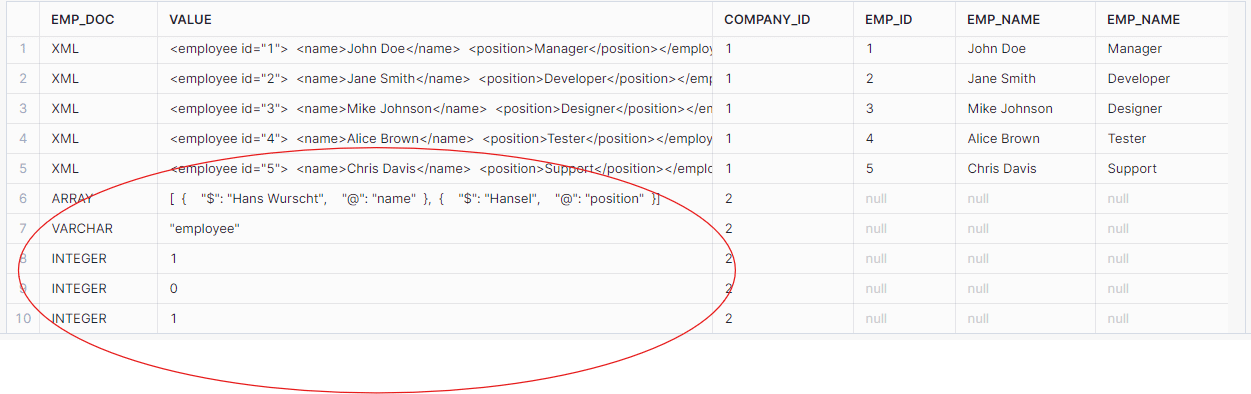
As seen, the data for the second company (with only one employee) was not flattened correctly. The employee data was returned as an array instead of individual XML elements.
Solution: Using Array Conversion
To address the issue with single-element arrays, we modified the query to convert the input to an array during the flattening process:
|
1 2 3 4 5 6 7 8 9 10 |
SELECT typeof(emp.value) as emp_doc, emp.value, get(comp.value, '@id') as company_id, get(emp.value, '@id') as emp_id, xmlget(emp.value, 'name'):"$"::string as emp_name, xmlget(emp.value, 'position'):"$"::string as emp_position FROM xml_data_table, LATERAL FLATTEN(INPUT => xml_data_table.xml_content:"$") comp, LATERAL FLATTEN(INPUT => comp.value:"$"::ARRAY) emp; |
The corrected query produced the expected results, properly handling single-element arrays:

By converting the input to an array during the LATERAL FLATTEN process, we were able to handle single-element arrays correctly and ensure that the XML data is parsed and flattened properly in Snowflake.
Flattening XML with multiple branches
When flattening XML that contains multiple branches we need to be very careful to avoid a cartesian product.
Let’s have a look at an XML file with multiple branches.
|
1 2 3 4 5 6 7 8 9 10 11 12 13 14 15 16 17 18 19 20 21 22 23 24 25 26 27 28 29 30 |
<University id="TUD"> <Faculty id="Engineering"> <Department id="ComputerScience"> <Course>Introduction to Programming</Course> <Course>Algorithms and Data Structures</Course> </Department> <Department id="ElectricalEngineering"> <Course>Circuit Analysis</Course> <Course>Electromagnetics</Course> <Course>Control Systems</Course> </Department> <ResearchGroup id="ArtificialIntelligence"> <Project>Machine Learning Advances</Project> <Project>Neural Network Optimization</Project> <Project>AI Ethics and Society</Project> </ResearchGroup> <ResearchGroup id="Nanotechnology"> <Project>Nano-materials Engineering</Project> <Project>Quantum Computing</Project> </ResearchGroup> </Faculty> <AdministrativeUnit id="Library"> <Service>Book Lending</Service> <Service>Research Assistance</Service> </AdministrativeUnit> <AdministrativeUnit id="IT"> <Service>Campus Network</Service> <Service>Helpdesk</Service> </AdministrativeUnit> </University> |
We can represent this XML in a tree like structure:
University
├── Faculty
│ ├── Department
│ │ └── Course
│ ├── ResearchGroup
│ │ └── Project
├── AdministrativeUnit
└── Service
As we can see there are three branches
University > Faculty > Department > Course
University > Faculty > ResearchGroup > Project
University > AdministrativeUnit > Service
Challenges of flattening multiple XML branches
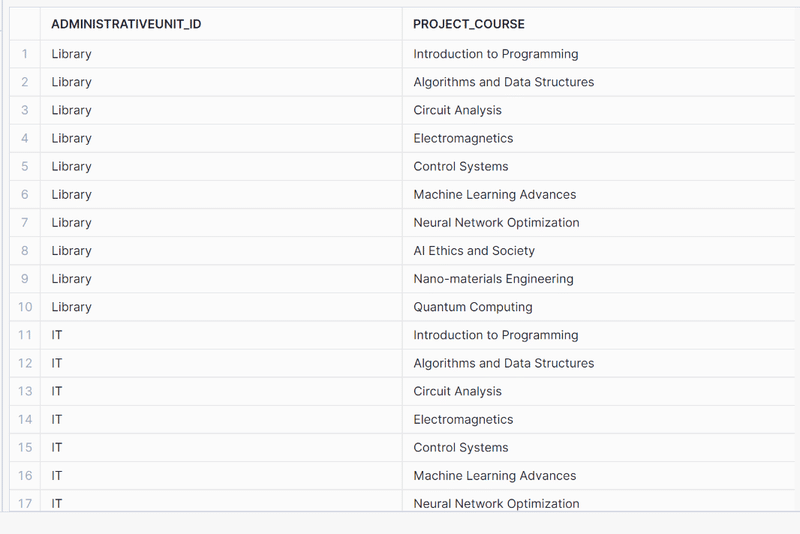
Let’s consider the two arrays <FACULTY> and <AdministrativeUnit> from the above example. We could use Flatten and the Lateral function to flatten the arrays. However, if we try to build a single query that flattens both arrays, we’ll get the dreaded Cartesian Product! In other words a multiplication of our result.
In the example above, there are 10 rows (i.e., subnodes) in the <Faculty> array and two rows in the <AdministrativeUnit > array. So the following query returns a total of 20 rows. This is definitely wrong and not what we want.
|
1 2 3 4 5 6 7 8 9 |
select Unit.value:"@id"::string::string as AdministrativeUnit_id, COURSE_PROJECT.value:"$"::string as Project_Course from XML_DATA_TABLE ,LATERAL FLATTEN(XML_CONTENT:"$") Unit ,LATERAL FLATTEN(XMLGET(XML_CONTENT, 'Faculty'):"$") Department , LATERAL FLATTEN(Department.value:"$") AS COURSE_PROJECT where GET( Unit.value, '@') = 'AdministrativeUnit'; |
The best way to handle multiple branches is to create separate tables. One for each branch. As we have three branches we will end up with 3 tables.
Let’s do that in the following steps.
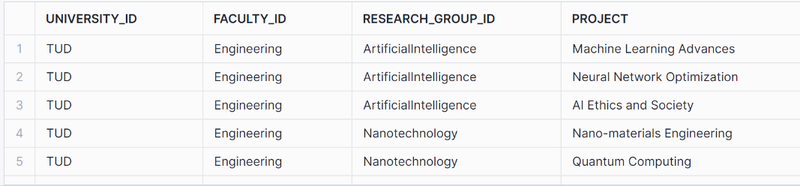
Project Branch
You can use the following code to flatten the project branches:
|
1 2 3 4 5 6 7 8 9 10 11 |
SELECT GET(XML_CONTENT, '@id')::string as university_id, XMLGET(XML_CONTENT, 'Faculty'):"@id"::string as Faculty_id, GET(Department_.value, '@id')::string as Research_group_id, COURSE_PROJECT.value:"$"::string as Project FROM XML_DATA_TABLE ,LATERAL FLATTEN(XMLGET(XML_CONTENT, 'Faculty'):"$") Department_ , LATERAL FLATTEN(Department_.value:"$") AS COURSE_PROJECT where GET( COURSE_PROJECT.value, '@') = 'Project' ; |
The flattened table looks like this:
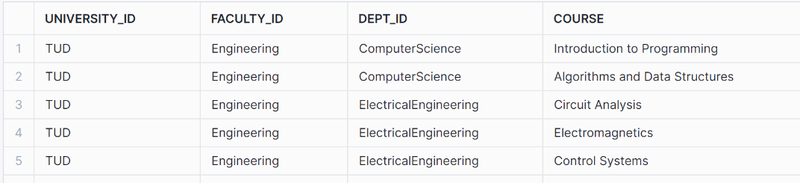
Course branch
|
1 2 3 4 5 6 7 8 9 10 11 |
SELECT GET(XML_CONTENT, '@id')::string as university_id, XMLGET(XML_CONTENT, 'Faculty'):"@id"::string as Faculty_id, GET(Department_.value, '@id')::string as dept_id, COURSE_PROJECT.value:"$"::string as Course FROM XML_DATA_TABLE ,LATERAL FLATTEN(XMLGET(XML_CONTENT, 'Faculty'):"$") Department_ , LATERAL FLATTEN(Department_.value:"$") AS COURSE_PROJECT where GET( COURSE_PROJECT.value, '@') = 'Course' ; |
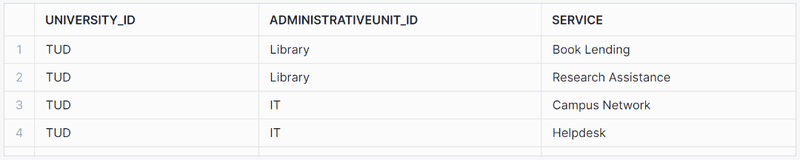
AdministrativeUnit Branch
|
1 2 3 4 5 6 7 8 9 10 |
select GET(XML_CONTENT, '@id')::string as university_id, Department_.value:"@id"::string::string as AdministrativeUnit_id, admin_unit.value:"$"::string as Service from XML_DATA_TABLE ,LATERAL FLATTEN(XML_CONTENT:"$") Department_ ,LATERAL FLATTEN(Department_.value:"$") AS admin_unit where GET( Department_.value, '@') = 'AdministrativeUnit' ; |
Query XML with schema on read
Now let’s create views on top of the flattened branches to create our reusable schema on read.
Creating database views makes the XML queries reusable and easy to use with SQL.
|
1 2 3 4 5 6 7 8 9 10 11 12 13 14 15 16 17 18 19 20 21 22 23 24 25 26 27 28 29 30 31 32 33 34 35 36 37 38 39 40 |
-- View for Research Groups and Their Projects CREATE OR REPLACE VIEW view_research_groups AS SELECT GET(XML_CONTENT, '@id')::string as university_id, XMLGET(XML_CONTENT, 'Faculty'):"@id"::string as Faculty_id, GET(Department_.value, '@id')::string as Research_group_id, COURSE_PROJECT.value:"$"::string as Project FROM XML_DATA_TABLE, LATERAL FLATTEN(XMLGET(XML_CONTENT, 'Faculty'):"$") Department_, LATERAL FLATTEN(Department_.value:"$") AS COURSE_PROJECT WHERE GET(COURSE_PROJECT.value, '@') = 'Project'; -- View for Departments and Their Courses CREATE OR REPLACE VIEW view_departments_courses AS SELECT GET(XML_CONTENT, '@id')::string as university_id, XMLGET(XML_CONTENT, 'Faculty'):"@id"::string as Faculty_id, GET(Department_.value, '@id')::string as dept_id, COURSE_PROJECT.value:"$"::string as Course FROM XML_DATA_TABLE, LATERAL FLATTEN(XMLGET(XML_CONTENT, 'Faculty'):"$") Department_, LATERAL FLATTEN(Department_.value:"$") AS COURSE_PROJECT WHERE GET(COURSE_PROJECT.value, '@') = 'Course'; -- View for Administrative Units and Their Services CREATE OR REPLACE VIEW view_administrative_units AS SELECT GET(XML_CONTENT, '@id')::string as university_id, Department_.value:"@id"::string as AdministrativeUnit_id, admin_unit.value:"$"::string as Service FROM XML_DATA_TABLE, LATERAL FLATTEN(XML_CONTENT:"$") Department_, LATERAL FLATTEN(Department_.value:"$") AS admin_unit WHERE GET(Department_.value, '@') = 'AdministrativeUnit'; |
This gives us three database views:
- view_research_groups,
- view_departments_courses,
- view_administrative_units.
We can now give these database views to our data analysts for further querying.
Working with mixed content in XML
In XML, mixed content refers to an element that contains both text and other child elements. This means the content is a mix of text nodes and element nodes, as opposed to purely text or purely child elements.
Here is an example of mixed content.
|
1 2 3 4 5 6 7 8 9 10 11 12 13 14 15 16 17 18 19 20 21 22 23 24 25 26 27 28 29 30 31 32 33 34 35 |
<?xml version="1.0" encoding="UTF-8"?> <org> <company>1 <employee id="1"> <name>John Doe</name> <position>Manager</position> </employee> <employee id="2"> <name>Jane Smith</name> <position>Developer</position> </employee> <employee id="3"> <name>Mike Johnson</name> <position>Designer</position> </employee> <employee id="4"> <name>Alice Brown</name> <position>Tester</position> </employee> <employee id="5"> <name>Chris Davis</name> <position>Support</position> </employee> </company> <company>2 <employee id="1"> <name>Hans Wurscht</name> <position>Hansel</position> </employee> <employee id="2"> <name>Uli</name> <position>Hansel</position> </employee> </company> </org> |
The <company> element contains both text (in this case the number 1) and other child elements (<employee>).
|
1 2 3 4 |
<company>1 <employee id="1"> <name>John Doe</name> <position>Manager</position> |
Extracting data from XML with mixed content is not straightforward due to the mixing of text and elements. However, it’s possible to parse such content using Snowflake’s XML functions.
The following query demonstrates how you can achieve this:
|
1 2 3 4 5 6 7 8 9 10 |
SELECT GET(COMPANY.value, '$')[0] AS company_id, GET(EMPLOYEE.value, '@id') AS employee_id, XMLGET( EMPLOYEE.value, 'name' ):"$"::string as employee_name, XMLGET( EMPLOYEE.value, 'position' ):"$"::string as employee_position FROM XML_DATA_TABLE, lateral FLATTEN(XML_CONTENT:"$") COMPANY, lateral FLATTEN(COMPANY.VALUE:"$") EMPLOYEE WHERE GET(EMPLOYEE.value, '@') = 'employee' ; |
Explanation
SELECT Clause:
- GET(COMPANY.value, ‘$’)[0] AS COMPANY_ID: Extracts the first text node from the <company> element, which contains the company ID.
- XMLGET(EMPLOYEE.value, ‘name’):”$”::string AS employee_name: Extracts the name element from each <employee> element and casts it to a string.
- XMLGET(EMPLOYEE.value, ‘position’):”$”::string AS employee_position: Extracts the position element from each <employee> element and casts it to a string.
FROM Clause:
- LATERAL FLATTEN(XML_CONTENT:”$”) COMPANY: Flattens the XML content at the root level to extract each <company> element.
- LATERAL FLATTEN(COMPANY.VALUE:”$”) EMPLOYEE: Further flattens each <company> element to extract nested <employee> elements.
WHERE Clause:
- GET(EMPLOYEE.value, ‘@’) = ’employee’: Ensures that only <employee> elements are processed. Otherwise the output will also have null rows because of text nodes present in the mixed content.
The output of the query is as follows:
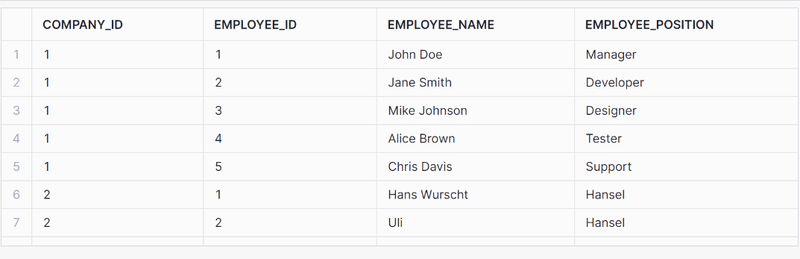
Parsing XML to Snowflake tables
In the previous section we covered in detail how we can query XML and create a schema on read on top of XML data stored inside Snowflake’s VARIANT data type.
We used XMLGET, GET, and LATERAL FLATTEN to walk the XML hierarchy.
We then created database Views on top of these queries to make the queries reusable and expose them to data analysts.
Another approach is to parse the data to Snowflake tables and write the output to a relational format.
We typically do this as part of ETL and a data pipeline. For example we can load data into Snowflake tables from the database views created previously as follows.
|
1 2 3 4 5 6 7 8 9 10 11 12 13 14 15 16 17 |
-- Step 1: Create the table CREATE TABLE research_groups ( university_id STRING, faculty_id STRING, research_group_id STRING, project STRING ); -- Step 2: Insert data into the table from the view INSERT INTO research_groups SELECT university_id, faculty_id, research_group_id, project FROM view_research_groups; |
While the VARIANT data type offers relatively good performance, querying Snowflake relational tables is always faster. This is particularly true for the following scenarios
- You have complex and deeply nested XML
- You require many joins across database views that you created as part of the schema on read.
The other significant advantage is that data analysts are very skilled using SQL and they prefer writing SQL against tables instead of semi-structured data.
Unless you have an ad hoc requirement or a very simple scenario and use case we recommend writing out your XML data to relational tables in Snowflake.
XML in data warehouse, data lake, or data lakehouse
When we convert XML to a relational format we typically do this as part of a wider data warehouse load where one of the data sources is XML.
You can check our guide on XML conversion in the context of data warehousing and data lakes for some reference architecture and what you need to take into account when building an XML conversion workflow.
You can use Flexter to automate the parsing of XML and conversion to Snowflake tables. Store your XML files on object storage, e.g. S3 or Azure Data Lake Storage (ADSL) and automatically convert the XML to Snowflake tables. No coding needed.
Pro tip: Learning XML to Snowflake conversion with Flexter is not just useful for Snowflake projects.
The same approach also applies when you need to convert XML to other relational databases such as Oracle, SQL Server, or BigQuery, and to file-based outputs using an XML to CSV and TSV converter, and other analytics-friendly formats.
Parsing XML in Snowflake with Python or Java
Apart from Snowflake’s native XML functions, you can also use Snowpark to parse and transform XML with Python or Java.
Snowpark is Snowflake’s developer framework for running code such as Python and Java closer to the data inside the Snowflake environment.
For example, with Snowpark for Python you can read an XML file from a Snowflake stage, parse it with a standard Python XML library such as lxml, and then turn the result into a dataframe or relational output for further processing.
This gives you more flexibility than native SQL functions when you need custom parsing logic, complex transformations, or external libraries.
|
1 2 3 4 5 6 7 8 |
from snowflake.snowpark.files import SnowflakeFile from lxml import etree def parse_xml_file(file_path: str) -> str: with SnowflakeFile.open(file_path, 'rb') as f: tree = etree.parse(f) root = tree.getroot() return etree.tostring(root, encoding='unicode') |
A similar approach can be implemented in Java. The trade-off is that Python or Java usually requires more coding, testing, and maintenance than Snowflake’s native SQL functions.
In practice, native SQL is a better fit for standard querying and lightweight extraction, while Python or Java is more suitable for complex XML transformations.
Flexter now also runs natively inside Snowpark Container Services, which provides another option when XML conversion requirements go beyond what is practical with hand-written code.
Converting XML to JSON
In Snowflake, converting XML to JSON can be useful when you want to work with a more familiar semi-structured format or when downstream tooling is better suited to JSON-style access patterns.
Since Snowflake stores XML in VARIANT, there is already a structural overlap between how XML and JSON are represented internally.
The difference between XML and JSON support in Snowflake also helps explain why XML to JSON can sometimes feel easier in practice than working with XML directly.
|
Feature |
XML in Snowflake |
JSON in Snowflake |
|---|---|---|
|
Native support status |
Generally Available |
Generally Available |
|
Max document size |
128 MB |
128 MB |
|
Schema support |
No XSD support |
infer_schema supported |
|
Key query functions |
PARSE_XML, XMLGET, GET |
PARSE_JSON, GET_PATH |
|
XQuery / XPath support |
Not supported |
N/A |
|
Recommendation |
Legacy / enterprise systems |
New pipelines (preferred) |
That said, converting XML to JSON is not the same as converting XML to a clean relational model.
JSON may make some access patterns easier, but it does not solve the underlying modelling challenge of hierarchical XML.
Pro tip
If you’re looking for more information on converting JSON to Snowflake, you should also check my other blog post on:
In many cases, it simply changes the shape of the semi-structured problem rather than eliminating it.
For example, the following XML:
|
1 2 3 4 |
<customer id="1001"> <name>Alice Brown</name> <status>Active</status> </customer> |
can be thought of conceptually as JSON in a structure such as:
|
1 2 3 4 5 6 7 |
{ "customer": { "@id": "1001", "name": "Alice Brown", "status": "Active" } } |
This does not mean that Snowflake automatically produces a perfectly clean JSON document for every XML input.
It simply illustrates the basic idea that XML elements, attributes, and values can be represented in a JSON-like nested structure.
Why XML to JSON is often not enough
Converting XML to JSON can improve readability for some teams, but it does not remove the deeper challenges of working with hierarchical XML:
- nested structures are still nested,
- repeating groups still need special handling,
- business data types often still need manual casting,
- relational reporting still requires modelling decisions.
This is particularly important in Snowflake because native XML support does not use XSDs, does not infer rich domain data types automatically, and does not generate a relational target model for you.
So while XML to JSON can be a useful intermediate representation, it is rarely a substitute for proper schema design.
Converting XML to Snowflake tables with Flexter
Converting clinical trials XML to Snowflake tables
We downloaded clinical trials data with 299,015 studies in XML format from the ClinicalTrials.gov website with thousands of XML files.
Each XML document contains information about a clinical trial, e.g. facilities or sites where the study is performed, names of doctors and other study personnel etc.
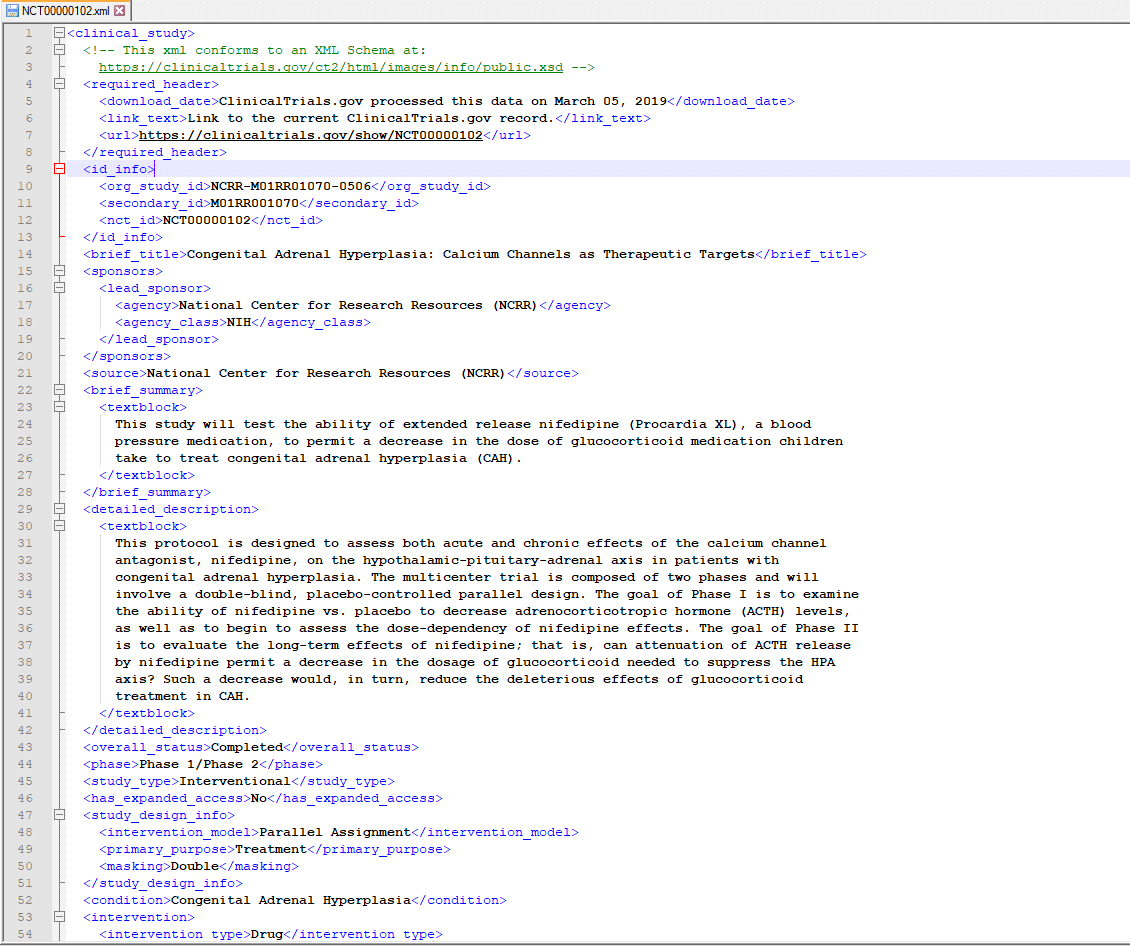
We will use Flexter to convert the clinical trials data locked away in the XML. In this example we will use Flexter’s command line utilities. Flexter also ships with an API.
We will use the XML data to infer a relational schema
Step 1: Create Data Flow and Target model
In a first step we create the target data model and the mappings from the XML elements to the table columns in the relational target schema. This information is stored in Flexter’s metadata repository. We will use the XML data only to infer a relational schema. In the next section we show you how you can use an XSD in combination with XML to derive a relational schema.
|
1 |
xml2er -g1 /ClinicalTrials.zip |
The -g switch tells Flexter which optimisation algorithm to use. Flexter ships with some algorithms that make it easier to work with the target schema by simplifying the structures.
We also point Flexter to the zipped up XML data. This is used to derive the relational target schema.
As output from this step we get a schema ID. In this case 2556. We will use this ID as input for the next step.
Step 2: Convert XML data to tables
We will now convert the XML to the relational schema we created in the previous step. We pass the schema ID 2556 into the -l switch and specify the connection details
|
1 |
xml2er -l2556 /ClinicalTrials.zip -S o “snowflake://https://<account>.snow flakecomputing.com/?warehouse=ware&db=db&schema=CLINICAL_TRIALS” -U <username> -P <pwd> |
That’s it. We can now query the data with SQL in Snowflake.
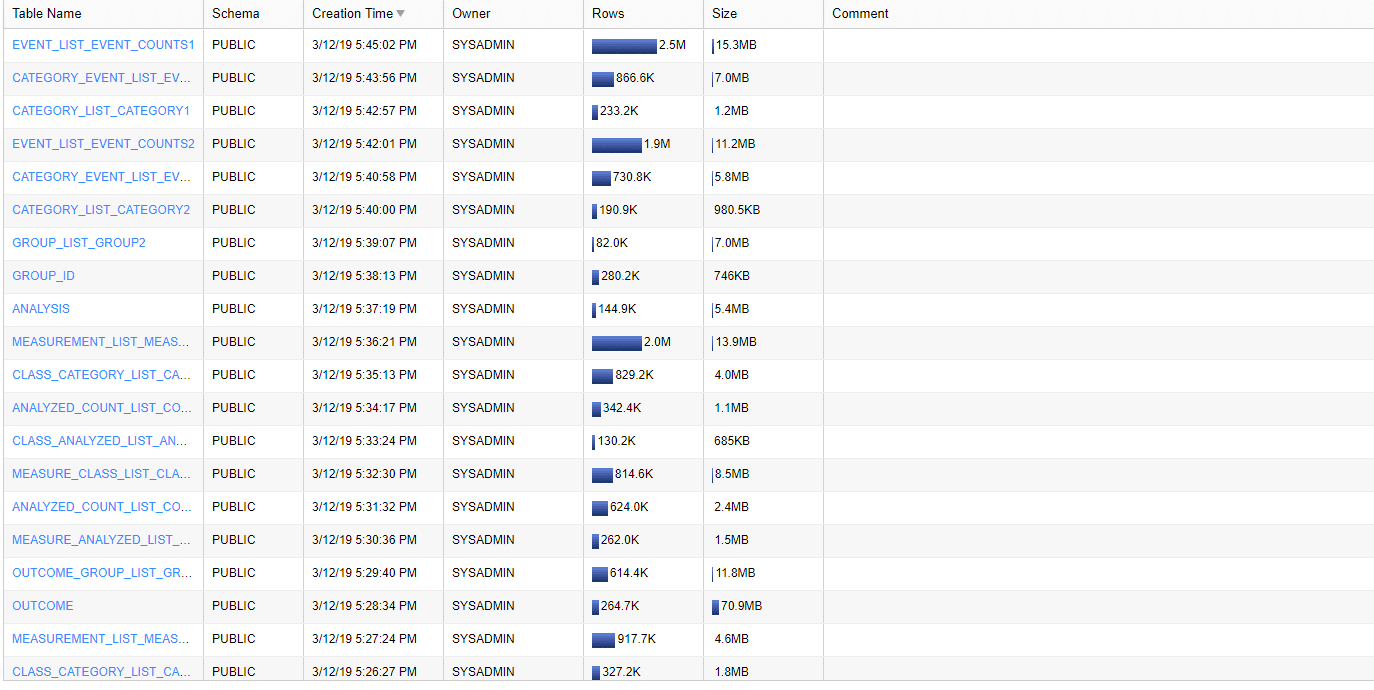
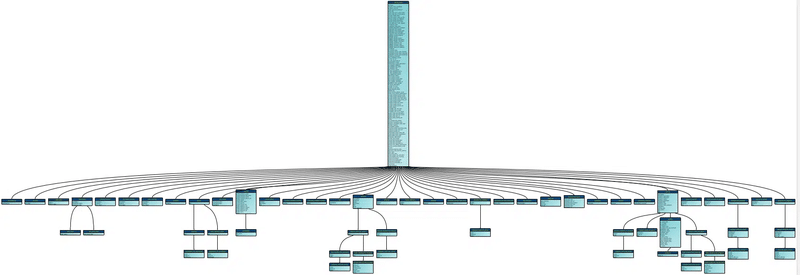
We mentioned earlier that Flexter ships with a metadata catalog. The metadata can be used to generate DDL scripts, compare different schema versions, evolve the schema, generate data lineage, generate an ER diagram, etc.
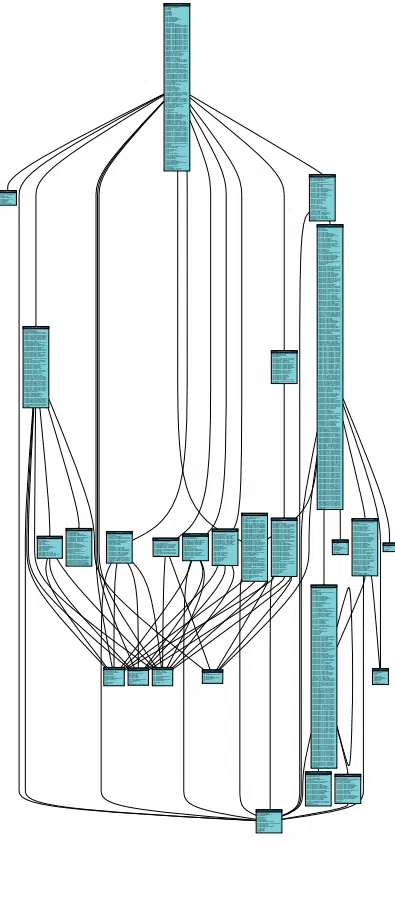
Here is the ER diagram that we generated from the Flexter UI and exported to a PDF. We have made the data model of the clinical trials data available for download.
Converting HL7 XML and XSD to Snowflake
In this example we show you how you can use an XSD to parse XML to Snowflake tables using Flexter. It is also a two step process but this time we use both the XSD and XML to generate the target schema.
For this example we will use HL7 CDA data. HL7 is a widespread standard in healthcare.
Step 1: Generate relational target schema.
You already know the first command from the previous section on processing clinical trials XML. It generates a schema ID. In this case the ID is 5964.
We use this ID to enrich and complement the created schema with additional information from the XSD, e.g. constraints, data types, relationships etc.
|
1 2 3 |
xml2er -g1 /CDA_XML.zip xsd2er -a5964 -g1 /CDA_XSD.zip |
The schema ID is passed to the -a switch of the xsd2er command line tool.
We also pass the CDA XSD as a zip to this Flexter command line utility.
The output is an updated schema ID 2406. This will be needed in the next step.
Step 2: Convert HL7 XML to Snowflake tables
We use the schema ID from step 1 to convert the data to Snowflake.
|
1 |
xml2er -l2406 /CDA_XML.zip -S o “snowflake://https://<snowflake account>.snow flakecomputing.com/?warehouse=ware&db=db&schema=CDA” -U <user> -P <pass> |
Now we can query the converted data with SQL on Snowflake.
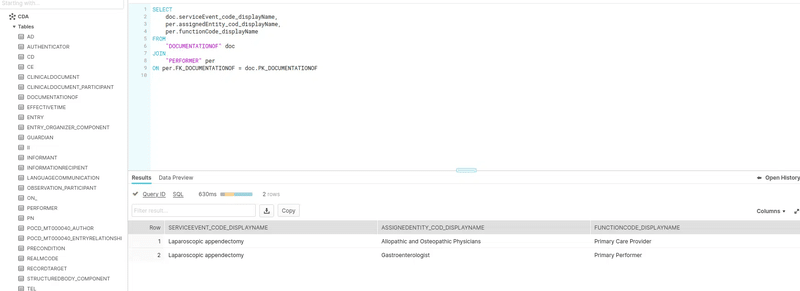
Here is the documentation that Flexter generated as an ER diagram in PDF.
Limitations of working with XML in Snowflake
So far we have focused on what Snowflake can do with XML. To make the right architectural choice, we also need to look at the limitations.
Snowflake can store and query XML, but once the XML becomes deeply nested, namespace-heavy, XSD-driven, or operationally important, the native approach starts to show clear gaps.
These gaps fall into four categories: querying and syntax, data typing and schema awareness, relational modelling, and operational performance.
Some of these limitations are specific to Snowflake’s XML feature. Others are the unavoidable result of trying to turn hierarchical XML into relational tables through manual coding alone.
Snowflake Limitations List
XML support is less mature than Snowflake’s JSON support
Snowflake’s XML functionality has historically lagged behind its JSON support in both maturity and ergonomics.
In practice, XML is still a narrower and less polished path, especially when compared with the richer tooling available for JSON and with the XML capabilities of platforms such as Oracle or SQL Server.
This matters because teams often assume that all semi-structured formats are treated equally inside Snowflake.
They are not. XML support is workable, but it is much less complete than what many enterprise XML workloads require.
Hard size limits make large XML files difficult to process natively
Snowflake’s XML processing depends on the VARIANT type, which still imposes a hard ceiling on document size (128MB as of July 2025).
Once XML files become medium to large, engineers may need to split, pre-process, or chunk the files before ingestion.
This is particularly limiting for enterprise XML workloads, where a single file can be very large or where one process must deal with huge numbers of XML files under tight SLAs.
Native XML processing is therefore workable for small to moderately sized documents, but it is not a good fit for very large XML files.
No streaming parser for very large XML documents
Snowflake’s XML processing behaves like a DOM-style parser: the document must be loaded into memory as a whole rather than processed as a stream of events.
That means there is no SAX-style streaming interface for working through giant XML files incrementally.
The practical consequence is that very large XML documents are fundamentally constrained by memory and VARIANT size limits.
For large-file XML processing, this becomes a major architectural limitation.
No XPath or XQuery support, and XML navigation is verbose
One of the biggest usability gaps is the absence of a general XPath or XQuery engine.
Snowflake provides proprietary functions such as PARSE_XML, XMLGET, and GET, but these are much more limited than standard XML tooling.
Deep navigation quickly becomes verbose because engineers must repeatedly nest XMLGET(XMLGET(…), …) calls to walk down the hierarchy. This is manageable for simple XML, but for deeply nested structures it becomes hard to read, hard to test, and hard to maintain.
Teams that already have XML expertise in XPath, XQuery, or SQL/XML cannot simply transfer those skills directly. They must instead adapt to Snowflake’s proprietary syntax and limitations.
Namespace-heavy XML is awkward to work with
XML namespaces are common in real-world enterprise standards because they prevent tag collisions and allow multiple vocabularies to coexist in the same document.
Snowflake’s XML functions do not provide an elegant native approach for namespace handling.
In practice, engineers often end up stripping namespaces before parsing or embedding namespace-qualified values directly into extraction logic.
Both approaches are fragile and increase maintenance overhead, especially when XML standards evolve over time.
No XSD support means no schema intelligence
Snowflake provides no native support for XML Schema Definitions (XSDs).
This is a major limitation because an XSD contains exactly the metadata engineers need during XML conversion: element definitions, data types, structural relationships, constraints, cardinalities, and inheritance rules.
Because Snowflake ignores the XSD, engineers must reconstruct that logic manually from XML samples and custom code.
This is time-consuming, error-prone, and especially risky when the source XML is complex or when the XML sample used for analysis is incomplete.
No automatic type inference and no native XML schema evolution
Since Snowflake does not use XSDs and does not support INFER_SCHEMA for XML, there is no reliable native mechanism to derive a complete relational schema from sample XML files. Domain-specific values such as dates, times, and timestamps may remain plain strings unless engineers cast them manually.
That creates two problems:
- First, schema design becomes a manual reverse-engineering exercise.
- Second, semantic correctness depends on developers remembering to cast values consistently in downstream SQL.
Schema evolution is also manual. If new XML elements appear, if cardinalities change, or if one element is renamed, the existing conversion logic may silently miss the data or populate downstream columns incorrectly.
Detecting and correcting those changes requires extra monitoring and refactoring effort.
Let’s illustrate this with an example.
When the engineer first wrote the code to convert the XML to relational tables on Snowflake they relied on the following XML sample.
|
1 2 3 4 5 6 7 8 9 |
<Company> <Name>Tech Solutions</Name> <Location>San Francisco</Location> <Employee> <FirstName>John</FirstName> <LastName>Doe</LastName> <Position>Software Engineer</Position> </Employee> </Company> |
The solution went into production and everything works seemingly fine.
However, as it turns out the sample that was used to infer the schema was too narrow and several elements were missed in the analysis.
|
1 2 3 4 5 6 7 8 9 10 11 |
<Company> <Name>Tech Solutions</Name> <Location>San Francisco</Location> <Employee> <FirstName>John</FirstName> <LastName>Doe</LastName> <Position>Software Engineer</Position> <Email>john.doe@techsolutions.com</Email> <Phone>555-1234</Phone> </Employee> </Company> |
Email and Phone will not be included in the conversion and there is no way to get notified about this issue.
A related issue is that information will go missing in case of the renaming of an element, e.g. Position to Role.
|
1 2 3 4 5 6 7 8 9 |
<Company> <Name>Tech Solutions</Name> <Location>San Francisco</Location> <Employee> <FirstName>John</FirstName> <LastName>Doe</LastName> <Role>Software Engineer</Role> </Employee> </Company> |
The conversion code will ignore this change and populate the downstream Position column with NULL values.
Snowflake does not generate a relational target model for you
Snowflake can help you query XML, but it does not automatically generate a relational target model from an XML document or XSD.
Engineers must manually analyse the hierarchy, design the target tables, define the row grain, and write the extraction and loading logic themselves.
Native XML handling also does not automate relational normalisation into multiple linked tables with generated primary keys and foreign keys.
In practice, many teams fall back to partial flattening because it is quicker to code initially, even though it often creates downstream usability and performance problems.
No source-to-target lineage for XML elements
Snowflake does not provide column-level lineage that shows exactly which XML element or XPath expression produced which target column in the relational model.
That may sound secondary, but it becomes important very quickly in regulated or business-critical pipelines.
Without automated lineage, troubleshooting, impact assessment, auditability, and handover to other engineers all become harder.
Repeated XML-in-VARIANT traversal comes with performance overhead
Keeping XML in VARIANT and repeatedly traversing nested structures at query time is flexible, but it is not free.
Queries that filter on internal XML elements usually cannot benefit from the same kind of pushdown and pruning advantages that are available when important fields are extracted into regular relational columns.
As a result, XML-heavy query patterns can become compute-intensive and slower than equivalent queries on properly modelled relational tables.
This is one reason why schema-on-read is useful for exploration, but schema-on-write is often the better choice for production analytics.
Summary of Limitations for XML in Snowflake
Taken together, these limitations do not mean that Snowflake cannot work with XML. It clearly can (as I showed earlier).
But they do mean that native XML processing is best suited to lighter XML workloads, exploratory querying, and relatively simple conversion scenarios.
Once the XML becomes large, deeply nested, namespace-heavy, XSD-driven, or operationally important, the manual approach becomes expensive to build, fragile to maintain, and difficult to scale.
That is where an automated XML conversion approach starts to make much more sense.
Automated XML conversion on Snowflake
We have created Flexter to address the limitations of working with XML on Snowflake. As a bonus it also eliminates the risks and headaches associated with manual XML conversion projects.
Flexter is an XML conversion tool aka XML converter. It automates the conversion of XML to a relational format on Snowflake and other popular data platforms and databases such as BigQuery, Databricks, Azure, Oracle, SQL Server, Teradata etc.
Converting XML to Snowflake with Flexter is a two step process. We have provided step by step walkthroughs in an earlier section when we talked about the options of parsing XML on Snowflake.
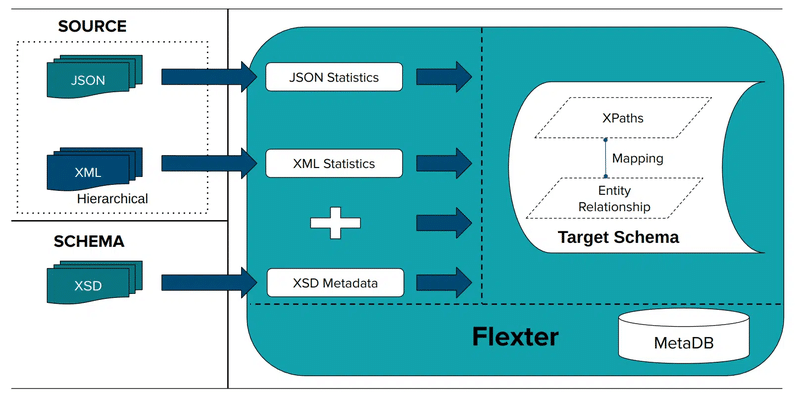
Step 1: Based on an XSD, a sample of XML files, or a combination of both you generate a relational target schema and the mappings between XML elements and the target table columns in Snowflake
Step 2: Convert XML
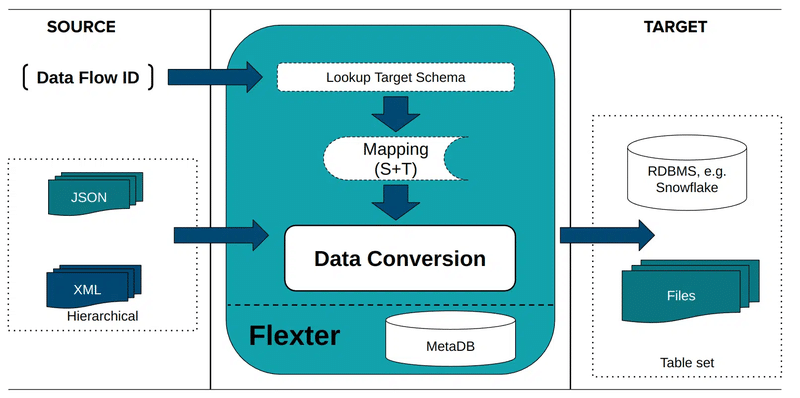
Yes, it’s that simple.
We have put together a brief demo video where we convert XML based on the FpML industry data standard to Snowflake. It is one of the more complex standards with tens of thousands of elements. It would be quite challenging to convert this data manually using code.
Did you know?
You can also use Flexter to automate the conversion of JSON to a relational format on Snowflake. The same simple two step process as for XML applies.
Manual versus automated XML conversion
The native Snowflake XML functions are useful for loading, inspecting, and querying XML.
However, once the goal shifts from ad hoc querying to repeatable conversion into analytics-ready relational tables, the manual approach quickly becomes expensive.
Engineers need to analyse the XML structure, design the target schema, write the extraction logic, maintain the mappings, and revisit the code whenever the XML changes.
This is manageable for small and simple XML feeds, but it becomes difficult for deeply nested XML, recursive structures, industry-standard schemas, or environments with many different XML message types.
This is where an automated XML conversion tool such as Flexter changes the economics of the project.
Instead of hand-coding the parsing and relational mapping logic, Flexter analyses the XML and XSD, generates the relational target schema, creates the mappings automatically, and loads the result into Snowflake.
In practice, this reduces delivery time from weeks or months to days or hours and avoids a large amount of brittle custom code.
|
Decision factor |
Manual XML conversion in Snowflake |
Automated XMl conversion with Flexter |
|---|---|---|
|
Best fit |
Small, simple, stable XML feeds |
Complex, nested, or high-volume XML |
|
Coding effort |
High |
Low |
|
Time to first result |
Slow |
Fast |
|
Schema design |
Manual |
Auto-generated |
|
PK/FK creation |
Manual |
Automatic |
|
Handling XSDs |
Not supported natively |
Full XSD-driven conversion |
|
Namespace-heavy XML |
Fragile and verbose |
Handled automatically |
|
Very large XML files |
Hard limit and manual workarounds |
Streaming support for multi-GB files |
|
Schema evolution |
Manual refactoring |
Automated adaptation |
|
Data lineage |
Manual documentation |
Source-to-target lineage generated |
|
Target options |
Mainly Snowflake SQL workflows |
Snowflake, Oracle, SQL Server, BigQuery, CSV, TSV, Parquet and more. |
The practical rule of thumb is simple:
- If you only need to query or flatten a small number of straightforward XML files, native Snowflake functionality may be sufficient.
- If you need repeatable production-grade conversion, relational normalisation, support for complex standards, or predictable maintenance over time, the automated approach is usually the better long-term choice.
Before closing off, please also note that there is also a measurable speed advantage in real projects.
For example, in one of our case studies, Flexter reduced a failing 50-day XML conversion effort to a working solution in 1 day. In another, it processed 20 million XML files in approximately 11 minutes.
These are the kinds of gains that are hard to achieve with a fully manual conversion approach.
If you want to explore potential improvements for your XML conversion project, please consider scheduling a call with our team.
Want to get a feeling for how automated XML to Snowflake conversion feels like?
Watch our video guide on how to convert your XML (and XSD) to SQL & Database Tables using Flexter Online, step-by-step, no coding required, all in under 3 minutes.
How to Convert XML to SQL & Database Tables for FREE – with Flexter Online
FAQ: XML in Snowflake
Below are some of the most common questions engineers ask when working with XML in Snowflake.
Yes. Snowflake natively supports XML through the VARIANT data type and functions such as PARSE_XML, XMLGET, GET, and FLATTEN. That means you can load XML, store it in a VARIANT column, and query individual elements with SQL.
Snowflake does not provide a dedicated XML data type. XML is stored in a VARIANT column, the same semi-structured type used for JSON and other nested data formats.
The standard approach is to stage the file first and then use COPY INTO with FILE_FORMAT = (TYPE = XML) to load the XML into a table, usually into a VARIANT column.
XMLGET is a Snowflake function that extracts an XML element from a VARIANT object by tag name and instance number. It is useful for simple XML navigation, although deeply nested XML can make the syntax quite verbose.
SQL itself does not use XML as a native relational data type, but many database systems extend SQL with XML functionality. In Snowflake, XML is queried through functions such as PARSE_XML and XMLGET rather than through a separate XML query language such as XQuery.
Snowflake can flatten XML structures for querying, but turning hierarchical XML into an analytics-ready relational model is still largely a manual process. Engineers usually need to define the target schema, write the extraction logic, and handle changes over time themselves.
Snowflake can work with XML, but there are important limitations. These include no XPath or XQuery support, awkward XMLGET nesting for deep structures, weak namespace handling, no XSD support, no automatic type inference, no native relational model generation, and performance overhead when XML stays embedded in VARIANT for repeated querying.
Automation is usually the better choice when the XML is complex, deeply nested, namespace-heavy, based on XSDs or industry standards, very large, or arrives in high volumes. It is also a better fit when delivery deadlines are tight or when a manual mapping approach would create too much custom maintenance work.https://sonra.io/wp-content/uploads/2024/10/XML-content-showing-company-and-employee-information-including-ID-name-and-position.png
If you want to go deeper, the following guides cover XML conversion, Snowflake XML handling, and related implementation patterns in more detail.
Further reading
Related guides on XML conversion
- XML to Database Converter – Tools, Tips, & XML to SQL Guide
- XML to XSD – Generate XSD from XML Files (2026 Guide)
- XML Converters & Conversion – Ultimate Guide (2026)
- Converting XML and JSON to a Data Lake
- How to Insert XML Data into SQL Table?
- The Ultimate Guide to XML Mapping in 2026
- Optimisation algorithms for converting XML and JSON to a relational format
- Re-use algorithms for converting XML and JSON to a relational format
Related Snowflake and Flexter resources
- Flexter Benefits
- Flexter FAQ & Guide – Automate XML & JSON Conversions
- Flexter product page
- Flexter data sheet
- Must have XML converter features
- Mask and obfuscate XML and JSON with Paranoid, Sonra’s open source tool for data masking semi-structured data.
- Converting 3GPP Configuration Management XML (3G, UMTS, 5G) to Snowflake
- Masking Sabre XML and converting to a database (Snowflake)
- Video: Converting FpML XML to Snowflake
- Automatically converting ESMA MIFID II / MIFIR XML to Snowflake
Official Snowflake documentation
For Snowflake’s official reference material, see the documentation for semi-structured data types and XML functions, including PARSE_XML, XMLGET, GET, FLATTEN, and LATERAL FLATTEN.

Uli Bethke
Uli has been rocking the data world since 2001. As the Co-founder of Sonra, the data liberation company, he’s on a mission to set data free. Uli doesn’t just talk the talk—he writes the books, leads the communities, and takes the stage as a conference speaker.
Any questions or comments for Uli? Connect with him on LinkedIn.
Follow Uli Bethke: