How to Convert ACORD XML to a Database (2026)
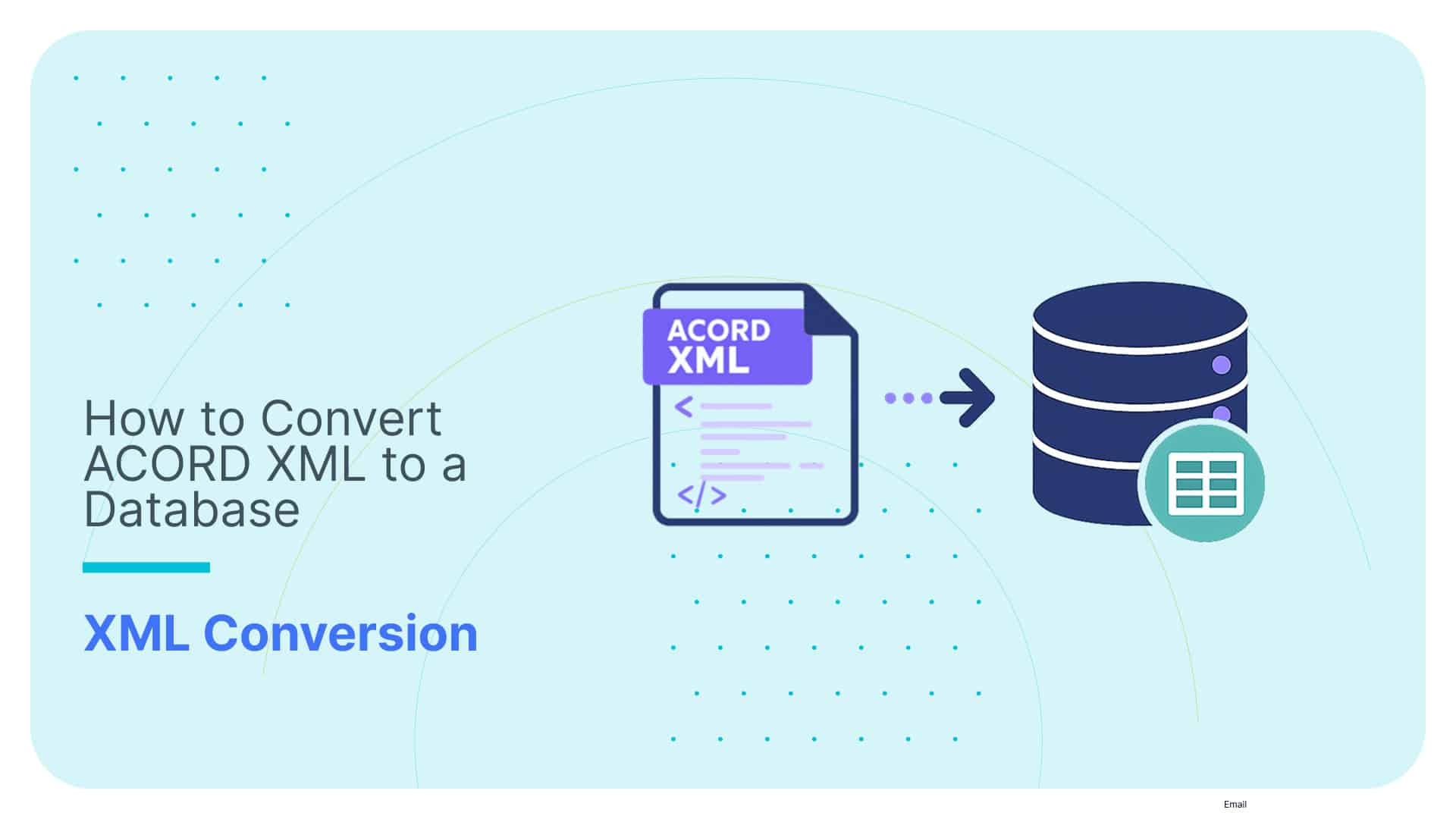

ACORD XML is supposed to make insurance data exchange easier. And in a narrow system-to-system sense, it does.
But the moment you try to query it, flatten it, or load it into relational tables, the pain starts.
That is because ACORD XML was built for messaging, not for databases.
It is very good at representing complex insurance transactions with deep nesting, repeating groups, and domain-specific schemas.
It is much less helpful when your team needs clean SQL tables for analytics, reporting, compliance, or downstream integration.
This guide closes that gap. I’ll show you what ACORD XML actually looks like, why converting it to a database is harder than it seems, and how to approach the problem without ending up with a brittle pipeline full of manual mappings and edge-case fixes.
TL;DR for those in a hurry:
- ACORD XML was designed to move insurance data between systems, not to sit neatly in SQL tables.
- There is no single ACORD XML shape. Each ACORD standard comes with its own structure and message conventions.
- That is why manual conversion gets ugly fast: nesting, repeating structures, version fragmentation, and carrier extensions all get in the way.
- This guide breaks down what ACORD XML looks like and why database conversion is hard.
- Despite all challenges, I will show you a way to automatically convert ACORD to SQL without building a brittle one-off pipeline.
Before actually showing you how to convert ACORD to database, let’s first have a quick dive into ACORD XML fundamentals.
Use Flexter to turn XML and JSON into Valuable Insights
- 100% Automation
- 0% Coding
What ACORD XML Looks Like
ACORD XML is not one single schema that every insurer uses in the same way. It is a set of subject areas built for different parts of the insurance business.
That matters because the XML structure, message style, and implementation patterns are not identical across domains.
If you are converting ACORD XML to a database, you are not just flattening “some XML.” You are dealing with business-specific message families.
Property & Casualty (P&C) XML
P&C XML covers the day-to-day operational side of insurance: quotes, policies, endorsements, claims, drivers, vehicles, locations, and coverages.
This is the domain most people picture when they think of ACORD XML in production.
A simplified P&C message often looks like this:
|
1 2 3 4 5 6 7 8 9 10 |
<ACORD> <InsuranceSvcRq> <PersAutoPolicyQuoteInqRq> <Producer>...</Producer> <InsuredOrPrincipal>...</InsuredOrPrincipal> <PersPolicy>...</PersPolicy> <PersAutoLineBusiness>...</PersAutoLineBusiness> </PersAutoPolicyQuoteInqRq> </InsuranceSvcRq> </ACORD> |
This matters in operational workflows because it closely reflects how insurers, agencies, and platforms actually exchange data.
It also maps reasonably well to a familiar business form: producer details, insured details, policy details, and vehicle or driver information all appear as separate XML objects rather than one flat record.
Reinsurance / GRLC XML
GRLC covers reinsurance and large commercial workflows such as placing, claims movement, settlement, bordereaux, and technical accounting.
The XML here is usually more message-oriented and more domain-specific than in P&C.
A simplified GRLC example looks like this:
|
1 2 3 4 5 6 |
<Jv-Ins-Reinsurance Version="2015-04"> <Placing Sender="broker" Receiver="reinsurer"> <BrokerReference>...</BrokerReference> <CreationDate>...</CreationDate> </Placing> </Jv-Ins-Reinsurance> |
The main difference is the business purpose and message style. P&C often feels like an operational service request.
GRLC feels more like a formal business message moving between brokers, cedents, and reinsurers in a structured process.
Life & Annuity (L&A) / TXLife
L&A XML supports life insurance and annuity processes, including new business, policy administration, servicing, and related exchanges with carriers or distributors.
At a high level, TXLife is the main message family people usually associate with this domain.
What matters here is that Life/TXLife has its own vocabulary, model, and version landscape.
Different carriers may run different versions, which adds another layer of complexity when you try to standardise ingestion.
Quick Comparison of ACORD XML Subject Areas
Before we go further, it helps to quickly separate the three main ACORD XML subject areas.
People often talk about “ACORD XML” as if it were one single format. It is not.
The business purpose, message style, and implementation context change depending on the domain, which is exactly why conversion work can get messy so quickly.
Here’s a comparison table between the three domains that we’ll focus on in this blog post, so that you quickly grasp the bigger picture:
|
Domain / standard family |
What the standard covers |
Primary business purpose |
Typical XML characteristics or message style |
Common implementation context |
Worked XML example in this article? |
|---|---|---|---|---|---|
|
Property & Casualty (P&C) XML |
Quotes, policies, endorsements, claims, drivers, vehicles, locations, and coverages. |
Support day-to-day operational insurance transactions. |
Usually, a generic <ACORD> envelope with a business request nested underneath. |
Agency systems, carrier platforms, quoting systems, policy administration workflows. | |
|
Reinsurance / GRLC XML |
Reinsurance and large commercial processes such as placing, claims movement, settlement, bordereaux, and technical accounting. |
Support structured business messaging between market participants. |
More domain-specific message structures, often with specialised roots and transaction names. |
Brokers, cedents, reinsurers, and reinsurance platforms. | |
|
Life & Annuity (L&A) / TXLife |
Life insurance and annuity transactions such as new business, servicing, and policy administration. |
Support data exchange for life and annuity operations. |
Distinct Life/TXLife model and message conventions, often more specialised by implementation version. |
Carriers, distributors, policy admin systems, and servicing platforms. |
Pro tip
Just because two trading partners both say they use “ACORD XML” does not mean they are using the same structure in practice.
P&C and Life & Annuity have different standards families, and even within the same family, carriers often run different versions or carrier-specific extensions.
That means your conversion logic cannot assume one stable schema forever.
In the real world, “standard XML” still suffers from version fragmentation, local variation, and the usual human tendency to make shared standards less shared than advertised.
Why convert ACORD to a database?
Nobody works with ACORD XML because they enjoy looking at nested insurance messages.
The goal is to answer business questions, feed downstream systems, improve data quality, and track change over time.
That is where the pain begins.
ACORD XML is excellent for system-to-system messaging. It is far less useful as a format for analytics, reporting, validation, or database storage.
The moment you try to search it, join it, or govern it at scale, the gap becomes obvious: ACORD XML was built to move data, not to make that data easy to use.
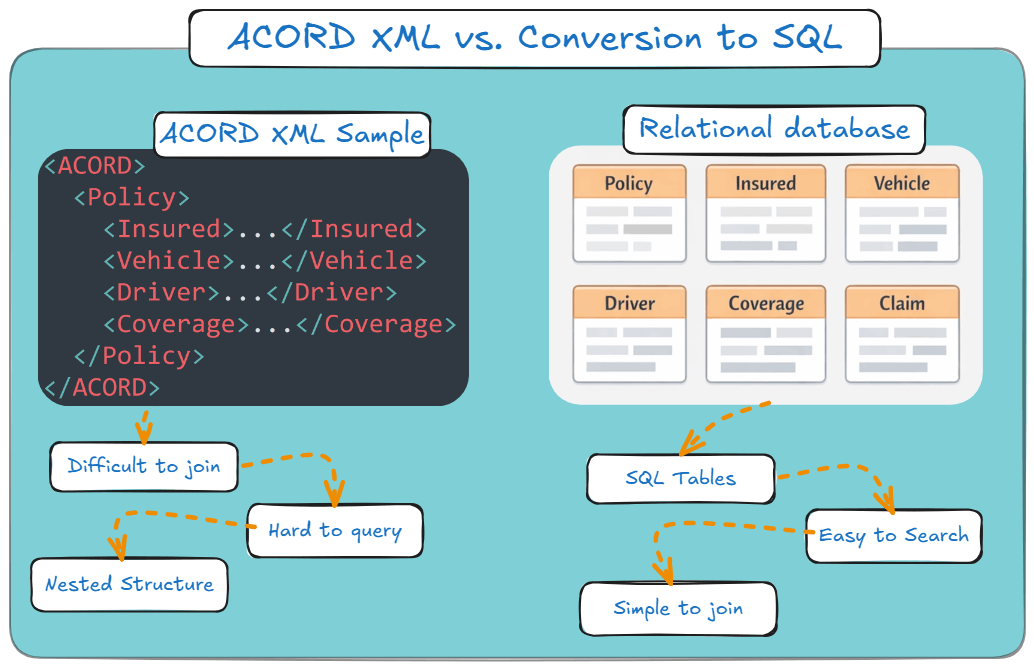
That is why conversion matters. Here are the main reasons to move ACORD XML into a database.
Advanced analytics and reporting
ACORD XML is deeply hierarchical. One policy message can contain insured parties, locations, vehicles, drivers, coverages, deductibles, endorsements, and transaction details, all nested inside each other.
That is useful for exchanging a rich business message.
It is much less useful when you want to ask simple questions.
If you want to know your total premium by state, claim volumes by carrier, or endorsement activity by producer, you do not want every query to turn into an XML parsing exercise.
You want SQL tables. You want joins, filters, and aggregates. You want Tableau or Power BI to behave like normal tools, not punishment devices.
Once you convert ACORD XML into relational tables, those questions become ordinary reporting tasks rather than miniature engineering projects.
Performance and searchability
Let’s say you need to find a specific VIN, claimant, or policy number across a large archive of ACORD XML files.
In raw XML, that usually means opening and parsing file after file after file until you find the record you need.
It works, technically. In the same sense that looking for a screw with a magnet in the grass technically works.
A database gives you speed.
Once the data is loaded into structured tables, you can index key fields and retrieve records quickly, even across millions of rows.
That matters for analytics, but it also matters for day-to-day operational work. If your users need to find policies or claims quickly, raw XML is not helping them.
Pro tip
Raw ACORD XML is fine if your ambition is to archive files and hope nobody asks difficult questions later.
It is not a search strategy.
The moment your users need to find a policy number, VIN, claimant, or producer quickly, parsing file after file stops being “flexible XML handling” and starts being operational punishment.
Data integration and interoperability
Most enterprise systems do not want nested ACORD messages as their day-to-day input. They want structured data.
Your CRM, underwriting platform, claims application, finance systems, and internal APIs are all much easier to work with when the data sits in rows and columns with stable keys and predictable types.
When I convert ACORD XML to a database, I am not just changing format. I am creating a usable internal data model.
That model becomes the bridge between the external insurance message and the rest of your organisation’s systems.
Without that step, ACORD XML tends to remain trapped as “that partner feed we store somewhere.”
Pro tip
Most integration problems are not caused by missing data.
They occur when data arrive in a format that the next system cannot handle.
Data quality and validation
This is where things get especially fun.
ACORD is a standard, but that does not mean every trading partner uses it in exactly the same way.
Optional elements, carrier-specific extensions, inconsistent values, and version drift all show up sooner or later.
If you leave the data in XML, you mostly preserve the mess.
If you move it into a database, you can start imposing rules. You can enforce data types, validate dates, require keys, and maintain referential integrity between related entities.
You can ensure a policy links to a valid producer, or that a claim record isn’t floating around disconnected from everything else.
So for me, conversion is not just about storage. It is about turning semi-governed XML into governed data.
Historical tracking and versioning
ACORD XML messages are usually snapshots. They show you what was sent at a specific point in time.
That is useful, but limited.
If a policy changes five times, you may end up with five XML messages sitting in storage, each representing a different state.
The history exists, but it is trapped inside separate documents that are awkward to compare and even more awkward to analyse.
A database gives you a much better handle on change over time.
You can track prior and current states, properly model history, and support audit, reporting, and downstream reconciliation much more easily.
Main takeaway
So the short version is this: ACORD XML is a strong exchange format, but a weak working format. If you want searchable, validated, integrated, and analytics-ready insurance data, you convert it to a database.
In the next section, I’ll explain why this conversion may not be as easy as one might expect.
Why converting ACORD XML to a Database is Hard
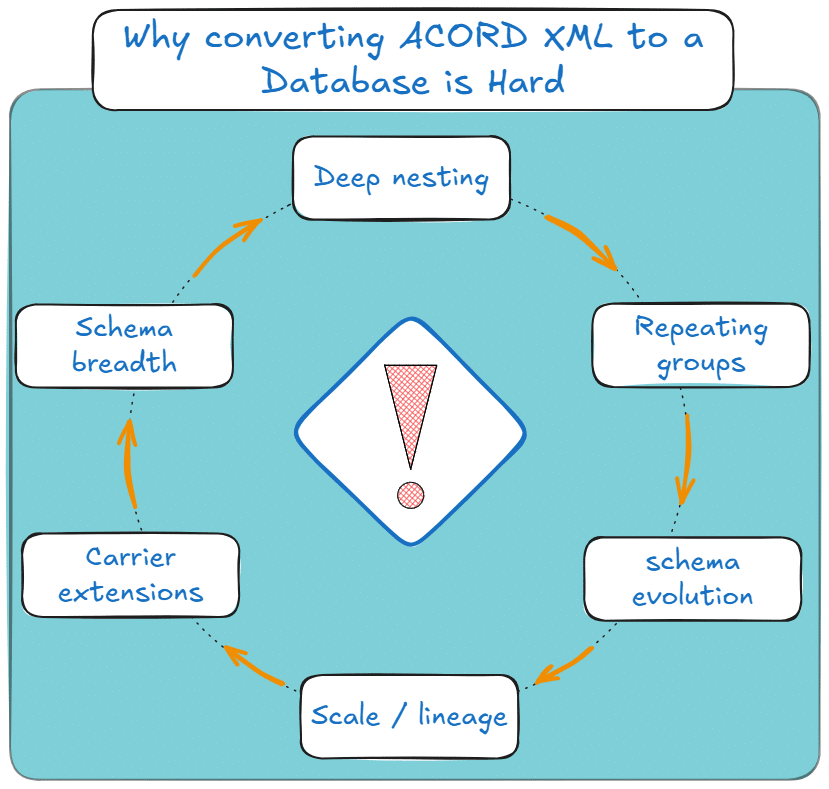
So before you even get to parsing or table design, the first reality check is this: ACORD XML does not come in one shape. It comes in several forms, and each one carries its own conversion headaches.
And even within one ACORD family, “standard” does not mean simple.
This is the part people tend to underestimate. Converting ACORD XML to a database sounds like a straightforward XML parsing job until you actually try to build one that survives real insurers, real message volumes, and real schema changes.
That is when the quick script begins its slow transformation into a maintenance burden.
Deep nesting and repeating groups
The difficulty is not just that ACORD XML is nested. It is that the nesting contains repeating business objects at multiple levels, such as vehicles under policies, drivers under households, and coverages under vehicles or locations.
Converting that structure into relational tables without duplicating data or breaking parent-child relationships is where the real modelling work begins.
If you do this naively, you usually end up in one of two bad places:
- Either you create one giant denormalised table full of duplicated values and vast stretches of NULLs, or,
- You flatten too aggressively and lose the parent-child relationships that actually make the data meaningful.
Neither outcome is especially charming.
A proper relational conversion means normalising the structure, generating surrogate keys where needed, and preserving the relationships between policy, insured, vehicle, driver, coverage, and claim-related entities.
That is not difficult in theory. It is difficult in volume, under a deadline, with messy real input.
Pro tip
Flattening ACORD XML is easy if you do not care about relationships.
Unfortunately, analytics, audit, and downstream systems usually do care.
Schema breadth
ACORD is not a cute little schema with twelve elements and a polite amount of nesting.
It is broad. Very broad.
The ACORD XML schema, especially in Property & Casualty, spans a large, complex canonical data model with a large number of elements, optional branches, and business-specific structures.
So when you build manual mappings, you are forced to make design decisions immediately:
- Which elements matter?
- Which ones are optional but still worth storing?
- What happens when the next carrier sends fields you have not modelled yet?
This is where brittle pipelines are born. Not because the engineers are bad, but because the schema surface area is large enough that hand-curated coverage tends to become incomplete by default.
Pro tip
Large XML standards do not usually fail because you cannot parse them.
They fail because you cannot hand-maintain complete and correct mappings for long.
Carrier extensions
“ACORD compliant” is one of those phrases that sounds reassuring right up until the moment Carrier B sends something Carrier A never did.
In practice, many insurers add proprietary fields, custom segments, and local variations to the standard ACORD structure.
So even if two partners both claim to use ACORD XML, the actual messages may differ in ways that matter to your parser and your target schema.
That means a pipeline built around one carrier’s flavour of ACORD often breaks, or silently drops data, when a second carrier enters the picture.
Which is not ideal.
Pro tip
ACORD compliant” does not mean “structurally identical.”
It often means “standard, plus whatever this trading partner felt like adding.”
Schema evolution
Even if you survive the first version of the mapping, the next problem arrives on schedule: change.
Carriers upgrade ACORD versions. They introduce new extensions. They repurpose optional elements.
They change message composition over time. And every one of those changes lands directly on your conversion logic.
So the real cost of manual ACORD conversion is not just building the pipeline once. It is maintaining it every time the schema shifts.
That is why this is rarely a one-off project. It is an ongoing engineering obligation masquerading as a data transformation task.
Pro tip
The first mapping is not the expensive part.
The expensive part is discovering you now own every future change.
If you want to dive deeper into the problem of XML mapping, check out my other blog post dedicated to that topic.
Scale and performance
A script that looks fine on 1,000 sample files can become deeply embarrassing at production scale.
Insurance platforms process high volumes of data: policy transactions, renewals, endorsements, claims events, billing data, financial messages, and more.
ACORD XML files can also be large, especially when they represent complex policies with lots of repeating business objects.
So now you are not just parsing XML. You are parsing a lot of XML, repeatedly, under operational constraints, without blowing up processing windows or infrastructure costs.
That is where many hand-built solutions stop being “lightweight” and start becoming fragile.
Preserving data lineage
And then there is the part people forget until audit season arrives.
For regulatory, compliance, and operational reasons, you often need to prove exactly how a field in a target table was derived from the original ACORD message.
You’ll have to answer questions such as:
- Which source element did it come from?
- Which mapping logic touched it?
- Which XML version produced it?
Hand-built pipelines rarely document this cleanly unless someone deliberately builds lineage alongside the transformation logic.
Usually, they do not.
So the bottom line is this: converting ACORD XML to a database manually is possible for one carrier, a narrow message set, and a fairly stable schema.
The moment the scope expands, more carriers, more message types, more schema updates, more production-scale volume, the manual approach becomes expensive, brittle, and difficult to govern.
In the next section, I’ll walk through the main approaches teams take and where each one starts to break down.
ACORD XML Conversion Approaches: Manual vs Automated
Once you understand why ACORD XML is difficult to convert properly, the next question becomes fairly practical:
How exactly are you supposed to convert it into SQL tables without creating a maintenance problem nobody wants to inherit?
In practice, there are four broad approaches teams usually consider. All of them can convert ACORD XML to SQL in some form.
The difference is the amount of manual work, fragility, and long-term ownership that come bundled with that conversion.
Option 1: Custom XSLT or hand-coded scripts
This is the classic engineer’s answer.
You write XSLT transforms, Python parsers, Java code, or some home-grown combination of all three.
The XML gets parsed, the relevant branches are extracted, and rows are inserted into target tables. For a small, stable, single-carrier implementation, this can absolutely work.
That is the good news.
The bad news is that hand-coded ACORD XML parsing ages badly.
The first version may handle one message family, one carrier, and one schema version reasonably well.
But the moment a carrier upgrades its ACORD version, adds proprietary extensions, or sends a message variant you did not model, the script starts to look much less clever.
And then there is the part people politely forget to budget for documentation.
Hand-coded pipelines usually do not auto-generate source-to-target mappings, ER diagrams, or column-level lineage.
So now your team is not only maintaining parsing logic, but also explaining to auditors and future engineers what that logic was supposed to do in the first place.
Which is rarely anyone’s favourite hobby.
Option 2: General ETL tools
The next option is a general ETL platform such as Informatica, Talend, or DataStage.
These tools can absolutely work with XML. They give you connectors, transformation stages, and a more structured way to build data flows than raw scripts.
That already makes them a bit more manageable than a pile of custom code. But are they really automating the mapping work?
The answer is no.
And unfortunately, a broad, deeply nested insurance XML standard with repeating groups, optional branches, version fragmentation, and carrier-specific drift does not suddenly become simple just because the mapping now happens in a GUI.
So yes, ETL tools reduce some coding effort and also help with data orchestration.
But they do not remove the burden of hand-mapping, and performance remains a major issue as ACORD volume and complexity increase.
Pro tip
Another way to see this is that ETL platforms do not understand the ACORD semantic model.
To them, ACORD is still just XML with a lot of structure and many places to make expensive mistakes.
Later on, I’ll show you a tool that can understand and analyse ACORD XML structure through intelligent algorithms.
Option 3: PilotFish eiConsole for ACORD
PilotFish deserves to be mentioned directly because it is one of the best-known ACORD-specific middleware options in this space.
It is also used in ACORD testing and certification, which gives it credibility with teams that want an ACORD-aware integration product rather than a generic XML tool.
Its main strength is its graphical, drag-and-drop mapping environment with native support for ACORD XSDs.
For organisations that prefer GUI-driven integration work and are comfortable configuring partner-specific mappings, that can be a sensible approach.
That said, PilotFish is still fundamentally a mapping-centric solution.
You are still operating in a world of per-carrier configuration, mapping maintenance, and ongoing adjustment as versions and extensions change.
That may be acceptable. It is just not the same thing as eliminating manual mapping work.
Option 4: Flexter Enterprise
This is where the approach changes more fundamentally.
Flexter Enterprise is not a drag-and-drop ACORD mapper, nor is it a generic ETL platform that happens to speak XML.
It is an automated enterprise-grade XML to database converter built to generate the relational model for you.
That means Flexter reads the ACORD XSD schema, XML samples, or both, and automatically generates:
- the target relational schema (DDL),
- the source-to-target mappings,
- and the data lineage documentation.
So instead of hand-building the ACORD XML to SQL model yourself, you review and use an automatically generated one.
That matters because it removes the most expensive part of the project: the manual mapping layer.
It also handles carrier extensions and schema changes much more cleanly than hand-coded or manually mapped approaches.
When the ACORD structure shifts, Flexter detects the differences and supports automated schema evolution rather than forcing your team into another round of manual rewiring.
And unlike lighter-weight tools, Flexter is built for scale.
It can scale up and out, process millions of files, and load the output into platforms such as Snowflake, Databricks, Oracle, SQL Server, BigQuery, Redshift, and others.
It also generates ER diagrams and lineage automatically, which is useful for governance, compliance, and avoiding the classic “the original engineer left, and now nobody knows what this column means” problem.
A comparison table for your options for ACORD XML to Database
|
Decision factor |
Custom scripts / XSLT |
General ETL tools |
PilotFish eiConsole |
Flexter Enterprise |
|---|---|---|---|---|
|
Setup time |
Low at first, then grows fast |
Moderate to high |
Moderate |
Fastest path to a usable relational model |
|
Handles carrier extensions |
Poorly, manual rework |
Manual reconfiguration |
Better, but still mapping-heavy |
Yes, with automated schema evolution |
|
Requires manual mapping |
Yes |
Yes |
Yes |
No |
|
Scales to millions of files |
Usually not well |
Depends on implementation |
Better than scripts, but still mapping-bound |
Yes |
|
Auto-generates documentation |
No |
Limited |
Limited |
Yes |
So the practical rule of thumb is this:
If you are converting ACORD XML for one narrow, stable integration, custom code or a mapping tool may be enough.
If you need a repeatable insurance XML database workflow that survives carrier extensions, schema updates, audit questions, and production scale, the automated route is usually the more sensible one.
In the next section, I’ll show you how Flexter Enterprise actually performs that conversion step by step.
How Flexter Converts ACORD XML: Step by Step
So far, we’ve looked at the problem from the outside:
ACORD XML is deeply nested, broad in scope, version-fragmented, and awkward to convert into a relational model by hand.
Now let’s look at what an automated approach actually does.
Because “automation” can mean anything from “a GUI with a lot of manual mapping” to “a system that genuinely removes the mapping work.” Those are not the same thing.
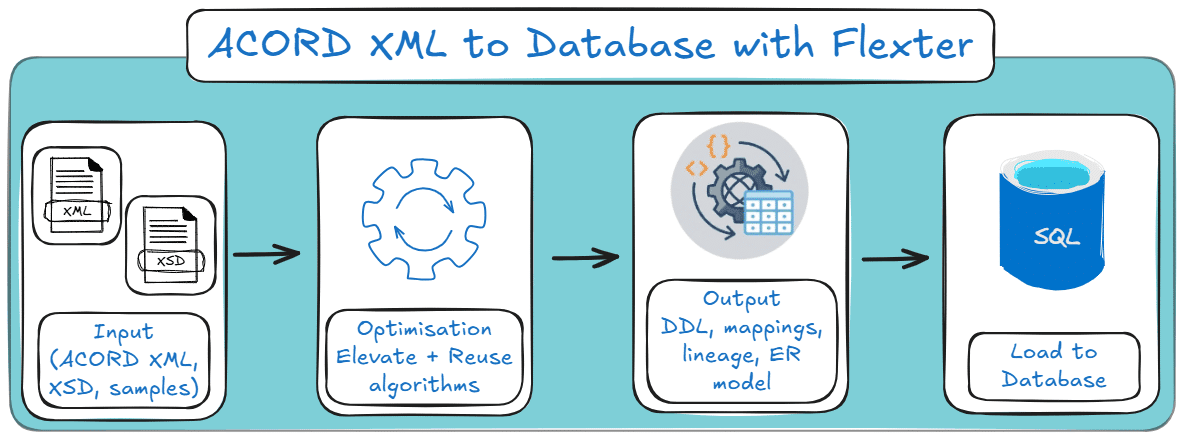
Step 1: Feed the ACORD XSD, sample XML, or both into Flexter
The starting point is simple: Flexter can work from the ACORD XSD, sample ACORD XML files, or both.
That matters because real projects rarely begin in perfect conditions. Sometimes you have the schema files.
Sometimes you only have sample messages from one or more carriers. Sometimes you have both, and sometimes you have a slightly chaotic mix of whatever people were able to send you.
When the full XSD is unavailable, Flexter uses a heuristic scanner to analyse XML samples and infer the schema structure from the files themselves.
So the project is not blocked just because the schema access situation is inconvenient, incomplete, or trapped behind licensing and internal process friction.
Step 2: Flexter optimises the target schema instead of blindly mirroring the XML tree
This is where the process becomes more interesting than a standard XML parser.
A naive XML to database conversion often creates one of two bad outcomes:
- Either too many tables, because every little branch gets broken out mechanically,
- or one oversized flattened structure that is full of duplicated values, NULL-heavy columns, and questionable relationships. That structure is often called One Big Table (OBT).
Neither is especially elegant.
Flexter avoids that by applying optimisation algorithms before the data is loaded.
The Elevate algorithm merges 1:1 parent-child relationships where separate tables would add little value and a lot of clutter.
The Reuse algorithm consolidates common data types and repeated patterns across the schema.
The result is a cleaner 3NF relational model that reflects the ACORD data’s business structure, rather than simply copying the XML hierarchy into SQL tables.
That distinction matters. Flattening XML is easy if your standards are low.
Building a relational model that people can actually query, govern, and maintain is the harder part.
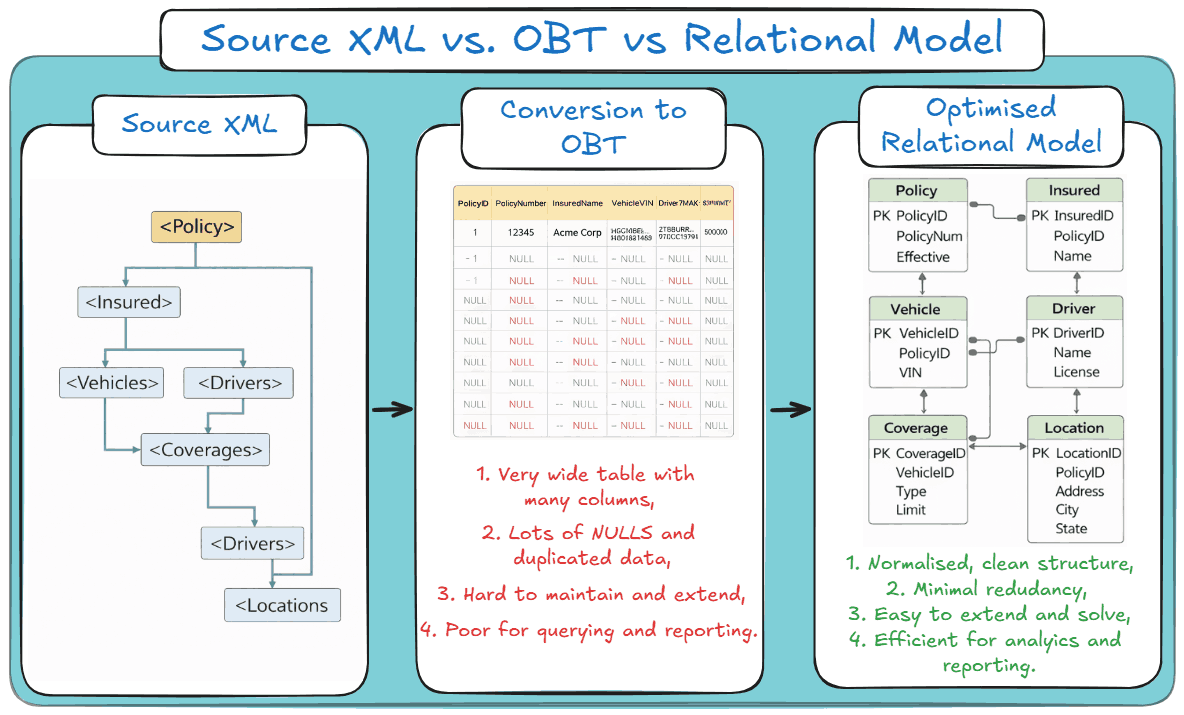
Step 3: Flexter generates the output artefacts before loading any data
Once the target model has been derived, Flexter generates the artefacts that manual projects usually leave half-finished:
- the target DDL,
- the source-to-target mappings,
- and the data lineage documentation.
That means the full output schema is available for review before any data is loaded. Architects can inspect the target model.
Engineers can validate the table design. Governance teams can review lineage. Everyone gets to see what the conversion will produce before production data starts flowing.
This is a small detail with a surprisingly large impact.
In hand-built ACORD XML projects, documentation is often treated as something that will be “cleaned up later.”
Later, of course, is a magical place where nobody has time, the original developer has moved on, and audit questions arrive anyway.
Automating this part removes a lot of very avoidable pain.
Step 4: Flexter loads the ACORD XML data into the target database at scale
Once the schema is approved, the conversion engine processes the ACORD XML files and loads them into the target database.
This is where the underlying architecture starts to matter. Flexter is Apache Spark-based, which means it is designed for production-scale conversion workloads rather than a handful of polite test files on a developer laptop.
It can load into targets such as Snowflake, Databricks, Oracle, SQL Server, BigQuery, Redshift, and others, depending on where you need the data to land.
It also handles schema evolution automatically.
So when the ACORD structure changes, whether through a version upgrade, a new optional branch, or another carrier-specific variation, Flexter detects the difference and evolves the target schema accordingly.
That is a very different maintenance profile from custom code or hand-mapped pipelines, where every change tends to trigger another round of manual updates.
Why does all this matter in practice
The real value here is not just that the conversion runs. Lots of things run once.
The value is that the schema generation, mappings, documentation, and loading process are all part of the same workflow.
That reduces the amount of hand-built logic your team has to maintain and makes the whole ACORD XML to database process far more repeatable.
And that is usually the point where the economics start to shift.
A small manual pipeline can look cheap at the beginning.
It becomes much less cheap when you are still maintaining it after the third carrier variation, the second schema update, and the first awkward audit request.
Pro tip
Want to see what your ACORD XML looks like as a relational schema before committing to a full project?
Try the free online XML to Database converter and run a real sample through it.
And if you want to discuss your specific use case, you can also book a call with our team.
FAQ for ACORD to SQL conversion
An ACORD XML file usually starts with a business message envelope, which then nests insurance objects, such as policy, insured party, vehicle, driver, coverage, or claim details.
That ACORD XML format is exactly why the data is good for exchange, but awkward for direct SQL use.
ACORD XML parsing is harder because the messages are broad, deeply nested, and full of repeating business objects such as vehicles, drivers, locations, and coverages.
On top of that, carrier extensions and version drift mean that the XML you parse today may not look identical tomorrow.
The ACORD XML schema defines the allowed XML structure, elements, and relationships in the message.
The ACORD data model is the broader business model behind that structure, which is why converting ACORD XML to a database is not just a parsing task, but also a modelling task.
Flexter Enterprise can work from the ACORD XSD, sample ACORD XML files, or both.
If the full ACORD XSD is unavailable, Flexter can analyse sample XML and infer the structure needed to generate the target database schema.
Yes. ACORD XML to SQL is a common requirement when the target platform is Snowflake, Oracle, SQL Server, Databricks, BigQuery, or Redshift.
The important part is not just loading the XML, but generating a relational model that preserves the business relationships cleanly enough to query and maintain.
Flexter handles carrier-specific extensions by detecting structural differences and supporting automated schema evolution rather than forcing you into another round of manual remapping.
That matters because “ACORD compliant” messages often vary by carrier, version, and local extension.
Flexter is built for real-world ACORD variation rather than one frozen XML shape.
In practice, that means you can validate support against your actual ACORD XSDs or XML samples during the proof of concept, which is the sensible way to handle P&C, Life / Annuity, and partner-specific implementations.
Not really. ACORD XML is a strong messaging standard, but a weak working format for analytics, reporting, search, and downstream integration.
If you want a usable insurance XML database, the practical step is to convert the ACORD XML into relational tables with stable keys, proper lineage, and enforceable data quality rules.
Flexter can load converted ACORD XML into Snowflake, Databricks, Oracle, SQLServer, BigQuery, Redshift, and other database targets.
So whether your ACORD XML to SQL project ends in a cloud warehouse or a traditional relational platform, the output model is still usable.
Flexter automatically generates source-to-target mappings, target DDL, and data lineage documentation as part of the conversion workflow.
That gives engineering, governance, and audit teams a traceable view of how each database field was derived from the original ACORD XML.
Next steps for efficient ACORD XML to SQL
If your scope is limited to a single, stable ACORD feed, a manual parser may be sufficient.
It can also be a reasonable starting point for students taking their first steps in the insurance data domain.
But once you are dealing with multiple carriers, version drift, carrier-specific extensions, audit requirements, or production-scale volume, the efficient path is usually to stop hand-mapping ACORD XML and move to automation.
Flexter Enterprise reads the ACORD XSD, sample XML, or both, generates the relational schema, mappings, and lineage, and loads the output into targets such as Snowflake, Databricks, Oracle, SQL Server, BigQuery, and Redshift.
A practical next step is to run a self-service proof of concept with a real ACORD XML sample and inspect the generated SQL schema before committing to a larger project.
To do that, you may want to use the online version of Flexter that will convert your ACORD XML to an online instance of a Snowflake database for free (hands-on examples included here).
That gives you a concrete view of what your insurance XML database could look like without first building a brittle one-off pipeline.
And if you want to discuss carrier-specific variations, target platforms, or the right relational model for your ACORD XML to database workflow, book a call with the team and review the output together.
Further reading
If you want more detail beyond the ACORD angle, have a look at some of my related technical posts on the Sonra blog: